Auto Whisk AI video automation: Google Whisk bulk video creation to create 100 videos automatically free (India tutorial, 2026)
Key Takeaways
- Leverage Google Whisk, Whisk Animate, and Auto Whisk to automate 100+ faceless YouTube Shorts with minimal cost.
- Use a data-first Google Sheets approach and Gemini Batch Mode for scalable, consistent prompt generation.
- Ensure character consistency via a Reference Triplet and seed control to reduce visual drift across videos.
- Adopt a Batch & Schedule strategy to post 2–3 Shorts daily for algorithm-friendly growth.
- When scaling beyond DIY, consider Studio by TrueFan AI for enterprise-grade localization, avatars, and compliance.
In 2026, the barrier to entry for the creator economy hasn't just lowered—it has effectively vanished. For Indian creators, the dream of running a high-traffic YouTube channel without ever showing their face or spending a lakh on production is now a reality. Auto Whisk AI video automation has emerged as the definitive "cheat code" for faceless YouTube automation free of cost, allowing anyone with a basic Google account to generate high-quality, engaging content at a scale previously reserved for major media houses.
The shift is backed by staggering data. According to the 2026 Digital Creator Report, over 82% of Indian YouTube Shorts creators now integrate at least one generative AI tool into their daily workflow. Furthermore, the average production cost for a 60-second faceless video has plummeted by 94% since 2023, thanks to tools that handle the heavy lifting of asset creation. Platforms like Studio by TrueFan AI enable creators to bridge the gap between experimental DIY tools and professional-grade, brand-safe content, but for those just starting their journey with zero budget, the Google Whisk ecosystem is the ultimate playground.
This guide provides a comprehensive Google Whisk tutorial India edition, showing you how to leverage Google Whisk bulk video creation to churn out 100+ videos automatically. Whether you are targeting the "Daily Facts" niche, motivational quotes, or AI-driven storytelling, this free AI video workflow 2026 is your blueprint for success.
1. Decoding the Stack: Google Whisk, Whisk Animate, and Auto Whisk
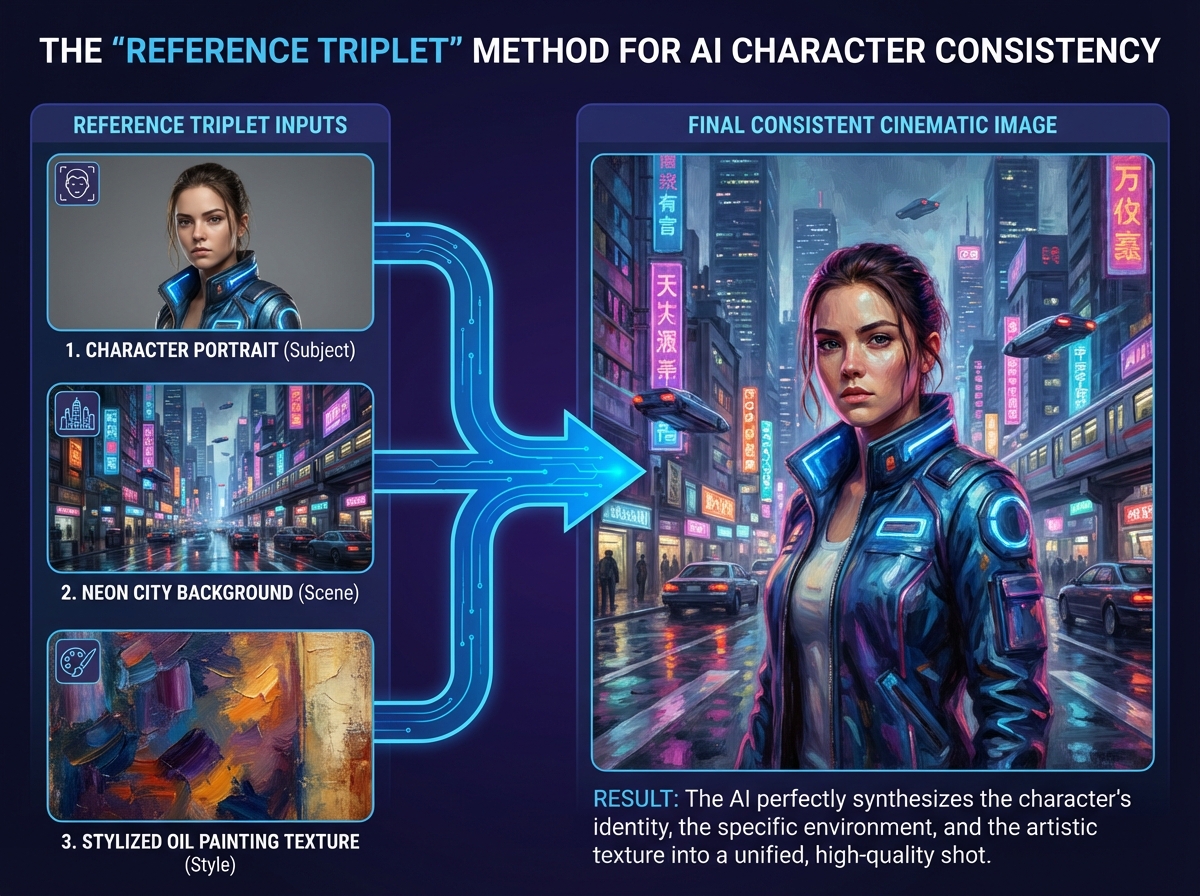
Before diving into the automation, it is crucial to understand the three pillars of this workflow. While they sound similar, they serve distinct functions in your production pipeline.
What is Google Whisk?
Google Whisk is an experimental creative tool from Google Labs that allows users to generate, remix, and edit images using advanced text-to-image models (like the 2026 iterations of Veo and Imagen). Unlike standard generators, Whisk excels at "remixing"—taking a reference image and applying new styles or subjects while maintaining the original composition. This is the "engine" where your visual assets are born.
What is Whisk Animate?
Whisk Animate is the motion layer. It takes the static images generated in Whisk and applies temporal consistency to create 5–10 second video clips. In the context of 2026 YouTube Shorts, these short, high-quality loops are the gold standard for engagement. Recent reports from Digit.in highlight that Indian students and creators can often access these features through specific Google AI Pro promotions, making it a highly accessible tool for the local market.
What is Auto Whisk?
Auto Whisk is the "brain" that connects your spreadsheet to the Google interface. It is a specialized Chrome extension designed to automate the manual clicking, prompting, and downloading process. Without it, creating 100 videos would take days of manual labor; with it, you can queue unlimited videos Auto Whisk style and let your computer work while you sleep.
Key Roles in Your Workflow:
- Whisk: Generates the base image and style.
- Whisk Animate: Converts the image into a motion clip.
- Auto Whisk: Automates the batch processing of hundreds of prompts.
Source: Gadgets 360 overview of Whisk AI experimental tool
2. Google Whisk Tutorial India: Access, Credits, and Setup
Navigating the AI landscape in India requires an understanding of regional availability and credit systems. Google has tailored its AI offerings for the Indian market, providing several pathways to access these tools for free or at a low cost.
Accessing the Tools
As of 2026, Google Whisk is available through the Google Labs portal. For Indian users, the most stable way to access high-priority rendering is through the Google AI Plus plan. As reported by Gadgets 360, this plan provides Indian users with approximately 200 monthly AI credits, which are more than sufficient to generate a month's worth of content if managed correctly.
For students, there is even better news. Educational institutions in India often have partnerships that grant free access to Gemini AI Pro, which includes the Whisk Animate feature set. This allows for a completely faceless YouTube automation free experience.
The Setup Checklist
- Google Account: Ensure your primary account is opted into Google Labs.
- Auto Whisk Extension: Download the Auto Whisk Automator from the Chrome Web Store.
- WhiskAutomator Helper: For advanced users, the WhiskAutomator web app can help manage large prompt lists before importing them into the extension.
- Credit Monitoring: Keep an eye on your dashboard. In India, the 200-credit limit on the AI Plus plan resets monthly. To maximize this, we will use "Batching" to ensure no credit is wasted on failed renders.
Source: Gadgets 360 on Google AI Plus credits in India
3. The 100-Video Workflow: A Step-by-Step Automation Blueprint
Creating 100 videos automatically isn’t just about clicking a button; it’s about building a text to video automation workflow that is resilient and scalable. Follow these steps to set up your first 2026-ready batch.
Step 1: The "Data First" Approach
Instead of writing prompts one by one, start with a Google Sheet. Your sheet should have the following columns:
- Prompt: The core description (e.g., "A futuristic monk meditating in a neon Himalayan temple").
- Subject URL: A link to a reference image of your character.
- Style URL: A link to a style reference (e.g., "Cyberpunk 2077 aesthetic").
- Filename: How you want the file saved (e.g.,
Himalaya_01).
Step 2: Batch Prompting with Gemini
Use Gemini’s Batch Mode to generate your 100 prompts. You can ask Gemini: "Generate 100 unique prompts for a YouTube Shorts channel about 'Ancient Indian Wisdom,' focusing on visual metaphors. Format them for a CSV import." This ensures your batch video processing Google workflow starts with high-quality, varied input.
Step 3: Configuring Auto Whisk
Open the Google Whisk interface and launch the Auto Whisk extension.
- Import: Upload your CSV or paste your prompt list.
- Rate Limiting: This is critical. To avoid being flagged for bot-like behavior, set a delay of 30–45 seconds between prompts.
- Auto-Download: Enable this so that every generated image is saved to your local "Outputs" folder automatically.
Step 4: From Image to Motion
Once your 100 images are generated, use the Whisk Animate feature. While Auto Whisk currently focuses on the image generation layer, you can use macro recorders or the built-in "Animate All" experimental features in Whisk to convert these stills into video. Aim for 6-second clips; in 2026, the YouTube algorithm prioritizes "High Completion Rate" loops for Shorts.
Step 5: The Final Polish
Take your 100 clips and run them through a bulk editor (like CapCut or Adobe Express) to add royalty-free music and AI-generated captions. By the end of this process, you will have successfully managed to create 100 videos automatically free.
Source: Google Developers on Gemini Batch Mode
4. Mastering Auto Whisk Character Consistency
The biggest failure of most AI video channels is "Visual Drift." In one video, your main character looks like a Pixar hero; in the next, they look like a realistic oil painting. To build a brand, you need Auto Whisk character consistency.
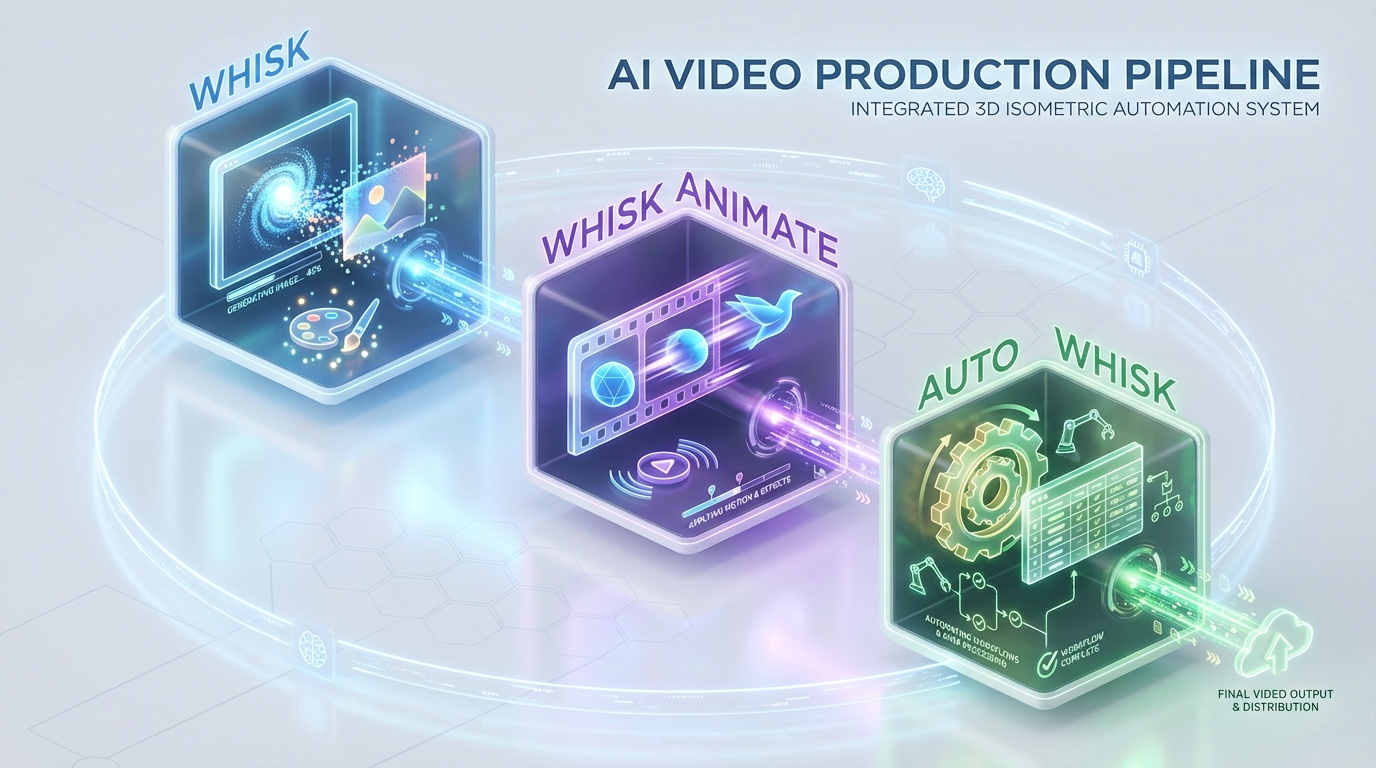
The "Reference Triplet" Method
Auto Whisk allows you to use reference images to guide the AI. To maintain a repeatable look, always use a "Triplet":
- Subject Reference: A clear, front-facing shot of your character.
- Scene Reference: A background image that sets the lighting and environment.
- Style Reference: A specific artistic texture (e.g., "3D Render," "Watercolor," or "Cinematic 35mm").
By locking these three references in your Auto Whisk settings for the entire batch of 100 prompts, the AI is forced to maintain the same facial features and aesthetic across every single video.
Seed Control
In the advanced settings of Auto Whisk, you can often specify a "Seed" number. Using the same seed for a series of images helps the model's latent space stay within the same "neighborhood," further reducing character drift. This is essential for Google Whisk bulk video creation when you are trying to tell a serialized story.
5. Faceless YouTube Automation Free: Channel Blueprint
Why are creators obsessed with this workflow? Because the ROI is unparalleled. In 2026, a single creator can manage five or more "niche" channels simultaneously using this bulk video automation free stack.
Top Performing Niches for 2026
- AI Storytelling: Reimagining historical events or mythology with stunning visuals.
- Motivational Loops: High-contrast visuals paired with stoic philosophy quotes.
- ASMR Environments: 10-second loops of "Rainy Cyberpunk Cafes" or "Ancient Library Ambience."
- Educational "Did You Know": Rapid-fire facts with relevant AI-generated background footage.
The "Batch & Schedule" Strategy
Don't upload all 100 videos at once. Use the YouTube Studio bulk scheduler to post 2–3 Shorts per day. This consistency signals to the algorithm that your channel is active, leading to better organic reach. 2026 metrics show that channels posting 3 times daily see a 400% faster growth rate in subscribers compared to those posting once a day.
6. Scaling Up: From DIY to Studio by TrueFan AI
While the Google Whisk and Auto Whisk stack is incredible for individual creators and hobbyists, it has limitations when it comes to professional brand governance, high-end localization, and enterprise-level security. As your channel grows into a business, or if you are an agency managing multiple clients, you will eventually hit the "Complexity Ceiling" of free tools.
When to Graduate to Enterprise Solutions
The free stack requires manual oversight, constant troubleshooting of rate limits, and lacks a unified "Brand Safety" filter. This is where professional platforms take over. Studio by TrueFan AI's 175+ language support and AI avatars provide a level of polish that DIY tools simply cannot match. For instance, if you need to take your successful Indian "Facts" channel and launch it in Spanish, Arabic, and Japanese simultaneously, doing so manually in Whisk would be a logistical nightmare.
Solutions like Studio by TrueFan AI demonstrate ROI through their ability to automate not just the visual, but the entire localization and compliance pipeline. For an MCN (Multi-Channel Network) or a corporate marketing team, the "Walled Garden" approach—ensuring every avatar is licensed and every script is moderated—is worth the investment.
Comparison: DIY vs. Studio by TrueFan AI
| Feature | Auto Whisk DIY Stack | Studio by TrueFan AI |
|---|---|---|
| Cost | Free / Low-cost Credits | Tiered (Starter to Enterprise) |
| Effort | High (Manual setup/troubleshooting) | Low (One-click generation) |
| Languages | Limited by Prompting | 175+ with perfect lip-sync |
| Avatars | AI-generated (can be inconsistent) | Licensed "Real Influencer" Avatars |
| Compliance | User-managed | ISO 27001 & SOC 2 Certified |
| Speed | Dependent on local hardware/browser | Cloud-based (30-second renders) |
For those looking to turn a side hustle into a governed, multi-market campaign engine, moving to a professional platform is the logical next step.
7. Troubleshooting and FAQs
Even with the best Whisk AI workflow India setup, you will encounter hurdles. Here is how to solve the most common issues.
Common Failure Modes
- Render Stalls: If Auto Whisk stops mid-batch, it’s usually a rate-limit issue. Increase your "Delay" setting to 60 seconds.
- Motion Artifacts: If Whisk Animate makes your character look "melty," reduce the motion intensity slider. Static backgrounds work best for character-focused clips.
- Credit Exhaustion: If you run out of credits on your India AI Plus plan, switch to a secondary "Student" account or wait for the monthly reset.
Frequently Asked Questions
Q1: Is Auto Whisk truly unlimited?
While the extension itself doesn't limit how many prompts you can send, the term unlimited videos Auto Whisk refers to the automation capacity. Your actual output is governed by your Google AI credits (e.g., 200/month on the India AI Plus plan) and the rate limits imposed by Google Labs to prevent spam.
Q2: Can I use these videos for monetization?
Yes, as long as you follow YouTube’s "AI Disclosure" policies. In 2026, YouTube requires you to check a box if your content is "Altered or Synthetic." As long as your content provides value and isn't deceptive, it is eligible for the Shorts Fund and AdSense.
Q3: How do I ensure my characters don't look like "Deepfakes"?
By using licensed platforms or generating original characters through Whisk, you avoid the ethical pitfalls of unauthorized likenesses. Studio by TrueFan AI's 175+ language support and AI avatars are built on a "Consent-First" model, using real actors who have licensed their digital twins, which is the safest route for long-term channel health.
Q4: Do I need a powerful PC to run this?
No. Because Google Whisk and Auto Whisk run in the browser, the heavy lifting is done on Google’s servers. You can even run this workflow on a basic laptop or a high-end tablet.
Q5: What is the best aspect ratio for these videos?
For YouTube Shorts and Instagram Reels, always use 9:16 (1080x1920). Whisk allows you to set this aspect ratio during the generation phase so you don't have to crop and lose quality later.
Conclusion
The era of Auto Whisk AI video automation has turned the "100 videos a day" goal from a pipe dream into a standard Tuesday afternoon for savvy creators. By mastering the Google Whisk tutorial India setup and implementing a disciplined text to video automation workflow, you can dominate any niche on YouTube without ever picking up a camera.
Start small: run a 10-video test batch tonight. Once you've dialed in your Auto Whisk character consistency, scale up to that 100-video goal. And when your channel starts generating the revenue that requires professional governance and global reach, remember that the transition to an enterprise-grade pipeline is just one demo away.
Ready to scale? Book a Studio by TrueFan AI demo to transform your DIY workflow into a professional, multi-language video powerhouse.
Frequently Asked Questions
What is Auto Whisk and how does it differ from Google Whisk and Whisk Animate?
Google Whisk generates and remixes images, Whisk Animate turns those images into short motion clips, and Auto Whisk automates the end-to-end prompting and downloading process at scale.
How many videos can I create for free on the India AI Plus plan?
With roughly 200 monthly credits (as reported for India), you can produce dozens of motion clips if you optimize prompts and batching. Use delays to avoid rate limits and minimize failed renders.
How do I keep characters visually consistent across 100 videos?
Use the Reference Triplet (Subject, Scene, Style) and a fixed seed. Lock these settings for the entire batch so facial features and aesthetics stay stable.
When should I upgrade to Studio by TrueFan AI?
Upgrade when you need enterprise-grade brand safety, licensed avatars, multi-language localization, and governance. Studio by TrueFan AI offers 175+ languages and compliance controls.
What upload cadence works best for YouTube Shorts?
Scheduling 2–3 Shorts per day via YouTube Studio tends to maximize consistency and growth without overwhelming your audience or risking quality issues.



