Best AI photo to video converter India 2026: Free slideshow makers, wedding tools, and enterprise automation
Estimated reading time: ~11 minutes
Key Takeaways
- 2026 tools turn photos into cinematic videos with intelligent curation, beat-synced edits, and 2.5D motion.
- Indian use cases span weddings, birthdays, family memories, and memorials with regional language TTS.
- Free vs. freemium: great for personal projects, but paid/enterprise is needed for watermark-free, rights-cleared, high-volume work.
- Studios scale with automation, APIs, and bulk personalization—tools like Studio by TrueFan AI cut editing time by 70%.
- Ensure music licensing, consent, and data privacy; optimize exports for WhatsApp delivery.
The digital landscape of 2026 has fundamentally transformed how we preserve memories. An AI photo to video converter India 2026 turns static images into cinematic slideshows with transitions, licensed music, captions, and AI-generated narration—ready for WhatsApp, Instagram Reels, or long-form event films. Whether you are a professional photographer managing a heavy wedding season or a family member wanting to create a family video from photos AI style, the technology now allows for near-instant, high-quality production that once took days of manual editing.
In 2026, the demand for AI slideshow creator with music India has surged, driven by a 45% CAGR in the generative video market within the subcontinent. Today's tools are no longer just about moving pictures; they are about intelligent curation, regional language support, and automated delivery systems that cater to India’s unique cultural fabric.
Table of Contents
- The Evolution of AI Photo-to-Video Technology in 2026
- Core Use Cases: From Indian Weddings to Memorials
- Free vs. Freemium: The Best Tools for Personal Use
- The 2026 Feature Checklist: What to Look For
- Step-by-Step Workflows for Cinematic Results
- Enterprise Automation: Scaling for Studios and Agencies
- Rights, Licensing, and Ethical AI in India
- Frequently Asked Questions (FAQs)
1. The Evolution of AI Photo-to-Video Technology in 2026
By 2026, the definition of a "slideshow" has been completely redefined. We have moved past simple cross-fades into an era of "intelligent assembly." Modern software now ingests raw photos (JPG/PNG), reads EXIF metadata to understand the chronology of an event, and applies face and group detection to ensure the most important people are featured prominently.
Key Capabilities of 2026 AI Converters:
- Intelligent Curation: Algorithms now automatically de-duplicate similar shots and select the "best" version based on lighting, focus, and emotional expression.
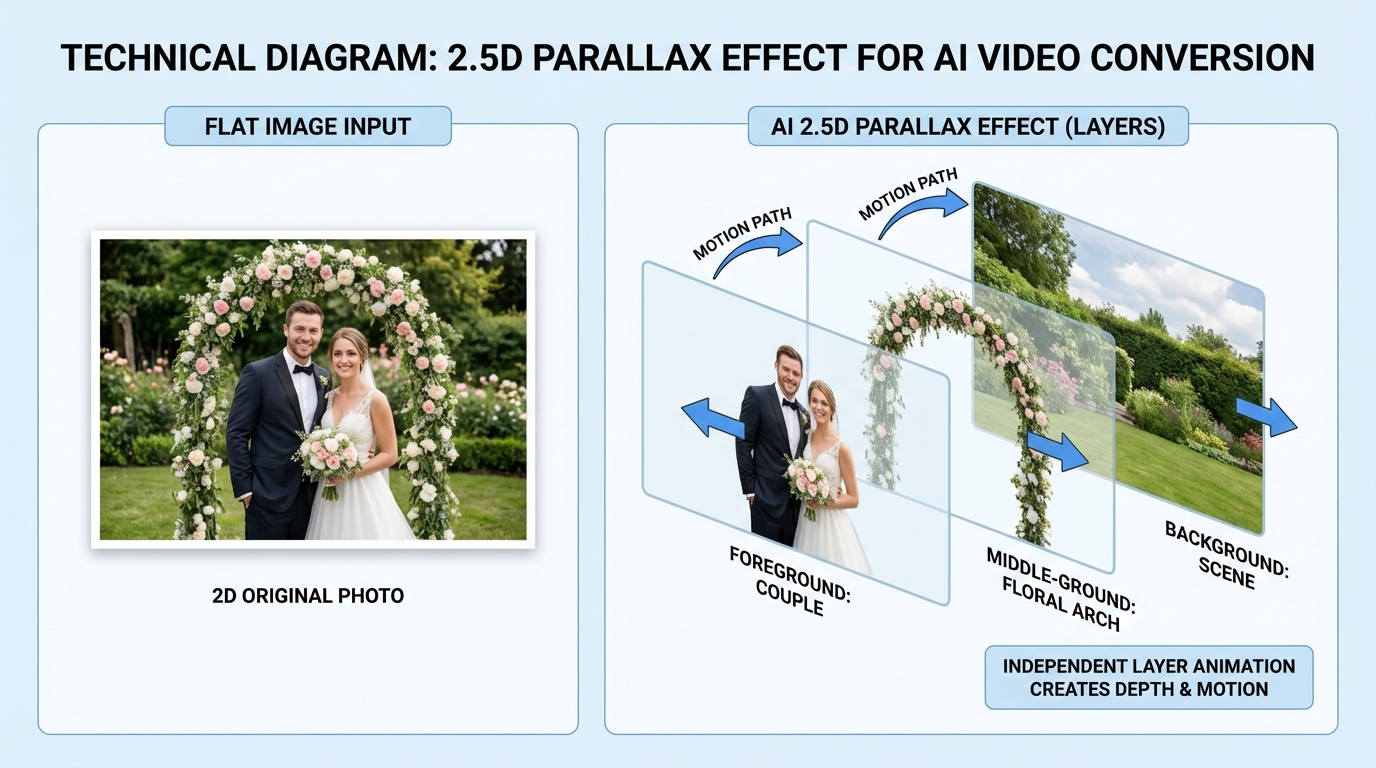
- 2.5D Parallax and Motion: A single 2D photo can now be converted into a 2.5D environment, creating a sense of depth where the subject moves independently of the background.
- Multi-Language TTS: With India's linguistic diversity, tools now offer high-fidelity text-to-speech (TTS) in Hindi, Tamil, Telugu, Bengali, Marathi, Kannada, Malayalam, Punjabi, Gujarati, and more. See the Regional Language Dubbing Test.
- Beat-Synced Transitions: AI analyzes the rhythm of your chosen soundtrack and ensures every cut and zoom happens precisely on the beat, a feature essential for a high-energy photo montage AI video maker.
- Auto-Aspect Ratio Conversion: The same set of photos can be instantly rendered into a 9:16 Reel, a 1:1 square for a post, and a 16:9 cinematic film for YouTube or TV.
According to recent industry reports, 4K video consumption in Tier 2 Indian cities has increased by 200% in 2026, making high-resolution AI output a necessity rather than a luxury.
Sources:
- Analytics India Magazine: Adobe Unveils AI Video Innovations (2026 Context)
- TrueFan AI Blog: AI Video Prompt Engineering 2026 Guide
2. Core Use Cases: From Indian Weddings to Memorials
The versatility of an AI photo to video converter India 2026 is best seen through its application in diverse cultural contexts.
Indian Weddings (The Multi-Day Extravaganza)
Wedding photographers now use AI to curate photos per ceremony—Haldi, Mehendi, Sangeet, Phere, and Reception. A wedding slideshow AI creator can generate mini-highlights for each event within minutes of the ceremony ending. AI Avatar Wedding Biodata India platforms like Studio by TrueFan AI enable creators to add a human touch to automated slideshows through AI-generated narrators that can introduce the couple or explain the significance of a specific ritual in the local dialect.
Family Memories and Milestones
For those looking to create a family memories video AI generator experience, the focus is on the "story arc." AI can now take a decade of scattered Google Photos and organize them into a "Growing Up" or "Journey of Us" film. This family video from photos AI workflow includes auto-tagging family members and suggesting nostalgic music tracks that fit the era of the photos.
Birthdays and Anniversaries
A birthday video maker AI photos tool focuses on high energy. It incorporates stickers, dynamic subtitles, and upbeat music. For anniversaries, the tone shifts to romantic and reflective, often using a photo collage video maker AI to show "then and now" comparisons in a split-screen format.
Memorials and Tributes
This is a sensitive use case where the memorial video generator AI India market has seen significant growth. These tools prioritize slow pans, muted color grading, and rights-cleared, somber music. The AI ensures that the transitions are respectful, avoiding high-energy wipes or jarring cuts.
3. Free vs. Freemium: The Best Tools for Personal Use
If you are looking for an AI video from photos free India solution, there are several robust options, though they often come with limitations like watermarks or lower resolution exports.
Top Free/Freemium Picks for 2026:
- InVideo AI: Founded in India, this tool is a powerhouse for slideshow video maker AI free enthusiasts. It allows you to input a prompt or a set of photos and generates a narrated video with b-roll and music. It is particularly effective for social media creators.
- Adobe Express: Excellent for high-quality templates. While the free tier is generous, the best assets and watermark-free exports usually require a subscription.
- Canva: The go-to for photo collage video maker AI needs. Its drag-and-drop interface is perfect for beginners, though its AI video generation is more focused on short-form content.
When to Move Beyond Free Tools?
Free tools are excellent for one-off personal projects. However, if you are a professional or an agency, you will likely encounter "The Watermark Wall" or "The Export Cap." Professional workflows require rights-cleared music (to avoid Instagram/YouTube copyright strikes) and the ability to process hundreds of photos at once without the software crashing.
4. The 2026 Feature Checklist: What to Look For
Before committing to a tool for event photo video automation India, ensure it meets these 2026 standards:
- Face Clustering & Priority: Can the AI recognize the bride, groom, or birthday child and ensure they are never cropped out of a 9:16 frame?
- Regional Audio Nuance: Does the AI slideshow creator with music India offer narration that sounds natural in regional accents, or does it sound like a generic robotic voice?
- WhatsApp Optimization: In India, 82% of wedding guests prefer receiving video highlights via WhatsApp within 24 hours. Does the tool offer an "Under 64MB" export preset that maintains 1080p clarity? See WhatsApp business video kirana.
- Music Licensing: Does the tool provide an NOC (No Objection Certificate) for the music used? This is critical for commercial studios to avoid legal hurdles with IPRS or PPL India.
- Content Governance: For enterprise users, features like moderation filters (to prevent inappropriate content) and audit logs are essential for maintaining brand reputation.
5. Step-by-Step Workflows for Cinematic Results
Creating a professional-grade photo album to video AI production follows a specific sequence to ensure the best output.
The Universal Workflow:
- Curation: Upload your photos to a tool that supports auto-deduplication. Remove blurry shots or "accidental" pocket photos.
- Sequencing: Group photos by event. For a wedding, this means separate folders for Haldi, Sangeet, etc.
- Style Selection: Choose a template. For a photo montage AI video maker, select a "Cinematic" or "Vlog" style.
- Music & Beat Sync: Select a track. Ensure the "Sync to Beat" toggle is on. This ensures that every transition feels intentional.
- Narration Layer: Write a short script (100 words per minute of video). Use a tool that supports Indian regional languages for a personalized touch.
- Review & Export: Check the "Safe Zones" to ensure no heads are cut off in vertical mode. Export as an MP4.
Specific Use Case: Birthday Video Maker AI Photos
- Structure: 5s Intro Title -> 15s Childhood Montage -> 30s Recent Memories -> 10s "Happy Birthday" Message.
- Voice Tip: Use a "Lively" or "Cheerful" TTS tone at 150 words per minute.
Specific Use Case: Memorial Video Generator AI India
- Structure: 10s "In Loving Memory" -> 40s Career/Impact -> 40s Family Life -> 10s Closing Quote.
- Voice Tip: Use a "Calm" or "Reflective" tone. Ensure the music volume "ducks" (lowers) automatically when the narration starts.
6. Enterprise Automation: Scaling for Studios and Agencies
For studios handling 50 to 500+ videos a month, manual editing is no longer viable. This is where event photo video automation India becomes a competitive advantage. See multi-location video automation tools.
Why Enterprise Solutions?
The ROI of automation is clear. Solutions like Studio by TrueFan AI demonstrate ROI through a 70% decrease in manual editing hours and a significant boost in client NPS scores. When a studio can deliver a high-quality, narrated highlight reel to a client's WhatsApp before they even leave the venue, the referral rate skyrockets.
The Power of Localization
Studio by TrueFan AI's 175+ language support and AI avatars allow for hyper-localized wedding films that resonate with grandparents in their native dialects. This level of personalization was previously impossible at scale.
Enterprise Features to Demand:
- API/Webhook Integration: Automatically trigger a video render the moment a photographer uploads photos to a specific cloud folder.
- Bulk Personalization: Generate 100 different versions of a video, each with a different guest's name or a personalized thank-you message. Learn more about batch video creation automation.
- Governance & Security: Ensure the platform is ISO 27001 or SOC 2 compliant to protect sensitive client data.
7. Rights, Licensing, and Ethical AI in India
Navigating the legal landscape is crucial for anyone using an AI photo to video converter India 2026.
Music Rights
In India, playing music at a private wedding is often exempt from certain royalties, but the moment that video is uploaded to YouTube or used by a commercial studio for promotion, you need licenses.
- IPRS (Indian Performing Right Society): Covers the composers and lyricists.
- PPL (Phonographic Performance Limited): Covers the sound recording owners.
- Novex Communications: Often handles rights for major film labels like Yash Raj or Zee Music.
Ethical Considerations
- Consent: Always obtain explicit consent before using AI to generate a voice or avatar of a deceased person for a memorial.
- Data Privacy: Ensure the AI tool does not use your private family photos to train its public models.
- Deepfake Awareness: Use watermarks or "AI-Generated" labels to maintain transparency, especially in professional event videography.
Legal Resources:
Conclusion
In 2026, the AI photo to video converter India 2026 market has matured into a sophisticated ecosystem that balances creative flair with technical automation. From the individual looking to preserve family memories video AI generator style to the massive production house seeking event photo video automation India, the tools are now available to make every story cinematic.
By choosing the right tool—whether it's a free editor like InVideo for a quick reel or an enterprise powerhouse for scale—you ensure that your memories are not just stored, but celebrated.
Final Checklist for Success:
- Curation: Quality over quantity.
- Localization: Use regional narration for emotional impact.
- Compliance: Respect music rights and data privacy.
- Distribution: Optimize for WhatsApp to ensure your audience actually sees your work.
Ready to scale your video production? Explore how automation can transform your workflow and deliver unmatched ROI in the modern Indian event landscape.
Recommended Internal Links
- Shoppable Video Ads Instagram Reels: India 2026 Guide
- Regional Language Dubbing Test: AI Lip Sync Accuracy 2026
- AI Avatar Wedding Biodata India: Create Smart Profiles
- Multi-location video automation tools for franchise growth
- Batch Video Creation Automation: Scale 1000 Videos Daily
- WhatsApp business video kirana: boost local shop sales
Frequently Asked Questions
Is there a reliable slideshow video maker AI free in India?
Yes, tools like InVideo AI and Canva offer excellent free tiers. However, for professional use without watermarks and with high-quality Indian language narration, you will eventually need a paid or enterprise solution.
How does an AI photo to video converter handle low-resolution images?
Most 2026 tools include AI Upscaling. They use neural networks to infer missing detail, turning an old 480p family photo into a sharp 1080p or even 4K image suitable for modern screens.
Can I use Bollywood music in my AI-generated slideshows?
For personal use on private devices, it is generally fine. However, for social media or commercial studio use, you must secure rights via IPRS and PPL India to avoid copyright strikes or legal action.
Can I automate the delivery of these videos to my clients?
Yes, enterprise tools like Studio by TrueFan AI integrate with WhatsApp APIs to deliver finished videos directly to clients' phones as soon as the AI finishes the render, complete with personalized messages.
What is the difference between a photo collage and a photo montage?
A photo collage video maker AI shows multiple images on the screen at once (grid style), while a photo montage AI video maker presents a chronological sequence of full-screen images with cinematic transitions and a narrative flow.
How many photos are needed for a 1-minute AI video?
Typically, for a high-energy montage, you need 20–30 photos (2–3 seconds per photo). For a slower, more reflective memorial or anniversary video, 12–15 photos allow longer pan-and-zoom effects.



