
AI Video Tools Low RAM India: The 2026 Playbook for 4GB RAM Devices, Offline Editing, and Mobile-Ready Exports
Estimated reading time: 9 minutes
Key Takeaways
- On low-spec devices, prioritize AI-assisted editing and offload heavy generation to Studio by Truefan AI.
- For Android, use VN, Alight Motion, and Tiny Mind; stick to 720p, clear caches, and leverage external storage for stability.
- On desktops, adopt a proxy workflow with Shotcut/Kdenlive/VSDC and consider lightweight Linux for better performance.
- Master compression with CRF 24–26 and lightweight ffmpeg commands to reduce file size without sacrificing quality.
- Optimize distribution for WhatsApp/Reels (bitrate, captions, safe zones) and use cloud workflows to scale reliably.
In the rapidly evolving digital landscape of 2026, the Indian creator economy has reached a staggering valuation of $3.5 billion, yet a significant portion of this growth is driven by creators using budget hardware. Finding AI video tools low RAM India is no longer just a niche requirement; it is a necessity for millions of students and aspiring influencers operating on 4GB RAM laptops and budget Android phones. While high-end generative AI often demands massive GPU power, this guide explores how you can leverage memory-efficient workflows to produce professional-grade content without expensive upgrades.
1. The 2026 Reality: AI Video Creation on a 4GB RAM Device in India
As we move through 2026, the "digital divide" in hardware remains a practical hurdle. While global tech giants showcase text-to-video models that require 24GB of VRAM, the average Indian creator is often working with a 4GB RAM mobile device or an older laptop. According to recent 2026 projections, over 65% of active creators in Tier 2 and Tier 3 Indian cities still rely on devices with 6GB of RAM or less.
On these systems, "AI video" must be redefined. Instead of attempting to run heavy generative models locally, successful creators are shifting toward AI-assisted editing. This includes features like auto-captions, smart trimming, and beat-syncing—tasks that are computationally lighter but offer high production value.
The GPU Myth vs. CPU Reality
Most modern AI tools, such as Stable Diffusion for images or Sora-like models for video, essentially require a dedicated GPU with at least 4GB to 8GB of VRAM. On a standard 4GB RAM laptop in India, attempting to run these locally will result in system crashes or render times that span days. Research from Analytics India Magazine highlights that Stable Diffusion typically needs a minimum of 4GB VRAM and 8GB of system RAM to function effectively.
For those determined to use local AI features, the operating system choice matters. Platforms like Studio by Truefan AI enable creators to bypass these hardware limitations entirely by offloading the heavy lifting to the cloud, but if you must work locally, switching to a lightweight Linux distribution can offer a significant boost. Inference tasks have been shown to run up to 3x faster on Linux compared to Windows on identical low-spec hardware, making it a "secret weapon" for student laptop video creation. Platforms like Studio by Truefan AI https://truefan.ai/blogs/multimodal-ai-video-creation-2026 enable creators to bypass these hardware limitations entirely by offloading the heavy lifting to the cloud, but if you must work locally, switching to a lightweight Linux distribution can offer a significant boost. Inference tasks have been shown to run up to 3x faster on Linux compared to Windows on identical low-spec hardware, making it a "secret weapon" for student laptop video creation.
Source: Analytics India Magazine - Stable Diffusion Requirements | Inference Speed: Linux vs Windows
2. Mobile Mastery: Budget Phone Video Editing AI for Android
In 2026, the smartphone is the primary workstation for the Indian creator. With mobile video traffic in India projected to grow by 25% year-on-year, optimizing your workflow for budget Android devices is critical. When looking for budget phone video editing AI, the focus should be on app size, cache management, and offline-first capabilities.
Recommended Apps for Low-RAM Androids
- VN Video Editor: This remains a powerhouse for Indian creators. It is free, supports multi-track editing, and includes AI-powered features like auto-captions and curve shifting that run smoothly on 4GB RAM phones. Its ability to export in various social aspect ratios (9:16 for Reels, 1:1 for Instagram) makes it indispensable.
- Alight Motion: For those needing motion graphics, Alight Motion allows for sophisticated keyframing. The trick on low-RAM devices is to limit the number of layers and use 720p preview resolutions.
- Tiny Mind: A rising star in 2026, Tiny Mind offers offline AI models that can be downloaded once and used without a constant data connection. This is perfect for creators in areas with patchy 5G coverage.
The Low-RAM Mobile Workflow
To keep your device from lagging, follow this 2026 optimization checklist:
- Shoot in 720p/30fps: While 4K is tempting, 720p is the "sweet spot" for low-RAM editing and is more than sufficient for WhatsApp and Instagram.
- Aggressive Cache Clearing: Apps like VN accumulate "junk" files. Clear your cache after every project to free up system memory.
- External Storage: Use a high-speed microSD card to store raw footage, keeping your internal 4GB/6GB RAM free for active processing.
Source: Beebom - Best Video Editors for Android | Tiny Mind: Offline AI on Google Play
3. Desktop Mastery: Proxy Workflows and AI Video Tools for Old Laptops
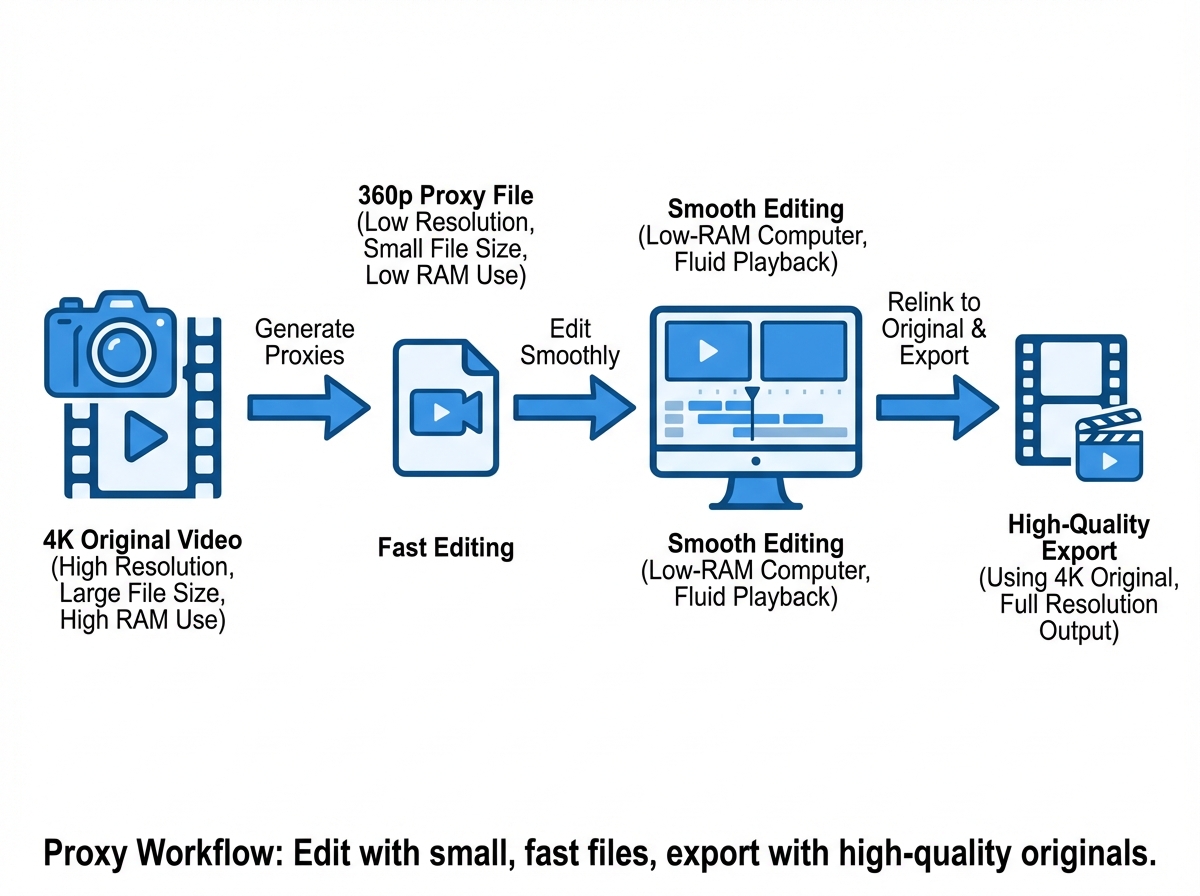
If you are a student or a freelancer using an older laptop with 4GB of RAM, the traditional "import and edit" method will fail. You must adopt a proxy workflow. This involves creating low-resolution "proxy" versions of your footage to edit with, which are then replaced by the original files during the final export.
Top Lightweight Editors for 4GB RAM
- Shotcut: An open-source editor that is remarkably stable on low-end hardware. By enabling "Proxy Editing" and setting the "Preview Scaling" to 360p, you can edit 1080p footage on a machine that would otherwise freeze.
- Kdenlive: Another excellent open-source choice. It offers "Proxy Clips" and allows you to disable the video preview during heavy processing to save RAM.
- VSDC Free Video Editor: Specifically designed for computers with low memory, VSDC uses a non-linear approach that is very light on the CPU.
The Linux Advantage for Student Creators
For student laptop video creation, 2026 has seen a surge in the use of lightweight Linux distros like XFCE or Linux Lite. These operating systems consume less than 500MB of RAM at idle, leaving 3.5GB available for your video editor. This is a massive improvement over Windows 11, which can hog up to 2.5GB of RAM just to stay open.
Source: Linux for Older Laptops - Reddit Community Insights
4. The Technical Playbook: Compressed AI Video Processing and ffmpeg
To succeed with memory-efficient video tools India, you must master the art of compression. In 2026, data costs and storage limitations are still primary concerns for many. Understanding codecs and bitrates allows you to produce high-quality visuals that don't take up gigabytes of space.
Understanding CRF (Constant Rate Factor)
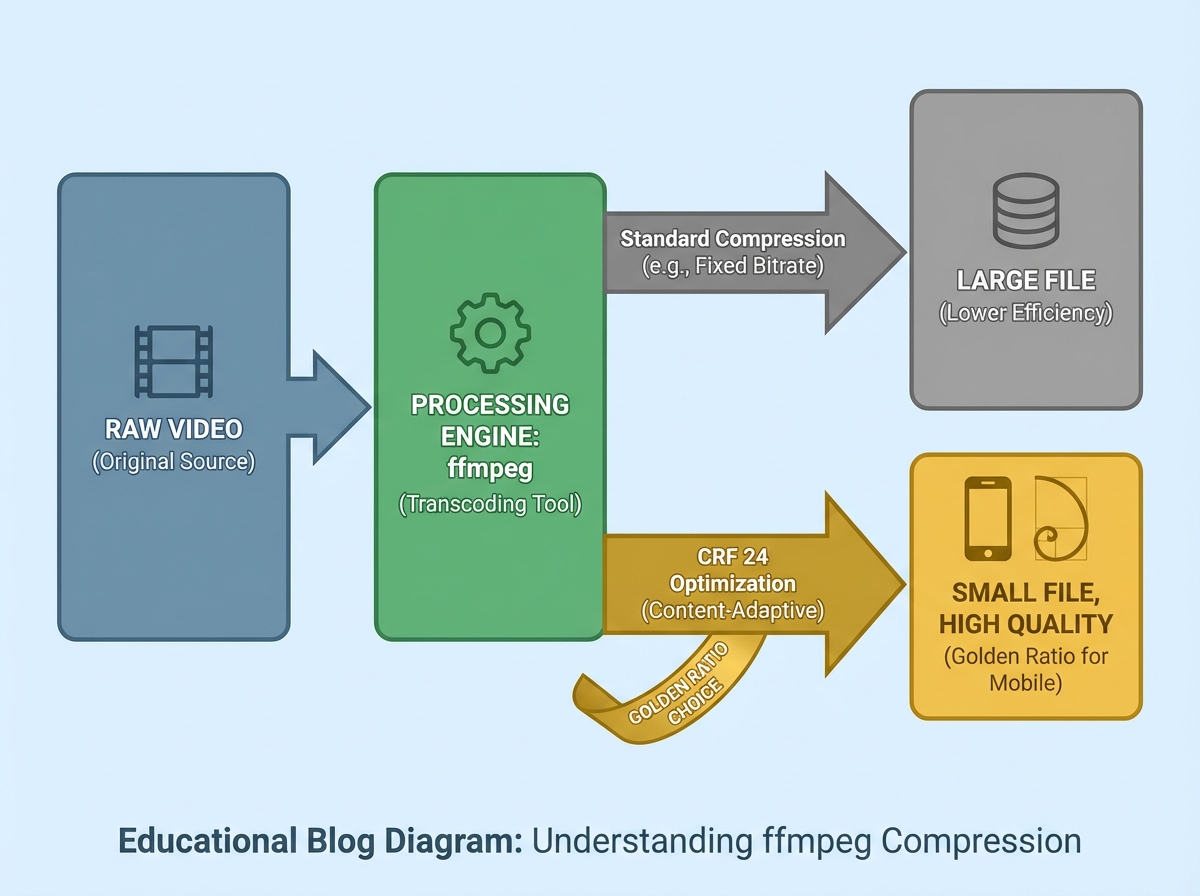
CRF is the most efficient way to compress video. Instead of a fixed bitrate, CRF adjusts the data rate based on the complexity of the scene.
- CRF 18-20: High quality, large file size.
- CRF 24-26: The "Golden Ratio" for Indian social media. It maintains visual clarity while drastically reducing file size.
- CRF 28+: Noticeable quality loss, only for previewing.
The Power of ffmpeg for Low-Spec Users
ffmpeg is a command-line tool that is incredibly light on RAM. It can convert, resize, and compress videos faster than any GUI-based editor. Here are two essential commands for 2026 creators:
For Instagram Reels (9:16, 1080p, Optimized):
ffmpeg -i input.mp4 -vf "scale=1080:1920:force_original_aspect_ratio=decrease,pad=1080:1920:(ow-iw)/2:(oh-ih)/2:black" -c:v libx264 -preset veryfast -crf 25 -c:a aac -b:a 128k output_reels.mp4For YouTube (16:9, 720p, Data-Saver):
ffmpeg -i input.mp4 -vf "scale=1280:720:force_original_aspect_ratio=decrease" -c:v libx264 -preset veryfast -crf 26 -c:a aac -b:a 96k output_720p.mp4By using these commands, you bypass the heavy RAM usage of a visual interface, allowing your 4GB system to focus entirely on the encoding process.
5. Distribution & Optimization: WhatsApp, Reels, and Data-Saving Trends
In 2026, the way content is distributed in India has shifted. WhatsApp has become a primary channel for video consumption, with social commerce expected to reach $2.9 trillion globally. For an Indian creator, AI video mobile optimization means ensuring your video looks good even after WhatsApp's aggressive compression.
WhatsApp Optimization Tips
- Target 1.5 Mbps: When exporting for WhatsApp, set your bitrate to 1.5 Mbps. This prevents the app from re-compressing your video and turning it into a pixelated mess.
- Burn-in Subtitles: Many users watch videos on mute while commuting. Use AI tools to generate captions and "burn" them into the video so they are always visible.
- Safe Zones: Keep all important text and faces within the center 80% of the frame to avoid being covered by the UI elements of Reels or Shorts.
2026 Data Trends
With the expansion of 5G in India, the average data consumption per user has hit 30GB per month. However, creators must still optimize for the "last mile"—the viewers on budget plans. Studio by Truefan AI's 175+ language support and AI avatars are specifically designed to produce lightweight, mobile-optimized outputs that load instantly even on slower connections.
6. Enterprise Scaling: Cloud-Based Creation with Studio by Truefan AI
For brands and agencies in 2026, managing a fleet of low-spec devices is a nightmare. This is where cloud-based solutions become the strategic choice. By moving the processing power from the local 4GB RAM device to a high-performance cloud GPU, teams can scale their content production without hardware bottlenecks.
Solutions like Studio by Truefan AI demonstrate ROI through their ability to generate thousands of personalized videos in minutes. Whether it's an edtech company creating localized lessons in 175+ languages or an NGO sending personalized health awareness clips via WhatsApp, the cloud removes the "RAM ceiling."
Why Cloud AI is the Future for India
- Zero Local Load: Your 4GB RAM laptop only needs to run a browser (like Chrome or Edge). The AI generation happens on remote servers.
- Consistency: Every video maintains the same high-quality lip-sync and resolution, regardless of the creator's local hardware.
- Security: Enterprise-grade security (ISO 27001 & SOC 2) ensures that brand assets are protected, a feature often missing in free local AI tools.
For Indian enterprises, the "Starter" tier at ₹2,999/month offers a low-risk entry point to high-quality AI video, providing 720p outputs that are perfectly balanced for the Indian mobile ecosystem.
Conclusion: The 2026 Playbook Summary
Navigating the world of AI video tools low RAM India requires a shift in mindset. Instead of fighting your hardware, you must work with it. By adopting proxy workflows on desktops, utilizing lightweight Android apps like VN, and leveraging the power of ffmpeg for compression, you can compete with creators who have ten times your budget.
For those looking to scale or for enterprises needing to reach millions of Indian consumers, the cloud is the ultimate equalizer. The future of Indian content isn't just about who has the best GPU—it's about who uses their available resources most intelligently.
Strategic Checklist for 2026 Creators:
- Hardware: Switch to Linux if your 4GB RAM laptop is struggling.
- Software: Use Shotcut (Desktop) or VN (Mobile).
- Workflow: Always use proxies and CRF 24-26 for exports.
- Scaling: Use cloud-based AI for high-volume, multi-language needs.
Frequently Asked Questions
Can I really run an offline AI video generator on 4GB RAM?
Local text-to-video generation is currently impractical on 4GB RAM. However, you can use "AI-assisted" tools like VN or Tiny Mind for specific tasks like auto-captions or smart trimming. For full generation, cloud-based Studio by Truefan AI is the recommended alternative as it requires zero local RAM.
What is the best export setting for Instagram Reels in India?
Use 1080x1920 resolution, H.264 codec, and a CRF of 24. This ensures the file is small enough for quick uploads but sharp enough to look professional.
Is Linux better than Windows for video editing on old laptops?
Yes. Lightweight Linux distributions like Linux Lite or XFCE use significantly less RAM, giving your video editor more "breathing room" to function without crashing.
How do I stop my 4GB RAM laptop from lagging during editing?
Always use a proxy workflow. Edit with low-resolution files (360p) and only use the high-resolution files during the final export. Also, close all other apps, especially browsers like Chrome.
Are there any free AI video tools for students in India?
Shotcut and Kdenlive are excellent free desktop options. For mobile, VN Video Editor offers the best balance of AI features and performance for budget devices.



