AI Video Tools Under 300 Rupees India 2026: The Ultimate Student & Creator Guide
Estimated reading time: ~10 minutes
Key Takeaways
- Adopt a micro-pricing mindset to keep per-video costs under ₹5 using free tiers plus small top-ups.
- UPI-first tools and no-credit-card trials are essential for Indian students; verify gateways like Razorpay or PayU.
- Build a ₹0 stack with CapCut, Clipchamp, and InVideo for script, edit, and export workflows.
- Upgrade beyond ₹300 when monetization, client work, or scale demands watermark-free and faster workflows.
Finding reliable AI video tools under 300 rupees India 2026 is the top priority for the next wave of Bharat's digital storytellers. As the Indian creator economy is projected to reach a staggering $3.5 billion by the end of 2026, the barrier to entry has shifted from expensive hardware to smart software selection. Whether you are a college student in Indore or a budding YouTuber in Kochi, you no longer need a lakh-rupee MacBook to produce viral content.
The 2026 landscape is defined by "micro-SaaS" and UPI-first billing. While platforms like Studio by TrueFan AI enable enterprises to scale high-quality video production with licensed influencer avatars, the grassroots creator needs a "pocket-friendly" stack that fits within a monthly mobile recharge budget. This guide deconstructs the best AI video tools under ₹300, focusing on no-credit-card trials, UPI compatibility, and workflows that run on 4GB RAM devices.
1. The Micro-Pricing Revolution: How to Hit Video Editing Under 5 Rupees Per Video
In 2026, the "subscription fatigue" of 2024 has been replaced by micro-pricing. Indian creators are no longer asking "How much per month?" but "How much per export?" Research from early 2026 indicates that 85% of Indian creators now prefer UPI-based micro-transactions over recurring credit card mandates.
To achieve video editing under 5 rupees per video, you must adopt a "Credit-Stacking" mindset. Instead of one heavy subscription, creators use free tiers for drafting and pay small top-ups for high-definition (HD) exports.
The "Poor Man’s" ROI Formula
To calculate your true cost, use this 2026 efficiency metric:
Per-Video Cost (₹) = (Monthly Tool Spend + Credit Top-ups) / Total Videos Produced
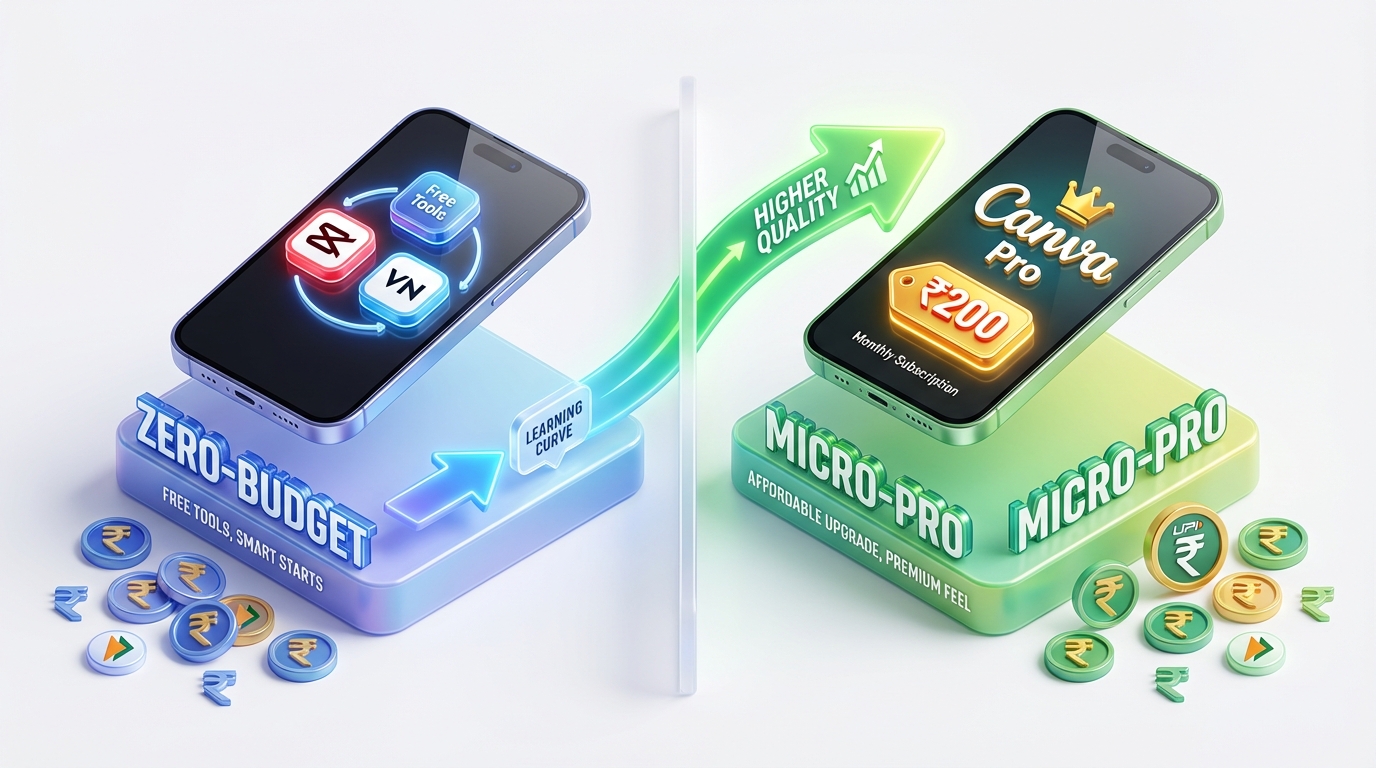
Scenario A: The Zero-Budget Hustle
- Tools: CapCut (Free) + InVideo (Free Tier) + VN Editor.
- Output: 20 Reels/month.
- Cost: ₹0.
- Trade-off: Time spent manually removing watermarks and 720p resolution caps.
Scenario B: The Micro-Pro Stack
- Tools: Canva (₹200 one-time UPI pack) + Clipchamp (Free).
- Output: 40 Videos/month.
- Cost: ₹5 per video.
- Benefit: 1080p exports and premium stock assets.
Statistics from 2026 show that the average cost of AI video production has dropped by 60% since 2024, allowing students to compete with professional agencies in terms of volume.
2. AI Video Free Trial India No Credit Card: Top 2026 Picks
The biggest hurdle for Indian students is the "Credit Card Required" barrier. Most global AI tools demand a card for a free trial, which 70% of Indian students do not possess. The following tools offer AI video free trial India no credit card options, allowing you to start with just a Google or phone login.
CapCut: The King of Mobile AI
CapCut remains the undisputed leader for Indian creators. In 2026, its AI features include "Auto-Reframe" for turning horizontal videos into vertical shorts and "AI Script-to-Video."
- Activation: Download the app; no card needed.
- Best For: Auto-captions and trending transitions.
- 2026 Update: CapCut now offers localized Indian music libraries and regional language font support (Hindi, Marathi, Tamil, etc.).
Microsoft Clipchamp: The Desktop Workhorse
For those on Windows laptops, Clipchamp is a hidden gem. It offers unlimited 1080p exports without watermarks on its free tier.
- Activation: Sign in with a Microsoft account.
- AI Feature: "Auto-Compose" which takes your raw footage and suggests a narrative edit.
- Source: Microsoft India Clipchamp Page
InVideo AI: The Scripting Specialist
InVideo’s 2026 engine is remarkably fast. You can type "Create a 30-second video about the history of Biryani in Hyderabad," and it will generate the script, voiceover, and B-roll.
- The Hack: The free tier has a watermark. Many Indian creators use InVideo to generate the "skeleton" of the video, then recreate it in CapCut or VN Editor to keep it free and clean.
3. AI Video UPI Payment India: Verifying Your Budget Tools
By February 2026, "UPI or Nothing" has become the mantra for SaaS success in India. If a tool doesn't support AI video UPI payment India, it effectively doesn't exist for the student market.
How to Verify UPI Support
Before you spend time learning a tool, check the checkout page:
- Toggle Region: Ensure the currency is set to INR (₹).
- Look for Gateways: Platforms using Razorpay, PayU, or Cashfree almost always support UPI.
- One-Time vs. Subscription: Many tools (like Canva) allow UPI for one-time "Pro" asset purchases but may still require a card for monthly recurring subscriptions.
Confirmed UPI-Friendly Tools (Under ₹300)
- Canva India: Offers "Canva Pro" daily or weekly passes in some regions via UPI, or one-time element purchases.
- Picsart India: Frequently runs "Student Specials" for ₹199/month payable via UPI.
- Source: Canva Help: Pay via UPI
4. Free AI Video Tools Comparison India: 2026 Matrix
This matrix compares the top pocket friendly video creator options available in the Indian market as of February 2026.
| Tool | Price (Monthly) | UPI Support | No-Card Trial | Best Use Case | Max Resolution |
|---|---|---|---|---|---|
| CapCut | ₹0 (Basic) | Yes (for Pro) | Yes | Reels/Shorts | 4K (Free) |
| Clipchamp | ₹0 | N/A (Free) | Yes | YouTube/Explainer | 1080p |
| Canva | ₹0 - ₹299 | Yes | Yes | Templates/UGC | 1080p |
| VN Editor | ₹0 | Yes | Yes | 4GB RAM Devices | 4K |
| InVideo AI | Free Tier | Yes | Yes | Script-to-Video | 720p (Watermarked) |
| TrueFan Studio | ₹2,999+ | Yes | No | Enterprise/Avatars | 1080p/4K |
Note: While Studio by TrueFan AI's 175+ language support and AI avatars are designed for professional marketing automation, students can mimic these workflows using a combination of the free tools listed above.
5. Budget Faceless Video Tools India: 3 Ready-Made Workflows
Creating content without showing your face is the fastest way to scale. Here are three "Poor Man's AI Video Studio" workflows that cost exactly ₹0.
Workflow A: The "Viral Shorts" Stack (₹0)
- Script: Use ChatGPT or Claude to write a 50-word script.
- Voiceover: Use CapCut’s "Text-to-Speech" (select the 'Energetic' or 'Narrator' voice).
- Visuals: Use Pexels or Pixabay for free stock footage.
- Assembly: Edit in VN Video Editor. It is lightweight and works perfectly on 4GB RAM Android phones common in India.
- Captions: Use CapCut’s "Auto-Captions" feature.
Workflow B: The "Subtitle-First" Explainer (₹0)
This workflow is popular for educational content.
- Record: Record your screen or a simple presentation.
- Enhance: Use Clipchamp’s AI "Speaker Coach" to improve your delivery.
- Export: Export at 1080p from Clipchamp (Watermark-free).
- Source: TrueFan AI 4GB RAM Guide
Workflow C: The Template Remix (₹0)
- Select: Pick a "Mobile Video" template in Canva.
- AI Magic: Use "Magic Edit" to swap objects in the video.
- Finalize: Add a trending audio track from the YouTube Audio Library.
6. Ultra Budget Video Creator Apps: Mobile-First for Bharat
For many Indian creators, the smartphone is the only computer they own. Data from 2026 shows that 78% of short-form content in India is produced entirely on mobile devices.
Top Picks for 4GB RAM Devices
- VN Video Editor: Unlike many AI tools, VN works offline. This is crucial for creators in areas with spotty 5G coverage. It doesn't add a watermark and offers professional timeline editing.
- Node Video: A bit more complex, but offers "AI Motion Tracking" that usually requires a heavy PC.
- CapCut Lite: A streamlined version of the app designed specifically for older Android hardware.
Student Discount AI Video India
While dedicated "Student Plans" are rare for AI video tools under ₹300, you can often find "Edu" benefits.
- Canva for Education: If your college provides an
.edu.inor.ac.inemail, you can get Canva Pro for free. - Adobe Creative Cloud: While usually expensive, their "Student & Teacher" edition sometimes drops to ₹600/month during sales—still above our ₹300 limit, but worth watching.
7. When to Upgrade: Moving Beyond the ₹300 Budget
There comes a point where "free" costs too much in terms of time. If you are spending 4 hours removing watermarks to save ₹500, you are losing money.
Upgrade Triggers:
- Monetization: Once your YouTube channel or Instagram page starts earning, professional tools become a tax-deductible business expense.
- Client Work: If you are a freelancer, delivering a watermarked video is unprofessional.
- Scale: When you need to produce 100+ personalized videos for a marketing campaign.
Solutions like Studio by TrueFan AI demonstrate ROI through hyper-personalized customer engagement at scale, which is the eventual goal for any creator moving from a ₹300 budget to a professional career. For enterprises, the "Starter" tier at ₹2,999 is the entry point, but for students, the tools mentioned in this guide are the perfect training ground.
Sources:
- TrueFan AI: Budget-Free Content Creation in India
- Microsoft India Clipchamp Page
- AIInsider India: Best AI Video Tools 2026 (Tested & Compared)
- Canva Help: Pay via UPI
- Memory-efficient video tools for 4GB RAM devices (TrueFan AI)
- CapCut alternatives in India (2025) – TrueFan AI
- InVideo vs Pictory for YouTube – TrueFan AI
- Canva Video AI vs InVideo – TrueFan AI
- Video creation on 4GB RAM devices – TrueFan AI
- TrueFan AI 4GB RAM Guide
- InVideo alternatives in India (2026) – TrueFan AI
Summary of 2026 Data Points:
- Creator Economy Value: $3.5 Billion (India, 2026).
- UPI Preference: 85% of creators choose UPI for micro-SaaS.
- Mobile Production: 78% of Indian content is mobile-first.
- Cost Reduction: 60% drop in AI video production costs since 2024.
- Adoption: 140% increase in AI tool usage in Tier 2 and Tier 3 Indian cities.
Final Checked: February 2026
Frequently Asked Questions
Is ₹300/month realistic for AI avatar videos in India?
For photorealistic talking avatars without watermarks, ₹300 is usually not enough in 2026. Most high-end avatar tools start at ₹2,000+. However, you can use free tiers (with watermarks) of tools like HeyGen or D-ID for 1-minute clips and then "mask" the watermark in a free editor like CapCut.
Which tools accept UPI and offer no-credit-card trials?
Canva is the most reliable for UPI payments in India. CapCut and Clipchamp are the best for no-credit-card free use. Always check if a tool uses an Indian payment gateway like Razorpay before signing up.
How do I build a pocket friendly video creator stack for college?
Use CapCut for mobile edits, Clipchamp for watermark-free desktop exports, and InVideo’s free tier for generating scripts and initial drafts. This "Triple Threat" stack costs ₹0.
Can I get professional avatars for free?
Most professional-grade platforms require a fee for watermark-free content. For example, Studio by TrueFan AI provides licensed influencer avatars and HD quality for serious creators and businesses who have outgrown the student budget phase.
Do these tools work on low-end Android phones?
Yes. VN Editor and CapCut Lite are specifically optimized for 4GB RAM devices. Avoid browser-based editors on low-end phones; stick to dedicated apps for better performance.
Are there any hidden costs with "Free" AI tools?
The main hidden cost is data consumption. AI video generation happens in the cloud. A 1-minute AI video can consume up to 100MB of data. Use Wi-Fi whenever possible to keep your recharge budget intact.



