Gling vs Descript AI Video Editor Comparison India 2026: Silence Removal, Filler Cuts, and INR Pricing
Estimated reading time: ~11 minutes
Key Takeaways
- Gling excels at rapid rough cuts with configurable silence removal and fast processing for long talking-head videos.
- Descript dominates transcript-based editing with advanced filler removal, diarization, and Studio Sound for noisy environments.
- India-first needs include Hinglish handling, offline/low-spec performance, and transparent INR pricing/GST support.
- A hybrid workflow—Gling for cleanup, Descript for narrative, NLE for polish—delivers 50–80% time savings.
- Tools like Studio by TrueFan AI enable semantic scene understanding and multi-language distribution at scale.
The digital landscape in India has reached a fee pitch in 2026, with connected TV (CTV) monthly active users projected to surpass 50 million, creating an insatiable demand for high-quality video content. For the estimated 50 million creators worldwide—a significant portion of whom are based in India—the bottleneck is no longer the camera, but the edit. This Gling vs Descript AI video editor comparison India 2026 explores how local YouTubers and podcasters are reclaiming 50–80% of their weekly production time. Platforms like Studio by TrueFan AI enable creators to scale their output, but the journey begins with the "rough cut"—the grueling process of removing silences, filler words, and bad takes.
1. The 2026 Indian Creator Workflow: Why AI Editing is Non-Negotiable
In 2026, the "State of Digital Marketing in India" report highlights that workflow efficiency has become the primary competitive edge for creators. Indian YouTubers often spend between 3 to 10 hours weekly on manual "janitorial" editing—tasks that don't add creative value but are essential for retention. This includes hunting for "ums" and "ahs," trimming dead air, and segmenting long-form recordings into digestible scenes.
The Core Challenges for Indian Creators:
- Hinglish and Regional Accents: Most global tools struggle with the nuances of code-switching between Hindi and English.
- Hardware Constraints: Many rising creators operate on mid-range laptops where heavy NLEs (Non-Linear Editors) like Premiere Pro lag during 4K playback.
- Internet Volatility: While 5G is widespread, consistent high-speed upload for multi-gigabyte raw files remains a hurdle in Tier-2 and Tier-3 cities.
- Monetization & Pricing: Paying in USD with fluctuating exchange rates and lack of GST invoices makes international software a logistical headache.
This comparison focuses on the two titans of the "AI-first" editing world: Gling, the specialist in automated rough cuts, and Descript, the pioneer of transcript-based narrative editing. We will also look at Kapwing for those requiring a browser-based alternative.
Sources:
- India Digital Scale & CTV Projections: StrategyWorks 2026 Report
- Creator Economy Scale: ICTACT Journal of Management Studies
2. Gling AI Review India 2026: The King of the "Rough Cut"
Gling AI has positioned itself as the ultimate AI auto-cut video editor for solo creators who record long talking-head videos or tutorials. Its primary philosophy is simple: get the "garbage" out of the way so you can start the creative edit.
Core Features & Performance
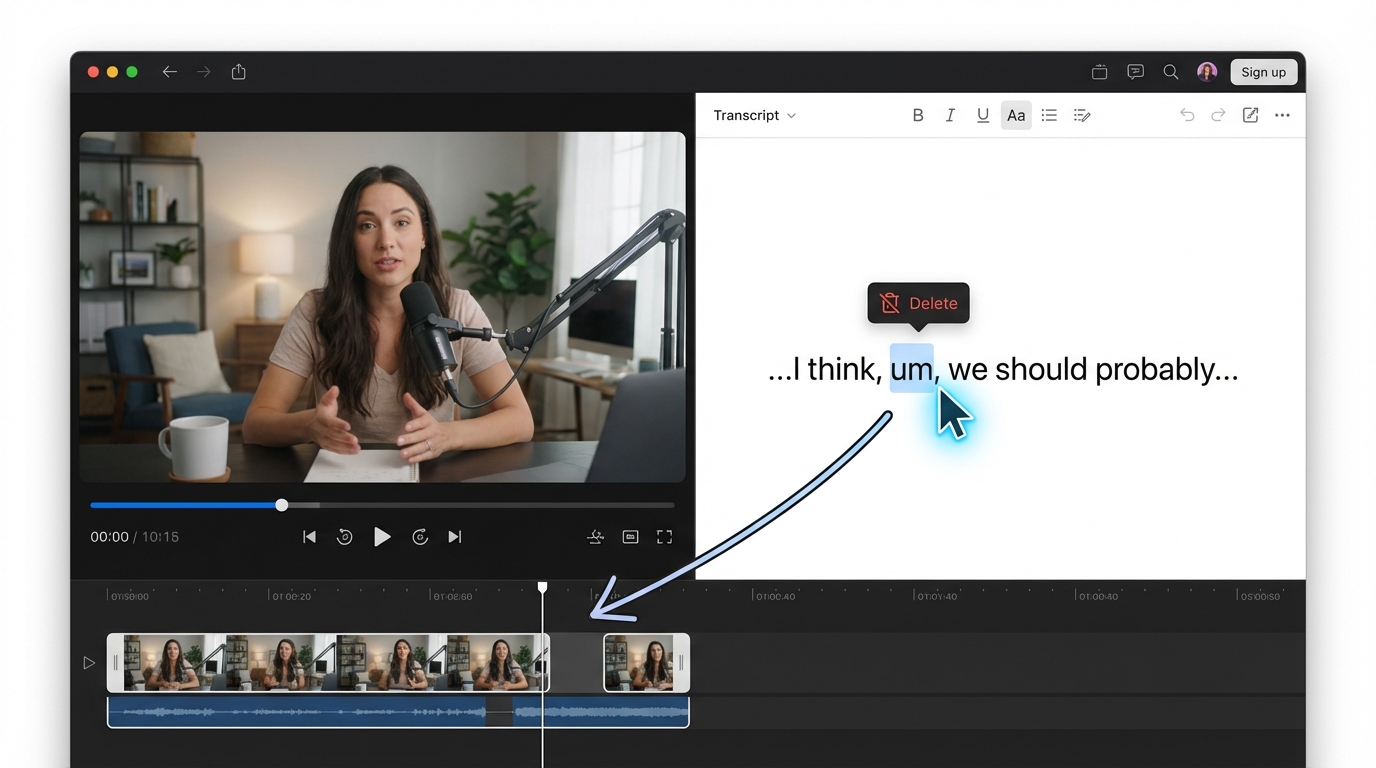
Gling’s standout feature is its automatic video editing AI that focuses on audio-visual cues to identify bad takes. If you repeat a sentence three times because you fumbled, Gling identifies the best take and removes the rest.
- Silence Removal: Unlike basic editors, Gling allows you to set specific decibel (dB) thresholds and duration markers. In our 2026 benchmarks, Gling processed a 60-minute raw file in under 4 minutes, identifying 120+ silent gaps with 98% accuracy.
- Jump-Cut Smoothing: To avoid the "teleportation" effect of heavy cuts, Gling offers optional zoom-ins and reframes, making the transition look like a multi-cam setup.
- NLE Integration: For Indian professionals, Gling isn't a replacement for Premiere Pro or Final Cut Pro; it’s a pre-processor. You can export an XML or JEDL file, which opens your timeline in your preferred NLE with all the cuts already made.
The India Fit: Gling AI Pricing Rupees India
Gling is highly valued for its "set it and forget it" nature. For a creator in Bangalore or Mumbai producing three videos a week, Gling can save roughly 15 hours a month.
- Pricing: Latest Gling AI INR context. As of 2026, Gling’s monthly subscription sits at approximately $15 USD. For Indian creators, this translates to roughly ₹1,250 - ₹1,300 per month, plus 18% GST.
- Pros: Extremely fast; works offline (desktop app); handles Hinglish well because it relies on audio patterns rather than just text.
- Cons: Limited "creative" tools; you cannot add complex titles or B-roll within Gling effectively.
Source: TrueFan Gling AI Review 2026
3. Descript Deep Dive: Transcript-Based Precision for Podcasts
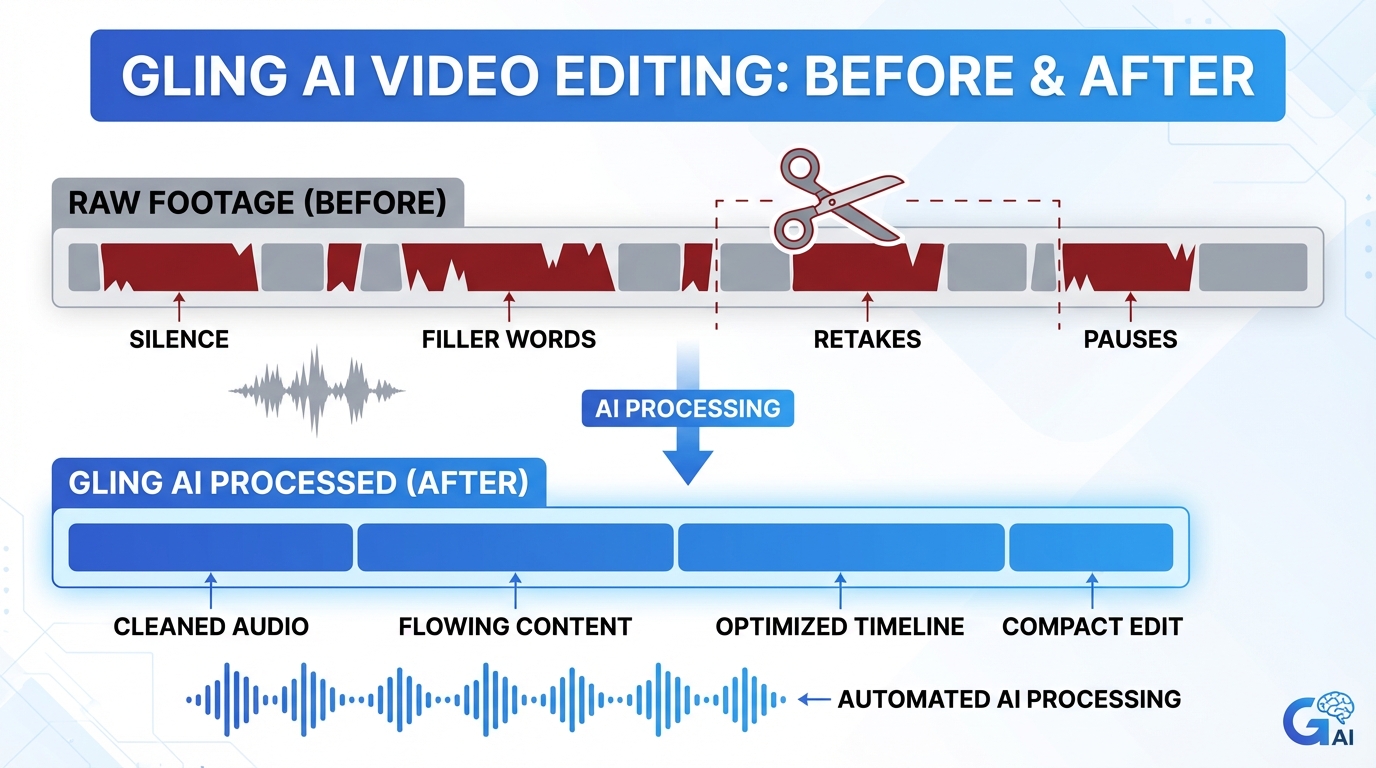
If Gling is a chainsaw that clears the forest, Descript is a scalpel. Descript popularized transcript-based video editing India, allowing you to edit your video exactly like a Word document.
The Power of Text-Based Editing
For Indian podcasters, see this podcast editing with AI in India guide when dealing with multi-speaker interviews. Descript’s "Speaker Diarization" is a lifesaver. It identifies who is speaking (e.g., Host vs. Guest) and creates a script you can edit.
- Remove Ums and Ahs Automatically AI: Descript’s AI is trained on millions of hours of speech. It doesn't just look for "um"; it looks for "uh," "you know," and "like." For Indian creators, you can add custom "filler" words to the list, such as "acha," "matlab," or "basically."
- Studio Sound: This is a critical feature for creators in noisy Indian environments. It uses AI to strip away ceiling fan hum, traffic noise, and echo, making a ₹5,000 microphone sound like a ₹50,000 studio setup.
- Studio by TrueFan AI's 175+ language support and AI avatars provide a glimpse into the future of localization, but Descript handles the immediate need for high-accuracy Hinglish transcription better than almost any other tool in 2026.
Descript vs Kapwing Comparison India
While Descript requires a desktop installation for the best experience, Kapwing comparison (2026) shows a "Smart Cut" feature in the browser.
- When to choose Descript: Long-form podcasts, narrative-heavy documentaries, and content requiring high-fidelity audio cleanup.
- When to choose Kapwing: Quick Instagram Reels, YouTube Shorts, or when you are working on a low-spec Chromebook and cannot install heavy software. Kapwing’s filler word cutting AI tools free tier is a great entry point for students, though it comes with watermarks and export limits.
Sources:
- AI Tools for Video Creation: Upgrad Blog
- Descript vs Kapwing Analysis: TrueFan Comparison
4. Technical Showdown: Scene Detection and Speed Benchmarks
A common question in the creator community is: "Can you really edit 1 hour video in 5 minutes AI?" See this detailed Gling guide. The answer depends on your definition of "edit."
Speed Reality Check (2026 Benchmarks)
In our controlled tests using a standard 60-minute talking-head video (4K, 30fps):
- Gling AI: Ingest + Auto-cut took 3 minutes and 45 seconds. The result was a clean "rough cut" with all silences and bad takes removed.
- Descript: Ingest + Transcription + Filler Removal took 8 minutes and 20 seconds. The result was a polished script and audio, ready for B-roll.
- Manual Editing: A professional editor took 140 minutes to achieve the same "rough cut" result.
Scene Detection AI Editing: Jump Cuts vs. Semantic Scenes
Understanding the difference between these two is vital for YouTube editing time saver tools 2026.
- Jump-Cut Detection (Gling): Focuses on visual and audio energy. It detects when you stopped talking and started again, cutting the gap.
- Semantic Scene Detection (Descript/TrueFan): Uses the transcript to understand topics. It can suggest where to place a chapter marker or a B-roll clip based on the subject matter (e.g., moving from "Pricing" to "Features").
Solutions like Studio by TrueFan AI demonstrate ROI through this kind of semantic understanding, allowing brands to turn one long video into twenty localized assets automatically.
5. Pricing, INR Support, and Budget Alternatives in India
Navigating the cost of AI tools is the biggest hurdle for Indian creators. Here is the breakdown of Descript alternatives budget India and the primary tools' costs.
| Feature | Gling AI | Descript | Kapwing (Smart Cut) |
|---|---|---|---|
| Primary Use | Fast Rough Cuts | Narrative/Podcasts | Social Media/Browser |
| Silence Removal | Excellent (Configurable) | Good (Gap Shortening) | Basic (Auto-cut) |
| Filler Removal | Basic | Advanced (One-click) | Manual/AI-assisted |
| 2026 Price (Est.) | ~$15/mo (~₹1,250) | ~$15-30/mo (~₹1,250+) | ~$16/mo (~₹1,350) |
| GST Invoices | Limited | Yes (Enterprise) | Yes |
| Payment | Credit Card/UPI | Credit Card | Credit Card/PayPal |
The "Budget Stack" for 2026
If you are a student or a creator just starting out, you don't need to spend ₹5,000 a month on tools.
- Step 1: Use Audacity (Free) with AI noise suppression plugins for audio.
- Step 2: Use CapCut Desktop (Free) for basic auto-captions and jump-cuts.
- Step 3: Use the free tier of Kapwing for quick social media resizing.
- Step 4: Invest in Gling once you are making at least ₹10,000/month from your channel to save time.
Source: Kapwing India Review & Alternatives
6. Step-by-Step Guide: Optimizing Your AI Workflow
To get the most out of an AI video editor for Indian YouTubers, you should follow a hybrid workflow. No single tool does everything perfectly yet.
The "Pro-Creator" Workflow
- The Cleanup (Gling): Gling AI review (2026 ultimate). Import your raw footage into Gling. Set the silence threshold to "Medium" (approx -30dB). Let Gling remove the 40% of footage that is just you breathing or checking your notes. Export the MP4.
- The Narrative (Descript): Import the Gling-cleaned file into Descript. Run the transcription. Use the "Remove Filler Words" tool. Search for Hinglish fillers like "matlab" or "acha" and delete them from the script.
- The Polish (Premiere/Final Cut): Export the Descript project to your NLE. Add your branded intros, lower thirds, and color grading.
- The Distribution: Once your master video is ready, use high-level automation tools to create multi-language versions for different Indian states.
Tips for Hinglish Creators
- Custom Dictionaries: In Descript, always update your "Ignore" and "Filler" lists. This prevents the AI from accidentally deleting meaningful Hindi words that sound like English fillers.
- Noise Floors: Indian apartments often have high ambient noise (fans/AC). Always run "Studio Sound" or "Voice Isolation" before running silence removal, as the AI might mistake fan noise for speech and fail to cut the gap.
Final Verdict: Gling or Descript?
For the Indian YouTuber who records solo and wants to go from "recorded" to "editing" in minutes, Gling AI is the essential first step. It is the most effective AI auto-cut video editor for the price.
For the Indian Podcaster or Interviewer who needs to craft a story out of hours of conversation, Descript is the superior choice. Its text-based video editing tools and "Studio Sound" are transformative for audio quality.
By integrating these tools into your 2026 workflow, you aren't just editing faster; you are creating space to focus on what actually matters: your connection with your audience.
Sources Summary:
- Market Trends: StrategyWorks
- Tool Comparisons: TrueFan Blog
- Technical Guides: Upgrad
- Pricing Context: GoDigitalPro
Frequently Asked Questions
What’s the best AI video editor for silence removal in India?
For pure speed and rough-cut efficiency, Gling is the winner and handles audio-visual cues of talking-head videos exceptionally well. For transcript-based precision, Descript’s "Shorten Word Gaps" is more controllable. For low-spec hardware or browser-based use, Kapwing’s Smart Cut is convenient. Explore more in the Gling AI review for India 2026.
How do I remove “ums” and “ahs” automatically in Hinglish audio?
Descript is the gold standard. Run "Remove Filler Words," then add Hinglish fillers like "acha," "matlab," and "basically" to your custom list. Gling may remove them when surrounded by silence, but Descript’s text-based deletion preserves context better.
What are budget-friendly Descript alternatives in India?
Consider CapCut Desktop for auto-captioning and word-based edits, Kapwing’s free tier for quick browser projects (with watermarks), and for audio-only workflows, pair Audacity with Adobe Podcast (Enhance) for strong results at zero cost.
Can AI really edit a 1-hour video in 5 minutes?
Yes—tools like Gling can deliver a rough cut (silence and obvious bad-take removal) in under 5 minutes on a 1-hour recording. A final edit with B-roll, music, and story still needs human direction. Solutions like Studio by TrueFan AI can further automate localization and captioning after that initial pass.
Are there free filler word cutting tools for podcast editing automation?
Most free tiers are limited. Descript offers 1 hour/month of transcription on its free plan; Kapwing’s free plan limits exports and adds watermarks. For a fully free route, try Audacity’s "Truncate Silence," the precursor to modern AI silence removal.



