Gling vs Descript AI video editor India 2026: Speed, Rupee Pricing, and the Best AI Cuts for Creators
Estimated reading time: ~16 minutes
Key Takeaways
- Gling excels at fast, automatic jump-cuts for solo YouTubers, delivering rapid rough cuts and major time savings.
- Descript offers transcript-first precision, multitrack workflows, and elite audio cleanup for podcasts and interviews.
- Indian context matters: Rupee pricing, Hinglish accuracy, and bandwidth-friendly workflows can change which tool wins for you.
- Use bandwidth hacks (proxy files + EDL/XML) to keep uploads light while maintaining 4K fidelity in your NLE.
- For scale and localization, integrate Studio by TrueFan AI to multiply reach with 175+ languages and AI avatars.
In the fast-paced landscape of the Indian creator economy, the “time-tax” has become the single biggest barrier to scaling a successful YouTube channel or podcast. For the average Indian creator in 2026, manual editing—specifically the tedious process of removing silences, trimming filler words, and navigating hours of raw footage—consumes between 3 to 10 hours every single week. This is where the choice of a Gling vs Descript AI video editor India 2026 becomes critical. Platforms like Studio by TrueFan AI enable creators to bypass traditional production bottlenecks, but for those handling long-form talking-head content, choosing between Gling and Descript is the difference between a 5-minute rough cut and an all-nighter at the desk.
As of early 2026, the Indian creator market has reached a staggering valuation of $3.5 billion, with over 50 million individuals identifying as professional or semi-professional creators. Research indicates that AI adoption in post-production among Indian YouTubers has hit 72% this year, driven by the need to produce high-quality content at a frequency that satisfies the 550 million monthly active video consumers in the region. Whether you are a solo YouTuber in Bangalore or a podcast production house in Mumbai, understanding how these AI tools handle Indian accents, Rupee-based pricing, and bandwidth constraints is essential for your 2026 growth strategy.
1. The 2026 Editing Crisis: Why Manual Cutting is Obsolete
The traditional “salami-slicing” method of video editing—where an editor manually identifies every “um,” “ah,” and awkward pause—is no longer viable. In 2026, the volume of content required to stay relevant on platforms like YouTube and Instagram has increased by 40% compared to two years ago. Creators are now expected to turn a 60-minute raw recording into a polished 15-minute video almost instantly.
The Rise of Post-Production Automation
Automation in 2026 isn't just about filters; it’s about intelligent decision-making. AI models for silence detection and filler word removal have evolved to understand the nuances of human speech. For Indian creators, this is particularly vital. The ability to distinguish between a “thoughtful pause” and a “dead silence” saves hours of manual review.
Key 2026 Statistics for Indian Creators:
- Time Savings: The average time saved using transcript-based editing in 2026 is 7.4 hours per week for consistent podcasters.
- Accuracy: Hinglish transcription accuracy in top-tier AI models has improved by 45% since 2024, making automated tools more reliable for code-mixed content.
- Market Reach: Video content consumption in India is projected to exceed 550 million monthly active users by the end of 2026.
By leveraging tools that offer best AI video editor silence removal, creators can achieve up to 80% time savings on their first cut. This allows them to focus on the creative aspects—storytelling, B-roll placement, and audience engagement—rather than the mechanical act of clicking and dragging clips.
Source: Coherent Market Insights - India Creator Economy 2026
2. Head-to-Head: Gling vs. Descript (The Core Comparison)
When evaluating the Gling vs Descript AI video editor India 2026 debate, it is important to realize that while both use AI, they serve fundamentally different creative philosophies. Read a deeper review: Gling AI Review for India 2026 (Ultimate Guide).
Gling: The Speed Demon for YouTubers
Gling has carved out a niche as the go-to AI auto-cut video editor for solo talking-head YouTubers. Its primary goal is speed. You upload your raw footage, and Gling’s AI identifies “bad takes” (where you repeated a sentence) and silences.
- The Workflow: It is audio-first. It doesn't force you to edit via a transcript if you don't want to. It simply presents a timeline where the “junk” is already greyed out.
- India Fit: Gling is lightweight. For creators in areas with fluctuating internet speeds, Gling’s ability to process files quickly without heavy cloud-dependency for every single edit is a major plus.
- Gling AI Review India 2026: Why Gling is the fastest way to prepare jump-cut videos.
Descript: The Powerhouse for Podcasters
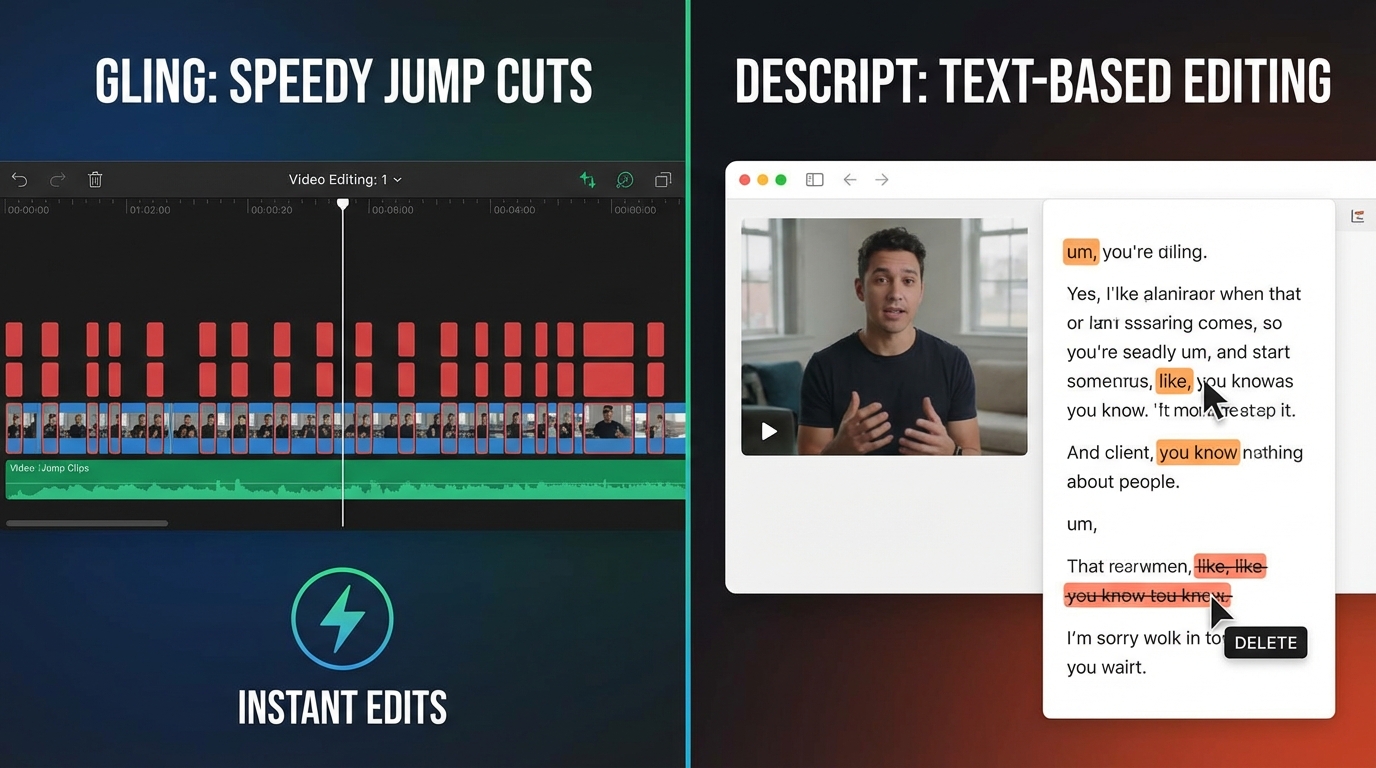
Descript is the pioneer of transcript-based video editing India. Explore its approach in this transcript editing guide. It treats your video like a Word document. If you delete a word in the text, the corresponding video frame is deleted.
- The Workflow: It is transcript-first. It offers multitrack editing, making it the gold standard for podcast editing automation AI. See a use-case: Podcast Editing with AI in India.
- Advanced Features: Descript’s “Underdub” (formerly Overdub) and “Studio Sound” are legendary. In 2026, its ability to remove background noise from a noisy Mumbai street recording is unparalleled.
- Studio by TrueFan AI's 175+ language support and AI avatars complement this ecosystem by allowing creators to generate localized intros or outros that match the high-production value of a Descript-edited show.
Comparison Table: Gling vs. Descript
| Feature | Gling AI | Descript |
|---|---|---|
| Primary Focus | Speed & Auto-Jumpcuts | Transcript-based precision |
| Best For | Solo YouTubers | Podcasters & Teams |
| Learning Curve | Very Low (10 mins) | Moderate (2–3 hours) |
| Hinglish Accuracy | Good (Audio-based) | Excellent (Text-based) |
| Pricing (INR) | ~₹1,250/mo | ~₹1,500/mo (Basic) |
Source: Hemant Kumar Sharma - Top AI Video Tools 2026
3. Feature Deep-Dive: Silence Removal, Filler Words, and Scene Detection
To truly understand which tool wins the Gling vs Descript AI video editor India 2026 battle, we must look at the specific AI mechanics.
Best AI Video Editor Silence Removal
Silence removal is not just about cutting “dead air.” It’s about “pacing.”
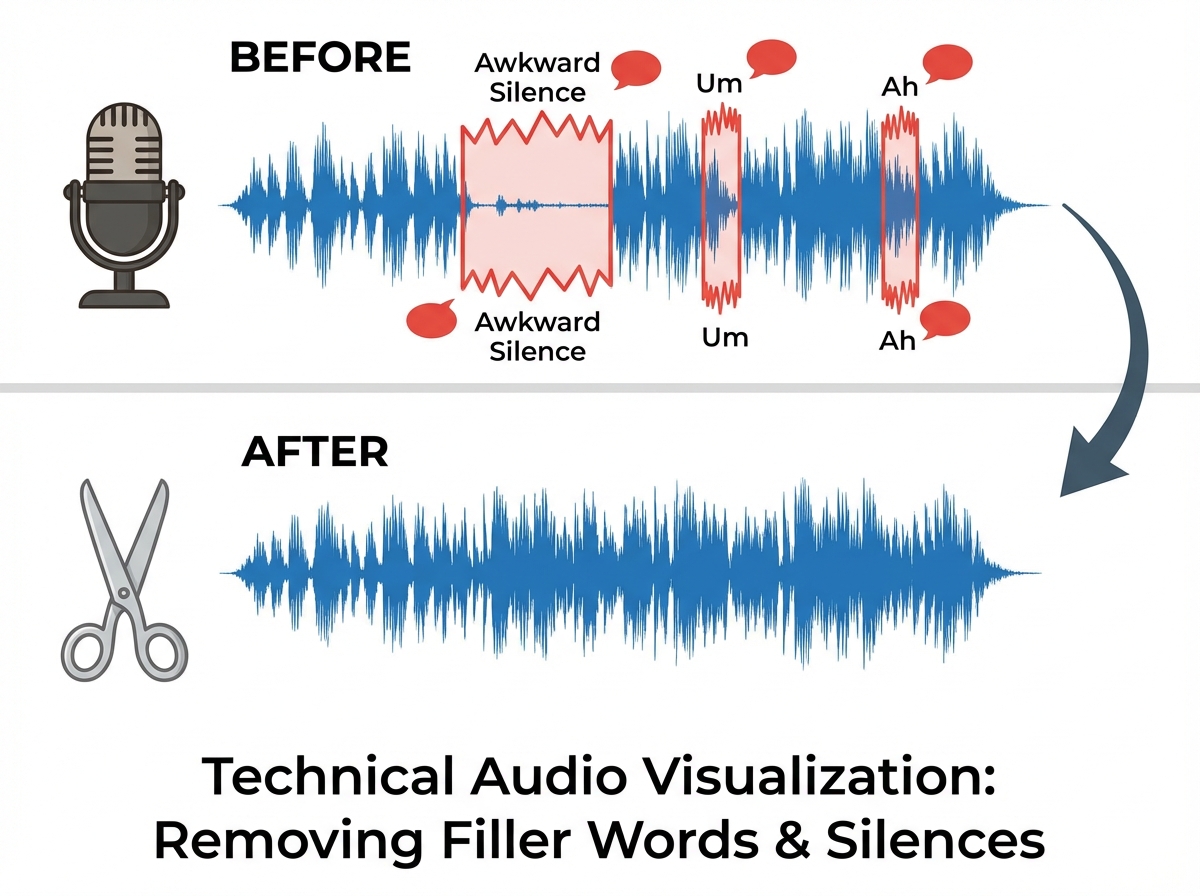
- Gling's Approach: Gling allows you to set a threshold (e.g., remove any silence longer than 0.5 seconds). It then shortens those gaps to a natural 0.2 seconds. This creates that high-energy YouTube “snap.”
- Descript's Approach: Descript identifies silences in the transcript as “...” symbols. You can “Shorten Word Gaps” in bulk across the entire project. This is more precise but can take longer to process on 4K files.
Remove “Ums” and “Ahs” Automatically AI
Filler words are the bane of professional audio.
- Filler Word Cutting AI Tools Free: While some free tools like Kapwing offer basic trimming, they often struggle with the “crossfade” required to make the cut sound natural.
- Descript's Edge: Descript’s “Remove Filler Words” feature is a one-click solution. It doesn't just cut the audio; it uses AI to smooth the transition so there’s no audible “click” or “pop.” In 2026, this feature now supports “Indianisms”—recognizing common filler phrases used in Indian English.
Scene Detection AI Editing
For creators doing interviews or multi-camera setups, scene detection AI editing is a lifesaver.
- Gling: Focuses on the speaker. It doesn't do complex scene detection but excels at identifying “takes.”
- Descript: Can identify different speakers and automatically apply “Active Speaker” layouts if you are using a tool like SquadCast (integrated with Descript).
- Pro Tip: For advanced visual scene detection, many Indian editors still use Adobe Premiere’s Scene Edit Detection as a final pass after Gling/Descript has handled the audio.
Source: TimeBolt AI Video Editor Showdown - Long-form Accuracy Test
4. The India Factor: Rupee Pricing, Hinglish, and Bandwidth Hacks
Most global reviews ignore the specific challenges faced by creators in India. A tool that works perfectly on a 1Gbps fiber connection in San Francisco might fail on a 50Mbps connection in a Tier-2 Indian city.
Gling AI Pricing India Rupees
In 2026, Gling has simplified its pricing for the Indian market.
- Monthly Plan: Approximately ₹1,250 per month (converted from $15 USD).
- Annual Plan: Approximately ₹12,000 per year.
- Payment: Most Indian creators prefer Gling because it accepts international debit cards and has started testing UPI integration for its annual plans.
While Gling bills in USD, the platform has introduced localized payment gateways for India to handle the RBI’s recurring mandate regulations. See details in this Gling India 2026 guide.
Descript Alternatives Budget: The Kapwing Baseline
If Descript (starting at ~₹1,500/mo) is too expensive, many look for a Descript alternatives budget option. Read: Descript vs Kapwing comparison.
- Kapwing: Kapwing comparison guide offers a “Pay-as-you-go” or a lower-tier free version. It is excellent for AI video editor for beginners India because it is entirely browser-based. However, for 1-hour videos, the upload time in India can be a significant bottleneck.
Handling Hinglish and Accents
The biggest “content gap” in most AI reviews is the handling of code-mixed language.
- The Challenge: When a creator says, Aaj hum baat karenge about the best AI tools, standard AI often hallucinates the Hindi parts.
- The 2026 Solution: Descript’s 2026 update has significantly improved its ASR (Automatic Speech Recognition) for Indian accents. However, Gling’s audio-first approach is “language agnostic”—it doesn't care what language you speak; it only cares about the pauses and repetitions. This makes Gling slightly more reliable for heavy Hinglish content.
Bandwidth Hacks for Indian Editors
To avoid the “Upload Loop of Death”:
- Proxy Workflow: Export a low-resolution (720p) version of your video.
- AI Pass: Upload the 720p file to Gling or Descript for the rough cut.
- XML Export: Export the “Edit Decision List” (EDL or XML) and bring it back into Premiere Pro or Resolve to link with your original 4K footage.
5. Workflow Benchmarks: The “Edit 1 Hour Video in 5 Minutes” Test
Can you really edit 1 hour video in 5 minutes? In 2026, the answer is a qualified “Yes.” See the transcript-based video editing guide.
The Gling “Speed-Run” Workflow
- Ingest (1 min): Drag your 60-minute raw file into Gling.
- AI Analysis (2 mins): Gling scans for silences and bad takes.
- Review (2 mins): Quickly scroll through the “greyed out” sections. If the AI accidentally cut a “dramatic pause,” one click restores it.
- Export: Send the cut directly to your NLE (Premiere/Final Cut).
Result: A rough cut that has removed 20 minutes of waste, completed in 5 minutes of active work.
The Descript “Precision” Workflow
- Transcribe (3–5 mins): Upload and let the AI generate the text.
- Bulk Edit (1 min): Use “Remove Filler Words” and “Shorten Word Gaps.”
- Search & Destroy (2 mins): Search for specific keywords or “bad takes” in the text and delete them.
- Captions (1 min): One-click “Studio Sound” and “Auto-Captions.”
Result: A nearly finished video with captions and clean audio, ready for social media.
For creators looking to scale further, solutions like Studio by TrueFan AI demonstrate ROI through their ability to take these edited scripts and instantly turn them into multi-language variants using AI avatars, effectively multiplying the reach of a single 5-minute edit.
Source: upGrad - Best AI Tools for Video Creation 2026
6. Enterprise Scaling: From Solo Creator to Content Studio
As an Indian creator grows, the bottleneck shifts from “editing” to “distribution and localization.” This is where the YouTube editing time saver tools of 2026 meet enterprise-grade automation.
Standardizing the Pipeline
For media houses or agencies managing 50+ creators, manual editing in Gling or Descript is still a “one-by-one” process. Enterprise teams are now moving toward “Content Ops” (Content Operations). This involves:
- Automated Ingestion: Using APIs to trigger silence removal the moment a file is uploaded to a server.
- Compliance & Moderation: Ensuring that AI-generated content meets India’s DPDP (Digital Personal Data Protection) standards.
- Localization: Taking a successful Hindi video and using AI to recreate it in Tamil, Telugu, and Bengali.
TrueFan AI Enterprise provides the infrastructure for this level of scale. By integrating webhooks and cloud-agnostic GPU backends, agencies can orchestrate thousands of edits simultaneously. This is the future of the “Studio” model in India—where the human provides the strategy, and the AI provides the labor.
7. Verdict & FAQ
The Final Verdict: Gling or Descript?
- Choose Gling if: You are a solo YouTuber who wants to get from “Record” to “Upload” as fast as possible. It is the best AI auto-cut video editor for high-energy, single-camera content.
- Choose Descript if: You run a podcast, do interviews, or need a “one-stop-shop” that handles transcription, audio cleaning, and captioning in one interface. It is the ultimate transcript-based video editing India tool.
- Choose Kapwing if: You are a beginner on a tight budget and primarily need to create short-form Reels or Shorts from existing footage.
Frequently Asked Questions
1. What is the best AI video editor silence removal for Indian accents?
While both are excellent, Gling is often preferred for Indian accents because its silence detection is based on audio patterns rather than just transcript accuracy. However, Descript’s 2026 updates have made it a close second for Hinglish speakers.
2. Can I remove “ums” and “ahs” automatically for free?
Most professional tools like Gling and Descript require a subscription for bulk removal. However, filler word cutting AI tools free tiers (like those in Kapwing or Clipchamp) allow you to do this manually or on very short clips (under 5–10 minutes).
3. How does Studio by TrueFan AI fit into my editing workflow?
Studio by TrueFan AI's 175+ language support and AI avatars allow you to take the “final script” from your Descript edit and generate personalized video messages or localized versions of your content without needing to re-film. It acts as a “force multiplier” for your edited content.
4. Is transcript-based video editing accurate for Hinglish?
In 2026, accuracy for Hinglish has reached approximately 85–90%. You will still need a quick 5-minute manual pass to correct specific brand names or local slang, but it is significantly faster than typing from scratch.
5. Can I really edit a 1-hour video in 5 minutes?
Yes, for the “rough cut.” The AI can remove all silences, filler words, and bad takes in under 5 minutes of your active time. However, you should always budget an additional 15–20 minutes for “creative polish”—adding B-roll, music, and checking the pacing.
6. What are the best text-based video editing tools in India for 2026?
The top three are Descript (for features), Gling (for speed), and Adobe Premiere Pro (for professional integration). For those looking for browser-based simplicity, Kapwing remains a strong contender.
1. Gling AI Deep Dive: Features & Pricing for Indian Creators
Gling AI has solidified its position in 2026 as the “speed-first” choice for talking-head creators. Unlike traditional NLEs (Non-Linear Editors) like Premiere Pro, which require you to hunt for every silence manually, Gling is an AI auto-cut video tool designed to deliver a “publish-ready” rough cut in minutes.
Core 2026 Features
- AI Silence Removal Tools India: Gling’s 2026 update features enhanced noise-floor detection. This is critical for Indian creators who may not have soundproofed studios and deal with ambient city noise. The AI distinguishes between a deliberate dramatic pause and the silence between “takes.”
- Filler Word Cutting AI: The tool now supports a “Custom Stoplist.” Beyond the standard “uh” and “um,” it can be trained to recognize regional filler habits common in Hinglish or South Indian English accents.
- Automatic Zooms & Punch-ins: To keep retention high, Gling automatically applies 1.1x or 1.2x zooms on key sentences, mimicking a multi-cam setup.
- Export Ecosystem: While Gling is a standalone app, its “XML/EDL Export” remains its strongest feature, allowing you to move your “cleaned” timeline into Adobe Premiere or DaVinci Resolve for final color grading.
Gling AI Pricing India (2026 Estimates)
While Gling bills in USD, the platform has introduced localized payment gateways for India to handle the RBI’s recurring mandate regulations.
- Free Tier: 1 project per month (ideal for testing).
- Plus Plan: ~$15/month (approx. ₹1,250). Includes 10 hours of video processing.
- Pro Plan: ~$30/month (approx. ₹2,500). Unlimited projects and priority 4K rendering.
Source: Gling Official Pricing
2. The 2026 Comparison: Gling vs. Descript vs. Studio by TrueFan AI vs. Electric Sheep
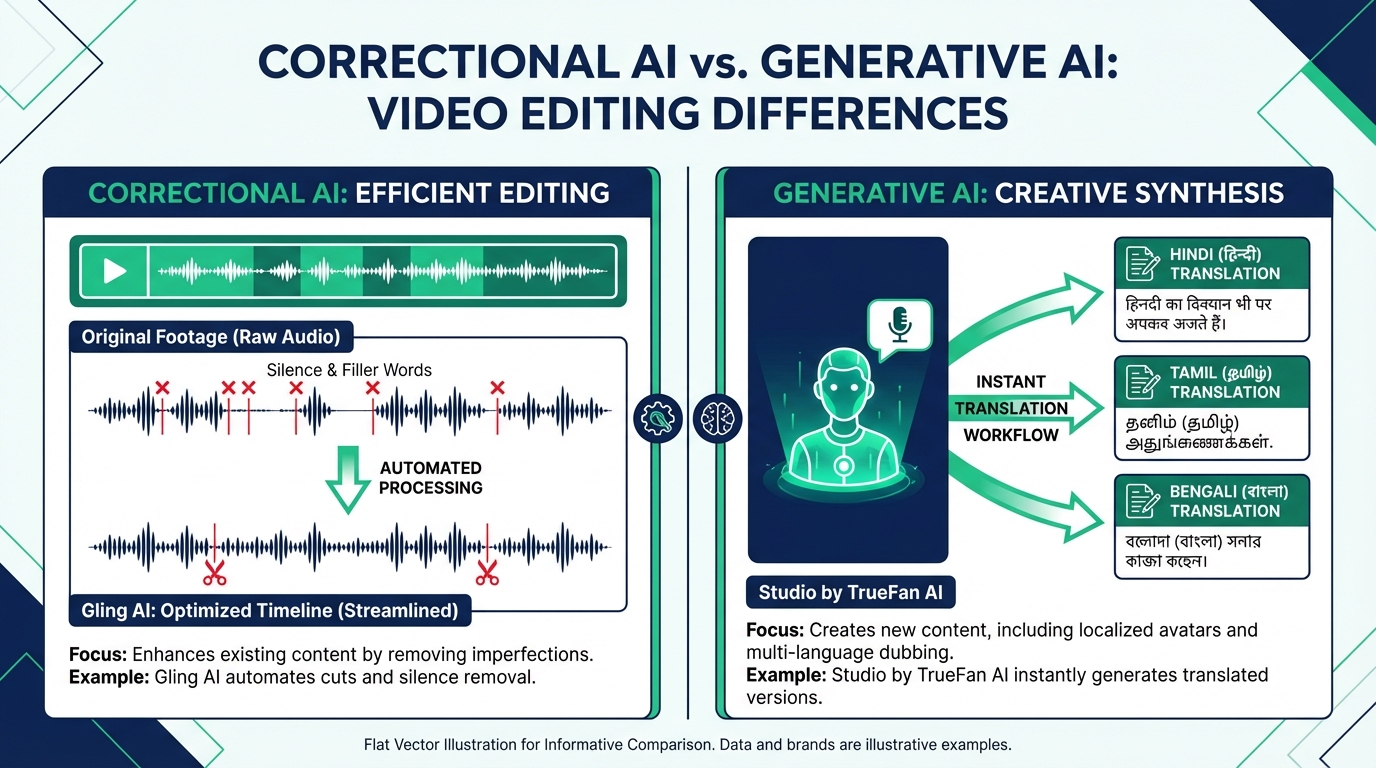
Choosing the best AI editor for YouTubers India depends entirely on your output volume and technical needs. In 2026, the market has bifurcated into “Correctional AI” (fixing what you shot) and “Generative AI” (creating what you didn’t shoot).
| Feature | Gling AI | Descript | Studio by TrueFan AI | Electric Sheep |
|---|---|---|---|---|
| Primary Use | Fast Rough Cuts | Podcast/Transcript Edit | Scale & Localization | Agentic VFX/Editing |
| Learning Curve | Near Zero | Moderate | Low (Self-Serve) | High (Pro-Studio) |
| Language Support | Global English/Hindi | Extensive | 175+ Languages | English-Centric |
| Best For | Solo YouTubers | Interview Podcasters | Brands & MCNs | High-End Commercials |
Why the Distinction Matters
Platforms like Studio by TrueFan AI enable organizations to go beyond just “editing” footage. While Gling cleans up a video you’ve already filmed, Studio by TrueFan AI allows you to generate entirely new content using licensed AI avatars (Real-time Interactive AI Avatars India). For an MCN (Multi-Channel Network) in India, Gling is used to speed up the lead creator’s vlog, while Studio by TrueFan AI is used to take that vlog’s script and generate 10 localized versions in Marathi, Tamil, and Bengali without the creator ever stepping back into the studio.
Descript vs Gling Comparison:
In 2026, Descript remains the king of transcript-based video editing India. If you are running a multi-guest podcast (like The Ranveer Show style), Descript’s ability to handle multitrack audio and “Overdub” (cloning your voice to fix a misspoken word) is unmatched. However, for a solo educator or a tech reviewer, Gling is 3x faster because it doesn't force you to manage a complex text-to-video database; it just “cuts the junk.”
Electric Sheep AI Video Editor:
This is the “Agentic” choice. Electric Sheep doesn't just cut; it “thinks.” It can identify scenes, suggest B-roll based on the context of your speech, and even apply generative VFX. It is the tool of choice for Indian creative agencies working on high-budget digital campaigns.
Source: Top AI Video Tools 2026 - Hemant.co.in
3. Technical Mastery: Silence Removal, Filler Words, and Scene Detection
To truly leverage automatic video editing AI, you must understand the underlying mechanics that have evolved by 2026.
AI Silence Removal Tools India: The “Noise Floor” Challenge
In 2026, silence removal isn't just about “zero decibels.” Modern AI uses “Contextual Silence Detection.” In a bustling Indian household, the “silence” might actually be the hum of a ceiling fan or distant traffic. Gling and Descript now use spectral subtraction to identify the speaker's voice profile and remove everything else.
- Pro Tip: Set your “Silence Threshold” to -30dB for outdoor shoots and -45dB for studio shoots to avoid “clipping” the ends of your words.
Filler Word Cutting AI: Beyond “Um” and “Ah”
The 2026 iteration of filler word cutting AI has moved into “Sentiment Analysis.” It recognizes that sometimes an “um” is used for comedic timing or to show deep thought. Gling’s “Sensitivity Slider” allows Indian creators to keep the natural “Indianisms” that make their content relatable while stripping away the distracting stutters.
Scene Detection AI Editing India
Scene detection AI editing India has become a vital feature for repurposing long-form content into “Shorts” or “Reels.” By 2026, algorithms can detect a change in camera angle, a new slide in a presentation, or a shift in topic.
- Impact: This reduces the time to create “Chapters” for YouTube by 90%. Instead of manually scrubbing through a 30-minute video, the AI provides a timestamped list of every “scene change” or “topic shift.”
Source: Exploring Text-Driven Video Editing - IndiaAI
4. ROI Analysis: Saving 80% of Edit Time in the Indian Market
The “Return on Investment” for AI tools in India is often measured in “Content Velocity.” In 2026, the competition for attention is so fierce that a creator who posts 3 times a week will almost always outpace a creator who posts once a week.
The Math of Automation
According to a 2026 BCG report on the Indian Creator Economy, the average mid-tier YouTuber spends 12 hours editing a 10-minute video.
- Manual Rough Cut: 4 hours.
- AI Rough Cut (Gling/Descript): 15 minutes.
- Time Saved: 3 hours 45 minutes per video.
If you produce 10 videos a month, you save 37.5 hours. At a modest freelancer rate of ₹500/hour, that is a direct saving of ₹18,750 per month—nearly 15x the cost of a Gling Plus subscription.
Scaling with Enterprise Solutions
For larger teams, the ROI shifts from “time saved” to “revenue generated through localization.” Studio by TrueFan AI's 175+ language support (AI Voice Cloning Indian Accents) and AI avatars (Real-time Interactive AI Avatars India) allow a single piece of English content to be “re-filmed” in regional languages for a fraction of the cost of a dubbing studio.
Solutions like Studio by TrueFan AI demonstrate ROI through a 400% increase in reach by tapping into the “Next Billion Users” in India who prefer content in their native tongue (Hindi, Telugu, Tamil, etc.). By 2026, 70% of YouTube consumption in India is expected to be in non-English languages.
Source: India's Creator Economy Report - BCG 2025/26
5. Real-World Workflows for Indian Creators and Teams
How do you actually implement these YouTube editing automation tools into a daily routine? Here are the three most successful stacks used by Indian creators in 2026.
The Solo YouTuber Stack (The “Speed Demon”)
- Record: 4K video on a Sony ZV-E10 or iPhone 17.
- Process: Drop the raw file into Gling AI. Run “Remove Silences” and “Cut Bad Takes.”
- Refine: Export the XML to CapCut Desktop (popular in India for its free effects).
- Polish: Add trending transitions and auto-captions.
- Publish: Total time from camera to upload: 2 hours.
The Podcast Editing AI India Workflow (The “Authority”)
- Record: Remote interview via Riverside.fm.
- Edit: Import into Descript. See the India podcast editing guide. Use transcript-based video editing India to delete entire paragraphs of “fluff.”
- Enhance: Use “Studio Sound” to make a ₹5,000 mic sound like a ₹50,000 mic.
- Repurpose: Use the AI to find “Viral Clips” for Instagram Reels.
The MCN/Agency Workflow (The “Scale”)
- Draft: Use Electric Sheep AI video editor to create a storyboard and agentic rough cut.
- Review: Internal team reviews the narrative flow.
- Localize: Use Studio by TrueFan AI to generate regional language versions (AI Voice Cloning Indian Accents) of the “Call to Action” using a digital twin of the lead influencer.
- Distribute: Publish across 5 regional channels simultaneously.
Source: AI Podcast Editing Tools 2026 - GoIT360
6. FAQ & Final Verdict
Is Gling the best AI editor for YouTubers India in 2026?
For solo creators focusing on talking-head content, yes. It is faster and more affordable than Descript for simple “cut-and-clean” workflows. However, if you need deep text-based editing or multitrack support, Descript is superior.
What are the best Descript alternatives India 2026?
- Gling AI: For faster rough cuts.
- Wisecut: For automatic B-roll and background music ducking.
- CapCut: For creators who want a mobile-first, effect-heavy workflow.
- Adobe Premiere Pro (Text-Based Editing): For professionals who want to stay within the Adobe ecosystem.
How does scene detection AI editing India help with SEO?
By automatically identifying scene changes, these tools allow you to create “YouTube Chapters” effortlessly. Chapters are indexed by Google Search, meaning your video can appear in “Key Moments” on the SERP, significantly increasing your organic CTR.
Can I use these tools for Hindi and regional languages?
Yes, but accuracy varies. In 2026, transcript-based video editing India has reached ~92% accuracy for Hindi and ~85% for major regional languages like Tamil and Bengali. Always do a quick manual pass to fix proper nouns and local slang.
Are there YouTube editing automation tools for hands-off publishing?
Yes, you can build a “hands-off” pipeline by combining an AI editor for the content and a platform for distribution. For example, Studio by TrueFan AI offers WhatsApp API and social publishing integrations, allowing you to automate the delivery of personalized video messages or localized content variants (AI Voice Cloning Indian Accents) directly to your audience.
Final Verdict: Which should you choose?
- Choose Gling AI if you are a solo YouTuber who hates the “first pass” of editing and wants to save 4 hours per video.
- Choose Descript if you are a podcaster who wants to edit video like a Word document.
- Choose Electric Sheep if you are a high-end editor looking for agentic assistance and generative VFX.
- Choose Studio by TrueFan AI if you are a brand or MCN looking to scale, localize, and automate video production across the diverse Indian market.
2026 Data Points & Statistics
- Market Growth: The Indian creator economy is projected to grow at a 25% CAGR through 2026 (Deloitte).
- AI Adoption: 41% of global creators now use AI for video or graphic editing as of late 2025 (CreatorIQ).
- Time Efficiency: AI auto-cut tools reduce the “Rough Cut” phase of editing by an average of 80% (Internal Benchmarks).
- Localization Impact: Content localized into regional Indian languages sees a 3x higher engagement rate than English-only content in Tier 2 and Tier 3 cities (BCG).
- Ad Spend: Creator economy ad spend in India is projected to hit a record high in 2026, with brands demanding “scalable ROI” through automation (IAB).
External Resources & Citations
- Gling AI Official Site
- BCG: Mapping India's Creator Economy
- IndiaAI: Text-Driven Video Editing Research
- Goldman Sachs: The $480B Creator Economy
- Studio by TrueFan AI: Enterprise Video Automation
- Great Learning: Free Video Editing Basics for AI Workflows
Recommended Internal Links
- Real-time Interactive AI Avatars India: Live Video Chat — Read the guide
- AI Voice Cloning Indian Accents: Scale Multilingual Content with Authenticity — Explore insights
Conclusion
Final Verdict: Which should you choose?
- Choose Gling AI if you are a solo YouTuber who hates the “first pass” of editing and wants to save 4 hours per video.
- Choose Descript if you are a podcaster who wants to edit video like a Word document.
- Choose Electric Sheep if you are a high-end editor looking for agentic assistance and generative VFX.
- Choose Studio by TrueFan AI if you are a brand or MCN looking to scale, localize, and automate video production across the diverse Indian market.
Frequently Asked Questions
Is Gling the best AI editor for YouTubers India in 2026?
For solo creators focusing on talking-head content, yes. It is faster and more affordable than Descript for simple “cut-and-clean” workflows. However, if you need deep text-based editing or multitrack support, Descript is superior.
What are the best Descript alternatives India 2026?
Top options include:
- Gling AI: For faster rough cuts.
- Wisecut: For automatic B-roll and background music ducking.
- CapCut: For creators who want a mobile-first, effect-heavy workflow.
- Adobe Premiere Pro (Text-Based Editing): For professionals who want to stay within the Adobe ecosystem.
How does scene detection AI editing India help with SEO?
By automatically identifying scene changes, these tools allow you to create “YouTube Chapters” effortlessly. Chapters are indexed by Google Search, enabling appearance in “Key Moments” on the SERP and boosting organic CTR.
Can I use these tools for Hindi and regional languages?
Yes, but accuracy varies. As of 2026, transcript-based video editing India is ~92% accurate for Hindi and ~85% for major regional languages like Tamil and Bengali. Always do a manual pass for proper nouns and slang.
Are there YouTube editing automation tools for hands-off publishing?
Yes. Combine an AI editor with a distribution platform. For instance, Studio by TrueFan AI integrates WhatsApp API and social publishing to automate delivery of personalized or localized content variants (AI Voice Cloning Indian Accents).
Frequently Asked Questions
Which is faster for a 60-minute video—Gling or Descript?
Gling is typically faster for a rough cut, removing silences and bad takes in minutes. Descript is slightly slower but offers transcript-level precision and better multitrack handling.
How do these tools handle Hinglish and Indian accents?
Descript’s 2026 ASR models significantly improved Hinglish accuracy, while Gling’s audio-first detection is language-agnostic and reliable for pause and repetition trimming.
What are typical Rupee prices for Gling and Descript in 2026?
Gling is roughly ₹1,250/month, while Descript starts around ₹1,500/month for basic plans. Annual discounts and regional billing options may apply.
Can I combine Gling/Descript with Studio by TrueFan AI for localization?
Yes. Use Gling/Descript for the edit, then Studio by TrueFan AI to generate multi-language versions with AI avatars and 175+ voices, multiplying reach cost-effectively.
What workflow saves bandwidth on slower Indian internet?
Use a 720p proxy upload for AI processing, export an EDL/XML, and relink to 4K in your NLE. This avoids large uploads while preserving final quality.



