AI Video Generator for Online Courses India: 2026 Guide for Udemy, Skillshare, YouTube, and Coaching Classes
Estimated reading time: ~12 minutes
Key Takeaways
- AI video generators cut production time and cost by up to 90%, enabling rapid course iteration and scale.
- Prioritize language quality, accurate lip‑sync, and caption exports to serve India’s multilingual learners.
- Follow platform policies and standards (Udemy, Skillshare, YouTube, LMS) to avoid rejections.
- Use a structured text‑to‑video workflow with micro‑lectures, avatar/voice tuning, and batch QA.
- Studio by TrueFan AI offers enterprise‑grade localization, custom avatars, and security for scaled EdTech.
In the rapidly evolving digital landscape of 2026, the demand for high-quality, accessible education has reached an unprecedented peak. For Indian educators, the challenge is no longer just about subject expertise; it is about the speed of content delivery and the ability to reach a linguistically diverse audience. This is where an AI video generator for online courses India becomes a transformative asset. By leveraging advanced generative AI, instructors can now bypass the traditional bottlenecks of expensive studio rentals, camera shyness, and grueling editing cycles.
Platforms like Studio by TrueFan AI enable independent tutors, coaching centers, and EdTech solopreneurs to convert text scripts into professional, presenter-led videos in minutes. Whether you are building a premium course for Udemy, a creative workshop for Skillshare, or a free educational series for YouTube, the integration of AI avatars is no longer a futuristic concept—it is a 2026 industry standard. This guide provides a comprehensive playbook for mastering faceless course creation, navigating platform policies, and maximizing ROI in the Indian market.
1. Why Indian Educators are Switching to Faceless Course Creation AI Tools India
The shift toward faceless course creation AI tools India is driven by a fundamental change in the economics of content production. In 2026, the Indian EdTech sector is projected to reach a valuation of $10.5 billion, with a significant portion of growth coming from Tier-2 and Tier-3 cities where regional language content is king.
Cost and Time Comparison: Traditional vs. AI-Driven
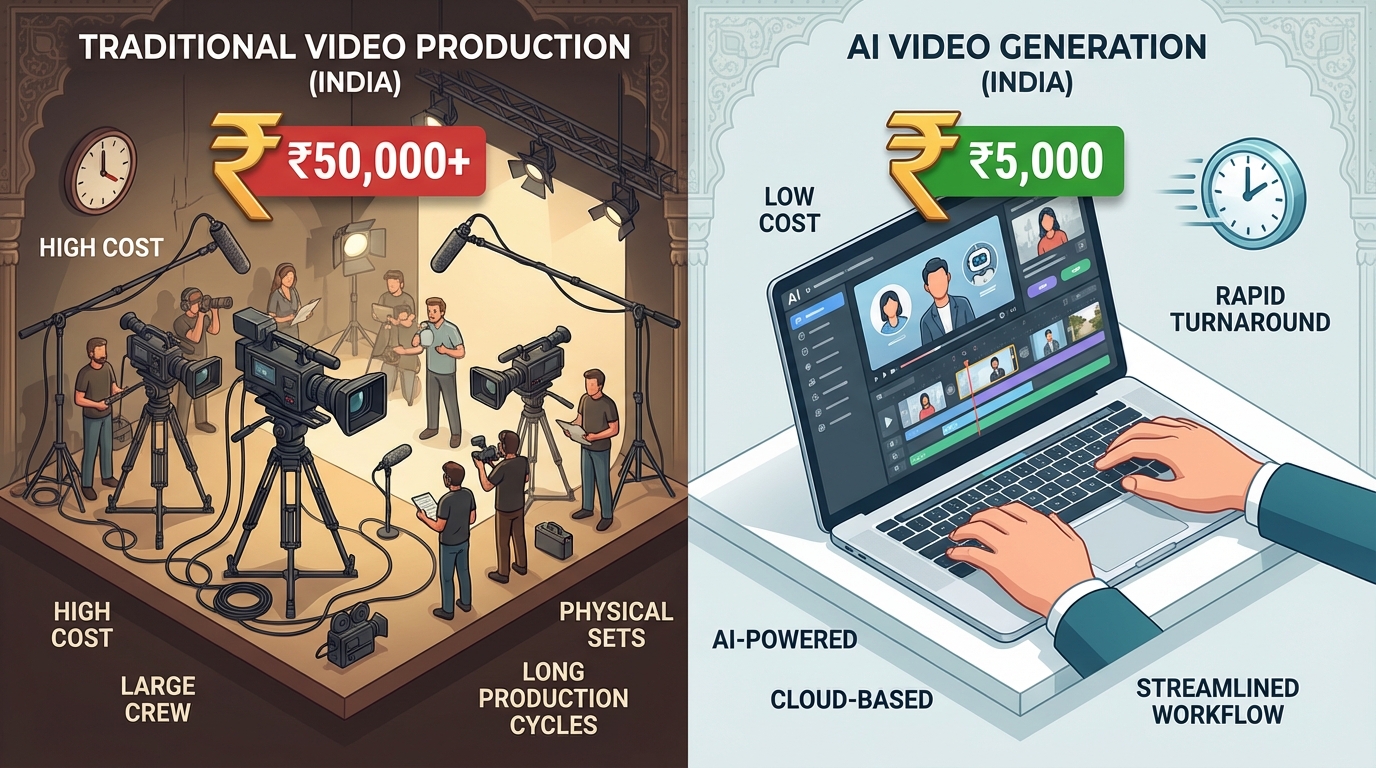
Traditional video production in India has historically been a high-friction process. For a standard 60-minute course module, a traditional studio shoot involves:
- Studio & Gear Rental: ₹25,000 – ₹50,000 per day.
- Professional Editing: ₹15,000 – ₹30,000.
- Crew (Lights, Sound, Camera): ₹20,000 – ₹40,000.
- Turnaround Time: 2 to 4 weeks.
In contrast, using an AI video generator for online course creation India, the same 60 minutes of content can be produced for a fraction of the cost—often between ₹5,000 and ₹15,000 depending on the subscription tier—with a turnaround time of just a few hours. This 90% reduction in cost and 95% reduction in time allows educators to iterate on their curriculum faster than ever before.
The Training Boom and Market Adoption
The accessibility of these tools has sparked a nationwide training movement. In Hyderabad, institutes are now offering specialized courses on AI video creation using tools like Pictory and Canva AI. Similarly, Chandigarh’s Morph Academy has integrated generative AI into its filmmaking curriculum to meet the demand for AI-driven educational content. Even the National Skill India Mission has recognized the importance of these tools in upskilling the next generation of digital creators.
Privacy, Consistency, and Localization
For many Indian educators, the “faceless” aspect is a major draw. It eliminates camera anxiety and the need for a perfect physical setup. Furthermore, AI avatars provide a consistent “instructor persona” that never ages, never gets tired, and can be updated instantly. If a syllabus changes, you simply edit the text script and regenerate the video, rather than re-shooting the entire module.
Sources:
- AI Video Creation Course in Hyderabad
- Morph Academy: AI Filmmaking and Generative Video
- National Skill India Mission: Updates
2. How to Evaluate an AI Video Generator for Online Course Creation India
Not all AI video tools are created equal, especially when catering to the nuances of the Indian market. When selecting a tool, educators must look beyond basic “text-to-video” features and evaluate specific technical and pedagogical benchmarks.
Language Quality and the “AI Spokesperson for Educational Videos Hindi”
The most critical factor for success in India is the quality of regional language support. A high-quality AI spokesperson for educational videos Hindi must exhibit natural prosody—the rhythm, stress, and intonation of speech. In 2026, leading tools have moved beyond robotic “text-to-speech” to emotive AI that understands context.
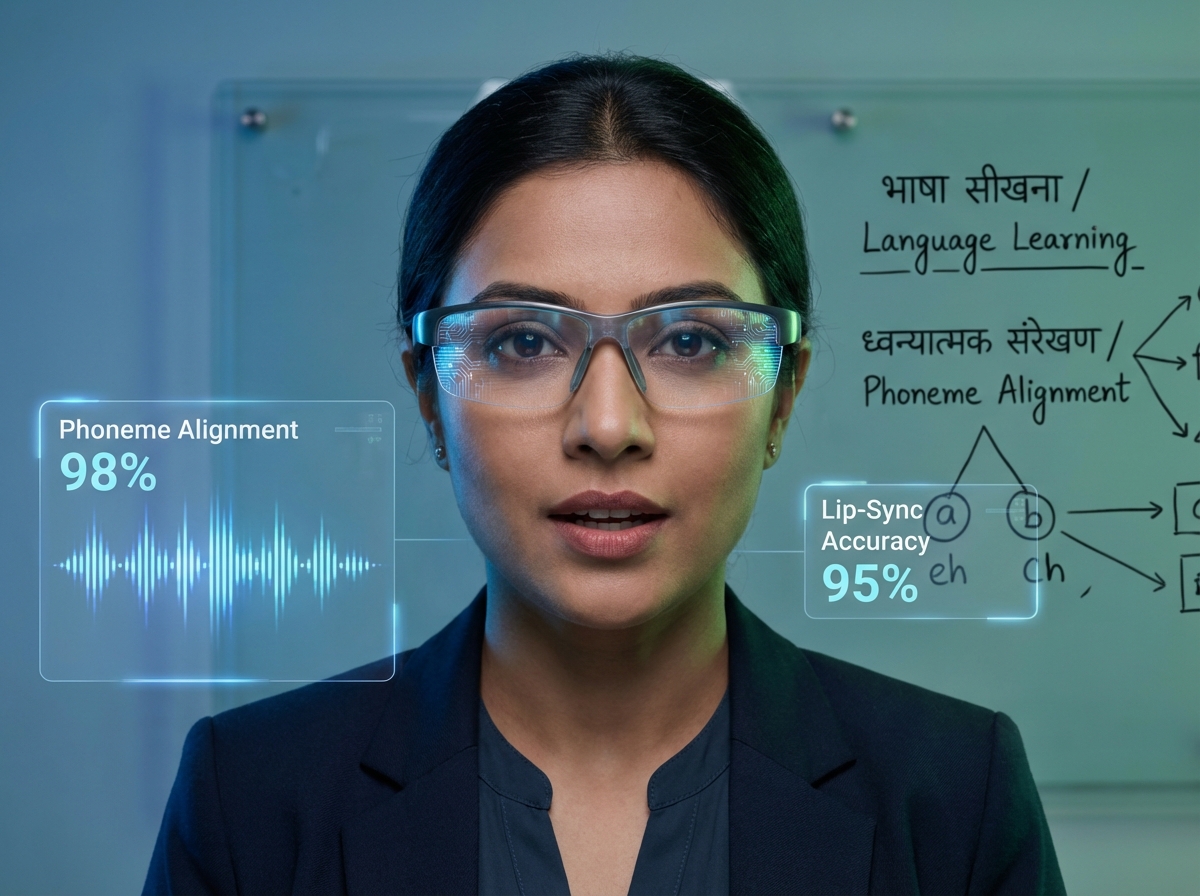
- Lip-Sync Accuracy: Ensure the tool uses phoneme-based alignment, which synchronizes the avatar’s mouth movements precisely with Hindi or regional language sounds.
- Accent Control: Look for options that offer neutral Indian English accents as well as localized Hindi dialects to build better rapport with students.
Course-Delivery Readiness (LMS and Platform Standards)
To ensure your videos are accepted by platforms like Unacademy or self-hosted LMS (Learning Management Systems), the tool must meet specific export standards:
- Resolution: Minimum 1080p (Full HD) H.264 MP4.
- Audio: AAC 128–192 kbps for crystal-clear narration.
- Accessibility: The ability to export SRT or VTT caption files is mandatory for SEO and inclusivity.
- Compliance: For corporate training, support for SCORM 1.2/2004 or xAPI packaging is a significant advantage.
Scale, Security, and Governance
As your course library grows, manual generation becomes a bottleneck. Advanced tools now offer API access and webhooks for batch production. Security is equally paramount; ensure the platform is ISO 27001 and SOC 2 certified to protect your intellectual property. In the Indian context, “consent-first” workflows are vital—ensure the AI avatars you use are fully licensed and that the platform has strict content moderation policies to prevent the misuse of your brand's likeness.
Sources:
3. Step-by-Step Production: Text-to-Video AI for Online Teaching India
Creating a high-impact course requires more than just a good tool; it requires a structured production workflow tailored for text-to-video AI for online teaching India.
Phase 1: Scripting and Structure
The foundation of any AI-generated video is the script. For online courses, the “micro-lecture” format (3–7 minutes) is most effective for retention.
- Pacing: For Hindi content, aim for 110–140 words per minute. For Indian-accent English, 130–160 wpm is the sweet spot.
- The Hook: Spend the first 15 seconds addressing a specific pain point.
- Visual Planning: Use a 16:9 aspect ratio. Keep on-screen text minimal (no more than 7 words per line) and use a B-roll ratio of 15–30% to keep the audience engaged.
Phase 2: Avatar and Voice Setup
Choose an avatar that matches the subject matter. A formal, professional avatar works best for finance or coding, while a friendly, casual tutor is better for soft skills or language learning.
- Custom Lexicons: Use the tool’s pronunciation editor to ensure technical terms (e.g., “Python,” “GST,” “UPSC”) are pronounced correctly in an Indian context.
- Branding: Add a “lower-third” graphic with your name or brand logo and maintain a consistent background across all modules to build student trust.
Phase 3: Batch Generation and QA
For a 20-module course, use templates to maintain visual consistency. AI video creator for coaching classes India 2026 workflows now allow you to queue an entire curriculum for overnight generation.
- Technical QA: Check for audio peaks (aim for -1 dBFS) and ensure the lip-sync doesn't “drift” in longer videos.
- Pedagogical QA: Verify that the AI-generated captions accurately reflect complex definitions and that the examples used are culturally relevant to Indian learners.
4. Platform Playbooks: Udemy, Skillshare, Unacademy, and YouTube
Each platform has its own set of rules regarding AI-generated content. Navigating these is essential to avoid course rejections or shadow-banning.
Udemy: AI Avatar for Udemy Course Videos
Udemy is one of the most popular platforms for Indian instructors. Their 2026 guidelines emphasize transparency and quality.
- Disclosure: You must state in your course description if you are using an AI avatar. A simple note like, “This course features an AI-generated instructor to provide a consistent learning experience,” is usually sufficient.
- Quality Standards: Udemy requires high-definition video and clear audio. Avoid “overly synthetic” voices that might distract learners.
- Engagement: Supplement your AI videos with downloadable resources, quizzes, and occasional “live” Q&A sessions to maintain a high instructor rating.
Skillshare: Create Skillshare Course with AI Avatar
Skillshare focuses on “project-based” learning. When you create Skillshare course with AI avatar, ensure the focus remains on the student's project.
- Originality: The scripts must be your original work. Skillshare’s automated systems are adept at flagging AI-generated scripts that lack unique insights.
- Class Projects: Use the AI avatar to explain the project steps clearly, but provide actual templates (PDFs, Figma files, etc.) to meet the platform's “hands-on” requirement.
Unacademy and Coaching Classes: Packaging for Paid Courses
For platforms like Unacademy or private coaching apps, trust is the primary currency.
- Bilingual Approach: Many successful Indian courses use “Hinglish.” Use an AI spokesperson for educational videos Hindi who can seamlessly blend English technical terms with Hindi explanations.
- Consistency: Use the same avatar across all your paid content to create a recognizable “brand face” for your coaching institute.
YouTube: AI Talking Head for Educational YouTube India
YouTube is the top of your funnel. An AI talking head for educational YouTube India should be optimized for high click-through rates (CTR).
- The First 8 Seconds: Use a high-energy intro to prevent viewers from clicking away.
- SEO Integration: Use both Hindi and English keywords in your titles and descriptions. Link your YouTube “teasers” to your full paid courses on Udemy or your own website.
Sources:
5. The 2026 Tooling Landscape: Comparing the Best Options
The market for AI video tools in India has matured significantly. While global players exist, local needs for regional languages and INR pricing have given rise to specialized solutions.
| Tool | Best For | Key Features |
|---|---|---|
| InVideo AI (InVideo vs. Pictory for YouTube) | Quick text-to-video | India-founded, excellent for YouTube explainers and social snippets. |
| Canva AI | Design-heavy slides | Great for educators who already use Canva for presentations. |
| AI Studios | Professional avatars | High-quality talking heads specifically for course modules. |
| Studio by TrueFan AI | Enterprise-grade scale | 175+ languages, ISO certified, and photorealistic Indian avatars. |
Why Studio by TrueFan AI is the Choice for Scaled EdTech
For educators looking to move beyond a single course and build a full-scale EdTech brand, Studio by TrueFan AI's 175+ language support and AI avatars provide a level of versatility that is hard to match. The platform is designed for high-volume production, offering:
- One-Click Localization: Instantly convert a Hindi physics lesson into Tamil, Telugu, or Marathi while maintaining the same avatar and tone.
- Custom Avatar Training: Large coaching institutes can create a digital twin of their star faculty, allowing them to “teach” thousands of hours of content without ever stepping into a studio.
- Enterprise Security: With SOC 2 compliance and robust content filters, it ensures that your educational content remains professional and protected.
Solutions like Studio by TrueFan AI demonstrate ROI through a combination of reduced production costs and increased market reach. By automating the localization process, an instructor can launch a course in five regional languages simultaneously, effectively quintupling their potential student base for the same initial effort.
Sources:
- InVideo: AI Video Generator
- Canva: AI Video Generator Features
- Google Gemini: Video Generation Overview
6. Localizing for Growth: Hindi-First and Regional Expansion
In 2026, the “English-only” approach is a missed opportunity. Data shows that Indian learners are 3x more likely to complete a course if it is delivered in their native language. See the localization impact.
The Hindi-First Workflow
- Draft in Hinglish: Most Indian students are comfortable with technical terms in English but explanations in Hindi.
- Voice Selection: Choose a voice with “Indian Prosody.” This ensures that the AI doesn't sound like a foreigner speaking Hindi.
- Caption QA: Hindi script (Devanagari) can be tricky. Ensure your tool supports correct diacritics and that the text is large enough (14px+) to be readable on mobile devices.
Expanding to the South and East
Once your Hindi course is successful, use your custom AI avatars for e-learning India to expand into Marathi, Bengali, Tamil, and Telugu. The beauty of AI is that the “instructor” remains the same, providing a consistent brand experience across different linguistic regions. This regional expansion is the fastest way to achieve a 10x growth in course revenue in the Indian market.
Final ROI Framework for 2026
To measure the success of your AI transition, track these three metrics:
- Production Velocity: How many modules can you publish per month now vs. before?
- Localization Multiplier: How much additional revenue is generated by regional language versions of the same course?
- Cost Per Learner: Calculate your total tool subscription divided by the number of students. In 2026, top Indian educators are bringing this cost down to under ₹50 per student.
By adopting an AI video generator for online courses India, you are not just saving money; you are building a scalable, future-proof educational brand that can speak to every student in India, in their own language, at any time.
Internal References for Implementation
Frequently Asked Questions
Will Udemy or Skillshare ban me for using an AI avatar?
No, neither platform bans AI avatars, provided you follow their disclosure policies. You must clearly state that AI was used in the production. The key is quality; as long as the content is educational, original, and high-definition, it will be accepted.
How do I handle technical terms in Hindi AI videos?
Most advanced tools allow the use of “Custom Lexicons.” You can program the AI to recognize that when it sees a term like “Algorithm,” it should pronounce it clearly in English even if the surrounding text is in Hindi.
Can I create an AI version of myself?
Yes. This is known as a “Custom Avatar.” Provide a few minutes of high-quality footage of yourself speaking, and the AI creates a digital twin—ideal for instructors who want to scale their presence without spending more time on camera.
Is it cheaper to use AI than to hire a freelance editor?
Significantly. A freelance editor in India might charge ₹5,000 to ₹10,000 per module. An AI video generator for online courses India subscription often costs less than that for an entire month of unlimited or high-volume video generation.
How does Studio by TrueFan AI ensure my content is secure?
Studio by TrueFan AI's 175+ language support and AI avatars are backed by enterprise-grade security. The platform uses a “walled garden” approach—your training data and scripts are never used to train public models. Each video includes a traceable watermark to prevent unauthorized distribution and ensure content compliance.



