Gling vs Descript Comparison India 2026: Edit a 1-Hour Video in 5 Minutes?
Estimated reading time: 11 minutes
Key Takeaways
- The Indian creator economy is booming; speed-first workflows with AI rough cuts and transcript editing are essential in 2026.
- Gling excels at fast rough cuts via waveform analysis; Descript dominates transcript-based editing for podcasts and long-form content.
- A practical “5-minute edit” is achievable for rough cuts with Gling; Descript requires transcript generation before deeper edits.
- For scale, integrate editing with generative platforms like Studio by TrueFan AI to automate intros, outros, and localization.
- Choose tools by output: YouTube talking heads → Gling; Podcasts/webinars → Descript; cinematic storytellers should use scene detection workflows.
1. The 2026 Indian Creator Landscape: Why Speed is Non-Negotiable
In 2026, India remains the world's largest YouTube market with over 467 million active users. However, the barrier to entry has shifted from "having a camera" to "having an AI-optimized pipeline." According to recent data from Financial Express, India now boasts over 50 million short-form video creators, all competing for the same 8-second attention spans.
The rise of AI-led channels, such as "Bandar Apna Dost," which reportedly earns approximately ₹35 crore annually through operational leverage, has proven that scale is the only way to win. For the average Indian creator working on a mid-range laptop (i5/Ryzen 5 with 16GB RAM), the goal is no longer just "editing"—it is "automation." Platforms like Studio by TrueFan AI enable creators to bridge the gap between raw footage and polished, multi-lingual output, but the journey starts with the rough cut.
The "5-minute edit" promise isn’t about finishing a cinematic masterpiece; it’s about using an auto-cut video editor India-optimized tool to strip away the "ums," "uhs," and dead air that plague raw footage. In a market where 2026 statistics show that 72% of viewers drop off within the first 30 seconds if the pacing is slow, tools like Gling and Descript are no longer luxuries—they are survival equipment.
2. Gling AI Review India 2026: The "Rough Cut" Speed Demon
If your primary goal is to take a 60-minute "talking head" video and turn it into a tight 40-minute draft without touching a single blade tool, Gling is your best friend. In our Gling AI review India 2026, we found that Gling’s "waveform-first" approach is specifically designed for YouTubers who record multiple takes.
How Gling Works for Indian Creators
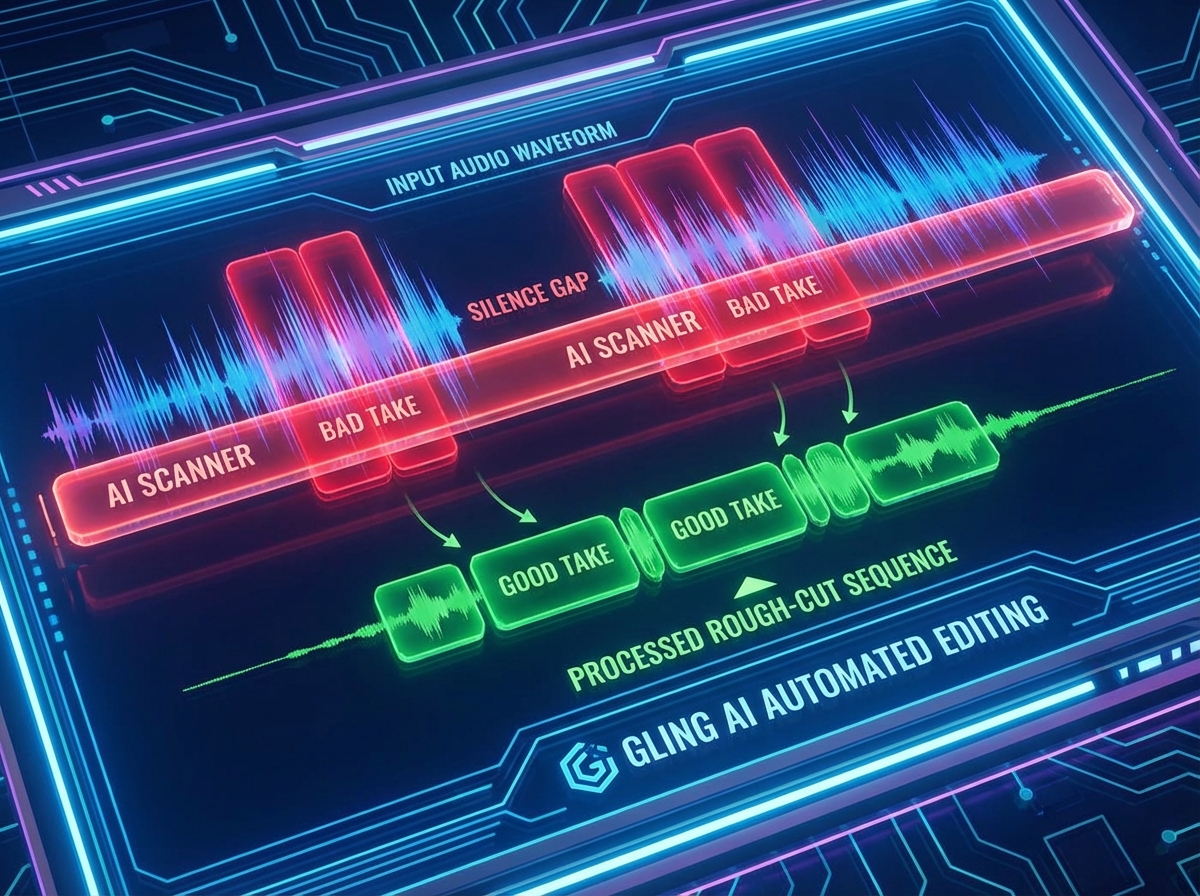
Gling doesn't just look at the transcript; it analyzes the audio waveform to detect silences and "bad takes." If you mess up a sentence and repeat it three times, Gling identifies the best version and cuts the rest. For an Indian creator recording in a home studio with occasional traffic noise or power-cut interruptions, Gling’s ability to ignore non-speech noise and focus on the vocal cadence is a lifesaver.
Key Features for 2026:
- Auto-Silence Removal: Aggressively trims gaps based on a decibel threshold you control.
- Bad Take Detection: Uses AI to compare repeated phrases and keep only the most fluent one.
- NLE Integration: You don't finish your video in Gling. You export an XML or EDL file directly to Adobe Premiere Pro or DaVinci Resolve.
- Gling Pricing India Rupees: As of early 2026, Gling's subscription is approximately ₹1,250 per month ($15 USD), making it an affordable YouTube editing time saver tool for growing channels.
The Speed Benchmark
In our tests on a standard MacBook Air M2 and a Windows i7 laptop, Gling processed a 1-hour 4K file in roughly 4 minutes. The resulting "rough cut" removed 18 minutes of silence and 12 bad takes. While you still need a 10-minute review pass to ensure no "intentional pauses" were accidentally cut, the time saved is nearly 90% compared to manual trimming.
Source: Techjockey - Gling India Listing
Source: Gling Official Pricing
3. Descript Deep Dive: The Transcript-Based Powerhouse
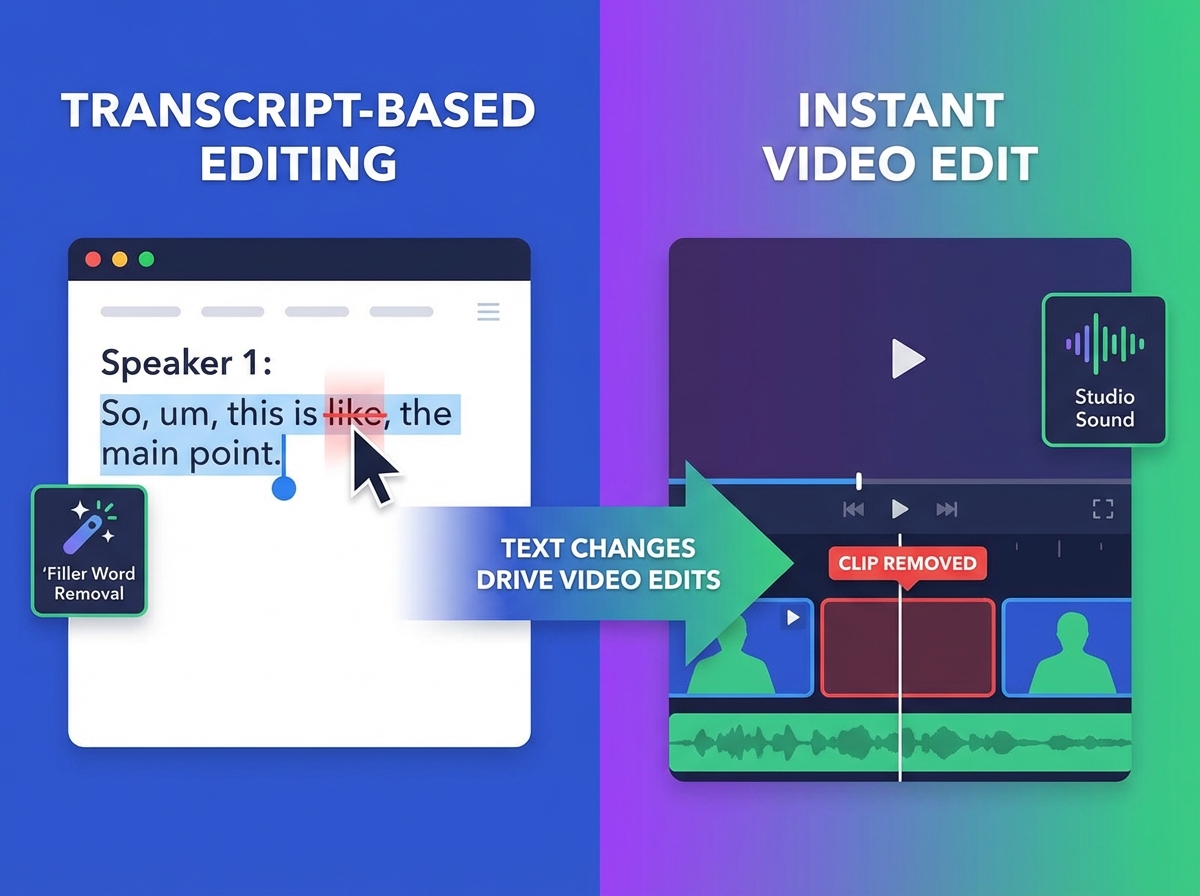
While Gling is a scalpel for rough cuts, Descript is an entire operating system for content. Descript popularized transcript-based video editing, where you edit your video by simply deleting words from a text document. If you delete a sentence in the transcript, the corresponding video clip vanishes from the timeline.
Why Descript Dominates the Podcast Scene
For the booming Indian podcast market—expected to grow by 34% in 2026—Descript is the gold standard. Its "Studio Sound" feature uses generative AI to make a recording done on a ₹2,000 budget mic sound like it was recorded in a professional studio in South Delhi.
Advanced 2026 Capabilities:
- Filler Word Removal: One-click removal of "um," "uh," "you know," and "like." In 2026, Descript’s accuracy with Indian accents has improved significantly, though it still occasionally struggles with "Hinglish" slang.
- Overdub: If you mispronounce a name or a brand, you can type the correct word, and Descript’s AI will "speak" it in your voice.
- Social Clips: Descript’s "Underlord" AI can automatically identify viral-worthy moments from a long video and format them into 9:16 Reels or Shorts (see YouTube Shorts automation AI).
Descript vs Runway Editing Comparison
It is important to distinguish between these tools. In a Descript vs Runway editing comparison, Descript is for structural editing (what is said), while Runway is for generative editing (how it looks). If you need to remove a background or generate a B-roll from text, Runway is superior. But for podcast editing automation AI, Descript remains the undisputed king.
Source: Descript Official Pricing
Source: TimeBolt - AI Editor Showdown
4. Head-to-Head: Gling vs Descript Comparison India 2026
Choosing the right tool depends on your specific output. Here is how they stack up across the most critical metrics for Indian creators in 2026.
| Feature | Gling AI | Descript |
|---|---|---|
| Primary Workflow | Waveform & Bad Takes | Transcript-based |
| Best For | YouTube Talking Heads | Podcasts & Webinars |
| Hinglish Support | Moderate (Audio-focused) | High (Text-focused) |
| Export Options | XML/EDL to Premiere/Resolve | Direct Video, MP3, Transcript |
| Pricing (Approx.) | ₹1,250/mo | Free to ₹2,500/mo (Pro) |
| Key USP | Fastest Rough Cut | Studio Sound & Overdub |
Accuracy and Regional Nuances
One major "content gap" in most global reviews is the handling of Indian regional languages. In 2026, Descript supports Hindi transcription with roughly 85-90% accuracy. However, for creators speaking Tamil, Telugu, or Bengali, Gling’s waveform-based silence removal is often more reliable because it doesn't depend on "understanding" the language—it just looks for the gaps.
The "5-Minute" Reality Check
Can you really edit 1 hour video in 5 minutes AI style?
- Gling: Yes, for the rough cut. It takes ~4 minutes to process and ~1 minute for you to hit "Export."
- Descript: Not quite. Because it generates a full transcript first, a 1-hour video might take 10-15 minutes to "transcribe and align" before you can start editing.
For creators on a budget, seeking filler word cutting AI free options, Descript offers a generous free tier (1 hour of transcription per month), whereas Gling typically requires a subscription after the first project.
5. Advanced Workflows: Scene Detection and Alternatives
As we move deeper into 2026, the "standard" edit is evolving. Beyond just removing silences, creators are using scene detection editing AI to automate B-roll placement.
Scene Detection vs. Transcript Editing
While transcript editing tells you who said what, scene detection AI (found in tools like DaVinci Resolve or specialized plugins) analyzes the visual data. This is crucial for travel vloggers or tech reviewers who have hundreds of clips. If you are a "talking head" creator, stick to transcript-based tools. If you are a cinematic storyteller, scene detection is your primary automatic editing AI tool.
Descript Alternatives Budget India
If the USD-to-INR conversion makes Descript or Gling too expensive, consider these Descript alternatives budget India creators are using in 2026:
- Wisecut: Great for "jump cut" vlogs with auto-ducking background music.
- CapCut Desktop: Now features surprisingly robust "Auto-cut" and "Remove Filler Words" features for free (see CapCut alternatives in India 2025).
- TimeBolt: Often cited as the fastest tool for aggressive silence removal, even outperforming Gling in raw speed tests.
Studio by TrueFan AI's 175+ language support and AI avatars also offer a unique alternative for those who want to skip the "filming" stage entirely and go straight to localized content generation.
6. Enterprise Scale: Operationalizing with Studio by TrueFan AI
For Indian MCNs (Multi-Channel Networks), marketing agencies, and large-scale studios, individual subscriptions to Gling or Descript aren’t enough. You need a centralized command center. This is where the integration of editing tools with generative platforms becomes essential.
The Hybrid Workflow
Large studios in 2026 are using a "Hybrid Pipeline":
- Ingest: Raw footage is uploaded to a cloud server.
- Rough Cut: Gling or Descript APIs automatically strip silences and fillers.
- Enhance: Studio by TrueFan AI is used to generate personalized intros, outros, or localized "digital twin" segments in regional languages like Marathi or Kannada (real-time interactive AI avatars, AI voice cloning for Indian accents).
- Distribute: The final asset is pushed to YouTube, Instagram, and WhatsApp via API.
Solutions like Studio by TrueFan AI demonstrate ROI through a 70% reduction in production costs for localized ad campaigns. Instead of hiring 10 different voice actors for 10 different Indian states, a single "Growth" plan at ₹19,999/month allows a brand to generate 120 minutes of high-definition, lip-synced content using photorealistic avatars like Gunika or Aryan (see MLOps video production infrastructure).
Governance and Security
In 2026, "deepfake" concerns are at an all-time high. Enterprise users must prioritize platforms that offer ISO 27001 and SOC 2 certification. Unlike "open-source" AI tools that may use your data to train models, professional solutions provide a "walled garden" approach, ensuring that your brand’s digital twins are secure and compliant with Indian IT regulations.
Conclusion: Mastering the 2026 Workflow
The Gling vs Descript comparison India 2026 concludes that there is no "single" winner—only a "right" tool for your specific stage of production. Gling is the ultimate "time-saver" for the first 10 minutes of your workflow, while Descript is the "perfectionist" tool for the final 50 minutes.
By combining these with generative platforms, you can transform from a "video editor" into a "content architect." The future of Indian content isn’t just about being creative; it’s about being fast enough to stay relevant.
Frequently Asked Questions
Is Gling or Descript better for Hinglish (Hindi + English) content?
Descript is generally better for Hinglish because its transcript-based editing allows you to manually correct words that the AI might misinterpret. However, if you just want to remove silences and don't care about the transcript, Gling is faster and less prone to "crashing" on complex language mixes.
Can I use these tools on a basic 8GB RAM laptop?
Gling is much lighter on resources because it is a focused, single-purpose app. Descript is a "heavy" application that requires significant RAM and a stable internet connection for its cloud-based AI features. For a basic Indian creator setup, Gling is the safer bet. For ultra-light setups, see our guide on AI video creation on 4GB RAM devices.
How do I handle GST and payments for these tools in India?
Most AI tools (Gling, Descript) charge in USD, which may require a credit card with international transactions enabled. However, local alternatives and platforms like Studio by TrueFan AI offer direct INR pricing (starting at ₹2,999/mo) and support Indian payment methods like UPI, making them much easier for local accounting and GST compliance.
What is the best AI editor for Indian YouTubers who do daily vlogs?
For daily vloggers, speed is everything. Gling is the best AI editor for Indian YouTubers in this category because it generates a Premiere Pro-ready timeline in minutes. You can spend your time on the creative "story" rather than the "technical" cuts.
Are there any free ways to remove filler words in 2026?
Yes, you can find filler word cutting AI free features in the CapCut Desktop version or the free tier of VEED.io. However, these often come with export limits (e.g., 720p resolution or watermarks). For professional YouTube growth, a paid tool like Gling or Descript is a necessary investment.



