Gling AI vs Descript Comparison India 2026: Silence Removal, Remove Ums/Ahs, Transcript-Based Editing, and Automation Workflows
Estimated reading time: 10 minutes
Key Takeaways
- Indian creators can save up to 80% editing time using silence removal and filler word automation.
- Gling AI excels at rapid rough cuts, while Descript offers deeper transcript-based editing and audio tools.
- Support for Hinglish and regional languages is crucial in India; Descript’s custom filler lists give it an edge for hybrids.
- Scale beyond editing with personalized video campaigns using Studio by TrueFan AI, WhatsApp delivery, and multilingual avatars.
- Choose tools based on workflow: Gling AI for speed, Descript for control, Kapwing for collaboration and shorts.
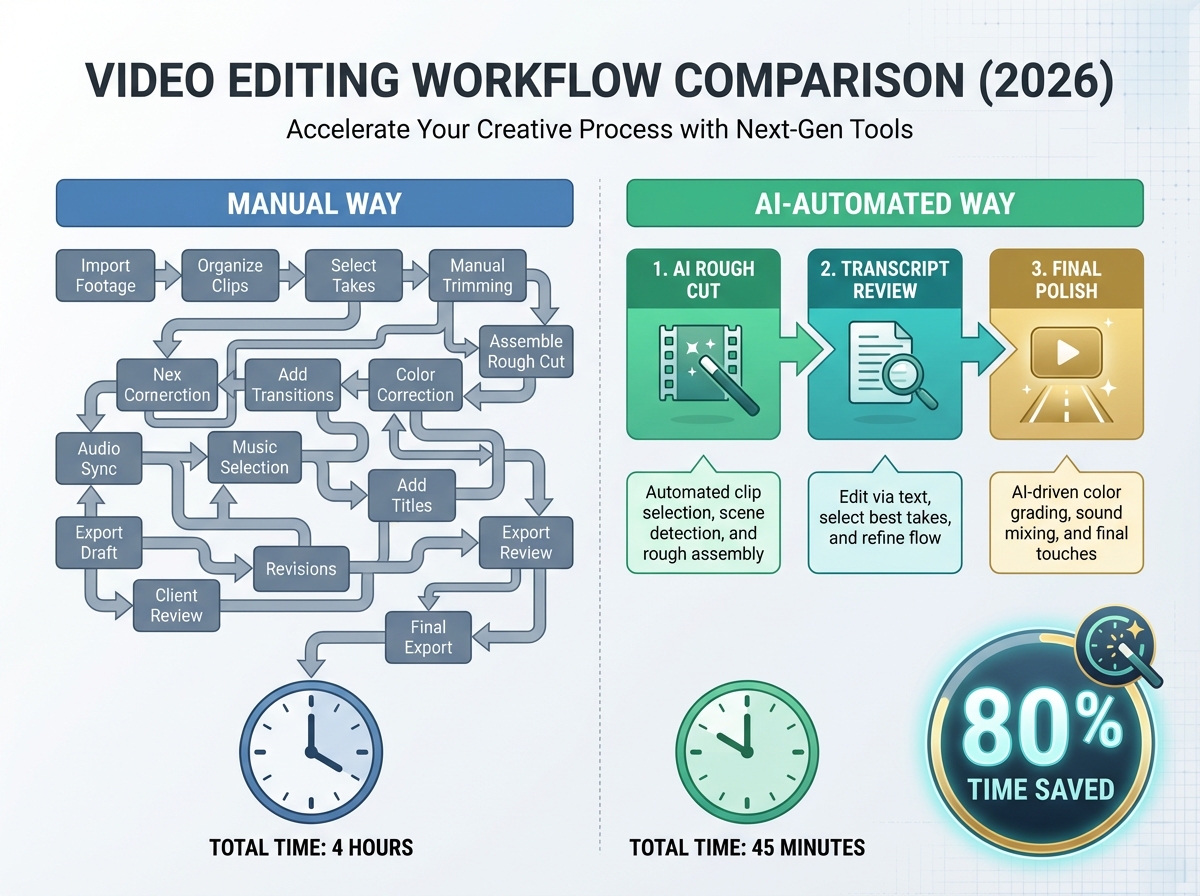
This Gling AI vs Descript comparison India 2026 is designed for the modern Indian creator who is tired of spending 10+ hours a week on the "grunt work" of video editing. In a landscape where India’s creator economy is influencing over $350 billion in consumer spending and boasts over 2 million monetized creators, speed is no longer just an advantage—it is a survival requirement. Whether you are a YouTuber in Bangalore or a podcaster in Indore, using an automatic video editing AI to handle silence removal and filler word cutting can save you up to 80% of your editing time.
1. The 2026 Creator Landscape: Why AI Automation is Non-Negotiable in India
As we move through 2026, the Indian digital space has undergone a massive shift. With the world’s largest YouTube user base and a creator economy projected to grow at a CAGR of 25%, the competition for attention is fierce. Data from early 2026 suggests that 82% of successful Indian YouTubers now use some form of AI editing time saver tools to maintain a daily or bi-weekly upload schedule.
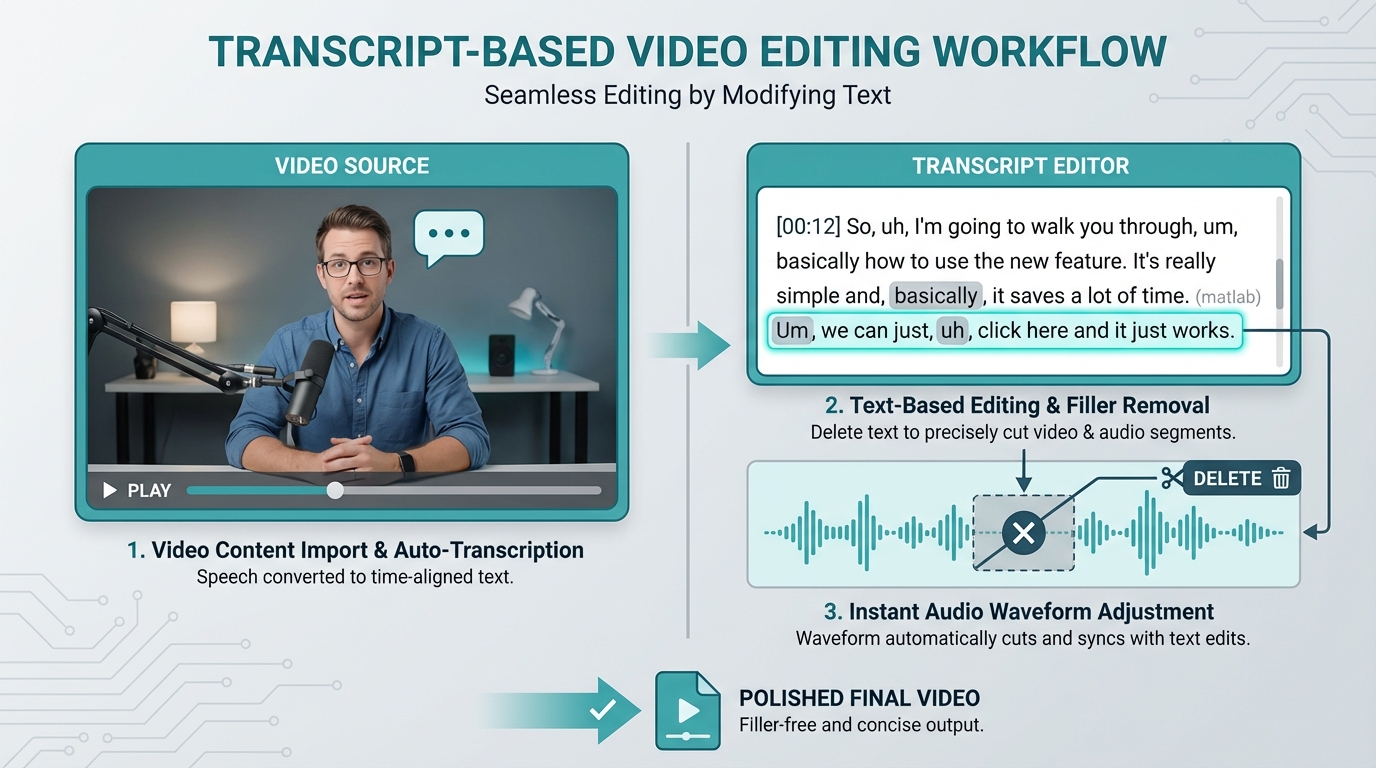
For the average Indian creator, the "editing bottleneck" usually happens in the first two hours: cutting out the "ums," "ahs," and the long silences where you were checking your notes. In 2026, manual cutting is considered an obsolete skill for high-growth channels. The focus has shifted to transcript-based video editing, where you edit your video as easily as a Word document.
Key 2026 Statistics for Indian Creators:
- ROI Focus: 90% of creators cite "Time Saved" as the primary metric for tool ROI in 2026.
- Regional Dominance: 85% of content consumption in India is now in regional languages (Hindi, Tamil, Telugu, Marathi), making multilingual AI support critical.
- Mobile-First Editing: 60% of Tier 2 and Tier 3 creators perform initial AI rough cuts on high-end tablets or cloud-based browsers due to the portability of AI video editor for beginners India solutions.
- Economic Impact: The average Indian creator saves approximately ₹15,000 per month in editor fees by using automated rough-cut tools.
- Automation Adoption: YouTube editing automation tools 2026 have seen a 140% increase in UPI-based subscriptions compared to 2024.
Platforms like Studio by TrueFan AI enable creators to take these edited masterpieces and scale them further through personalized AI avatars and localized messaging, but the journey starts with the "Rough Cut."
Source: Boston Consulting Group Report on India Creator Economy, HubSpot Marketing Statistics 2026
2. Technical Deep Dive: Silence Removal, Filler Words, and the "Hinglish" Challenge
To choose between Gling AI and Descript, you must understand the technical mechanics of how these tools "see" your video.
Silence Removal Quality
A best AI video editor silence removal India tool doesn't just cut out quiet parts; it identifies audio below a specific threshold (typically -35 dB to -25 dB). In 2026, the best tools are "punctuation-aware," meaning they won't cut a pause that is meant for dramatic effect or a breath that makes the speech sound natural. For Indian creators recording in home environments with ceiling fans (a common noise source), the AI must distinguish between "fan hum" and "silence."
Removing Ums/Ahs (Filler Word Removal)
The remove ums/ahs AI video feature uses Automatic Speech Recognition (ASR) to find disfluencies. However, Indian creators face a unique challenge: Hinglish. Fillers like "matlab," "acha," "basically," and "you know" are often woven into the speech. While Descript allows for custom filler word lists, Gling AI focuses on the universal "ums" and "uhs" with high speed.
Transcript-Based Video Editing
This is the "magic" feature of 2026. Instead of looking at a complex timeline of blue and green blocks, you see a text transcript. If you delete a sentence in the text, the corresponding video clip is deleted. This is the ultimate AI editing time saver tool for talking-head videos and podcasts.
Scene Detection and Auto-Cuts
An AI auto-cut video editor uses histogram analysis and motion vectors to identify when a "scene" changes. This is vital for creators who use multiple camera angles or those who want to automatically create "jump cuts" to keep the audience engaged—a staple of the 2026 YouTube aesthetic.
Source: TimeBolt Long-Form Accuracy Test, TrueFan AI Podcast Workflows
3. Head-to-Head: Gling AI vs. Descript (with Kapwing Context)
In 2026, the choice between these tools depends on your specific workflow.
| Feature | Gling AI | Descript | Kapwing |
|---|---|---|---|
| Primary Focus | Rapid Rough Cuts | Full Transcript Workspace | Browser Collaboration |
| Silence Removal | Extremely Fast / One-Click | Highly Customizable | Good for Shorts |
| Filler Word Depth | Standard (Ums/Ahs) | Advanced (Custom Lists) | Basic |
| Hinglish Support | Moderate | High (Custom Dictionary) | Moderate |
| Learning Curve | Very Low (Beginner) | Medium (Pro) | Low |
| Hardware Req. | Low (Cloud/Desktop) | High (Desktop App) | Low |
| Best For | YouTubers / Solo Creators | Podcasters / Narrative | Social Media Teams |
Gling AI: The Speed King
Gling AI Review India 2026 is the AI video editor for beginners India needs. It is designed for one thing: taking a 30-minute raw recording and turning it into a 10-minute clean "rough cut" in under 60 seconds. It exports directly to Adobe Premiere Pro or DaVinci Resolve, making it a favorite for creators who still want to do their final color grading and sound design manually.
Descript: The All-in-One Powerhouse
Descript is more than an editor; it’s a production suite. With features like "Studio Sound" (which makes a ₹1,000 mic sound like a ₹50,000 studio mic) and "Overdub" (AI voice cloning to fix script errors), it is the gold standard for podcast editing AI India. However, it requires a stable internet connection for its heavy cloud processing, which can be a hurdle in some parts of India.
The Kapwing Alternative
In any Descript vs Kapwing comparison, Kapwing wins on collaboration. If you have a team of three people in different cities (e.g., a scriptwriter in Delhi, an editor in Mumbai, and a manager in Bangalore), Kapwing’s browser-based real-time editing is superior.
Source: Swell AI Gling vs Descript Breakdown, TrueFan AI Descript vs Kapwing Comparison
4. The 80% Time-Saver Workflow: Step-by-Step for 2026
To achieve the promised 80% time savings, you must follow a structured YouTube editing automation tools 2026 workflow.
Phase A: The YouTube Talking-Head Rough Cut
- Ingest: Upload your raw 4K footage.
- Auto-Cut: Run the AI auto-cut video editor. Set the silence threshold to -30 dB and the minimum gap to 250 ms. This removes the "dead air" instantly.
- Filler Pass: Use the remove ums/ahs AI video tool. In 2026, we recommend a "Review First" approach—don't auto-delete everything. Keep the fillers that sound natural to avoid "robotic" pacing.
- Transcript Edit: Read through the text. Highlight and delete the sections where you repeated yourself or went off-script.
- Scene Detection: Apply scene detection AI editing to automatically create jump-cuts or zoom-ins (1.1x zoom) every time there is a major topic shift.
Phase B: The Podcast Mastery Workflow
- Multitrack Alignment: If you have two speakers, the AI aligns the tracks perfectly.
- Voice Cleanup: Apply "Studio Sound" to remove background noise like traffic or AC hum.
- Shorten Word Gaps: Use the "Shorten Gaps" feature to set a uniform 0.4s pause between speakers, making the conversation sound snappy.
- Localization: Studio by TrueFan AI's 175+ language support and AI avatars can be combined with AI voice cloning in Indian accents and real-time interactive AI avatars to create "Video Audiograms" in Hindi, Marathi, or English for Instagram Reels.
Phase C: Hardware & Bandwidth Optimization for India
- Proxy Editing: If you are on a low-spec laptop (8GB RAM), always use "Proxies" (lower resolution versions of your video) during the AI processing phase — see low-RAM workflow ideas.
- Offline Transcription: If your internet is patchy, use tools that support local (on-device) transcription to avoid upload failures.
5. Pricing and Budgeting in Rupees (INR) - 2026 Guide
Budgeting is the biggest concern for the "Indie" creator. Here is how the costs break down in 2026, converted from USD to INR (approximate rates).
| Tool | Monthly Price (INR) | Annual Price (INR) | Best Budget Fit |
|---|---|---|---|
| Gling AI | ~₹1,250 | ~₹12,000 | Solo YouTubers |
| Descript (Creator) | ~₹1,500 | ~₹14,500 | Professional Podcasters |
| Kapwing (Pro) | ~₹1,350 | ~₹13,000 | Social Media Agencies |
| TrueFan AI (Starter) | ₹2,999 | ₹29,990 | Enterprise/Scale |
Descript Alternatives Budget India Stack
If these subscriptions are too high, you can build a "Budget Stack":
- CapCut Desktop (Free): Excellent manual + auto-captioning.
- Clipchamp (Free with Windows): Basic silence removal.
- TimeBolt (One-time payment): For precision silence cutting without a monthly sub.
- Cleanvoice.ai: For one-off filler word removal (pay-as-you-go).
Note: Most tools now support UPI payments through Google Pay or PhonePe via international-enabled cards. Always check for GST invoice options if you are a registered business in India to claim 18% Input Tax Credit.
Source: Sparki Descript Alternatives 2026, Hemant Kumar Sharma 2026 Tool Guide
6. Scaling Beyond the Edit: The Enterprise Layer with TrueFan AI
Once your "Rough Cut" is finished and your "Final Polish" is done in your NLE, the question becomes: How do I make this video work harder for me?
In the 2026 market, a single video in one language is a missed opportunity. Solutions like Studio by TrueFan AI demonstrate ROI through personalized video campaigns that take your core content and adapt it for thousands of individual viewers.
Why TrueFan AI for Indian Enterprises?
- Real Influencer Avatars: Instead of "uncanny valley" CGI, use digital twins of real Indian influencers like Gunika or Aryan to deliver your message. Learn about interactive AI avatars.
- WhatsApp Integration: In India, WhatsApp is the primary consumption channel. TrueFan AI allows you to trigger personalized video messages directly to a customer's WhatsApp based on their behavior (e.g., a "Thank You" video after a purchase).
- Compliance & Safety: For Indian brands, safety is paramount. TrueFan AI features built-in moderation filters to ensure no "slop" or inappropriate content is generated, maintaining a 100% clean compliance record.
- ISO 27001 Certified: Data privacy is no longer optional in India; it is the law.
Whether you are a media network regionalizing content or an e-commerce brand A/B testing 50 different video intros, the combination of a solid AI editor (Gling/Descript) and a scaling platform (TrueFan AI) is the winning formula for 2026. Explore MLOps video production infrastructure.
7. Troubleshooting and Artifacts
Common AI Editing Artifacts & Fixes
- The "Jump-Cut" Jerk: If the AI cuts too close to a word, it looks jarring. Fix: Set a "Buffer" or "Tail" of 3 frames (approx. 100ms) before and after every cut.
- The "Ghost" Word: Sometimes the AI removes a filler but leaves the first letter of the next word. Fix: Use the transcript editor to manually "Restore" the clipped word.
- Audio Pops: Rapid cuts can cause digital clicks. Fix: Apply a tiny (2-frame) constant power crossfade to all edit points.
Conclusion
Final Verdict: Which One Should You Buy?
- Choose Gling AI if: You are a solo YouTuber who wants to get from "Raw Footage" to "Rough Cut" as fast as possible so you can spend your time on creative storytelling.
- Choose Descript if: You are a professional podcaster or narrative creator who needs deep control over the transcript, audio quality (Studio Sound), and multitrack editing.
- Choose Kapwing if: You are a social media agency focusing on short-form content (Reels/Shorts) and need a collaborative, browser-based tool.
The future of content in India is automated. By integrating these YouTube editing automation tools 2026 into your workflow today, you aren't just saving time—you are building a scalable content machine.
Source: Analytics India Magazine on Descript Evolution, YouTube: Gling Review 2026
Frequently Asked Questions
Which AI video editor is best for removing silences in India?
The best AI video editor silence removal India depends on your hardware. If you have a powerful MacBook or PC, Descript offers the most control. If you are working on a mid-range laptop or need the fastest results, Gling AI is superior for "set-and-forget" silence removal. Read more in the Gling AI Review India 2026.
Can I use AI to localize my edited videos into regional Indian languages?
Yes. While Gling and Descript handle the editing, platforms like Studio by TrueFan AI enable you to take that finished video and use AI avatars to "speak" the content in 175+ languages with lip-sync, ideal for Tamil, Telugu, Bengali, and more.
How do I handle "Hinglish" filler words like ‘matlab’ or ‘acha’?
Most AI tools still struggle with non-English fillers. The best workflow is to use Descript’s Custom Filler List and add these words manually. Alternatively, use a transcript-based editor to quickly scan for these words and delete them in bulk.
Is there a free filler word cutting AI tool for beginners?
Yes, tools like VEED.io and Cleanvoice offer limited free tiers. For a completely free (but manual) workflow, try CapCut Desktop’s "Remove Silences" feature. For longer YouTube content, paid tiers are often more practical.
Descript vs Kapwing—which is better for a 2-person team?
If you need real-time collaboration, a Descript vs Kapwing comparison favors Kapwing; its browser-native architecture lets two people edit simultaneously. Descript excels when one person edits and another reviews.



