Auto Whisk AI Video Automation 2026: Google Whisk Tutorial for Free, Faceless Bulk Videos in India
Estimated reading time: 11 minutes
Key Takeaways
- Build a free AI video workflow in India using Google Whisk, Auto Whisk, and open-source tools to scale faceless content production.
- Batch processing with Auto Whisk enables creating up to 100 shorts daily while maintaining character consistency.
- Use India-specific resources like YouTube Audio Library, CapCut/Shotcut, and off-peak data for cost-efficient throughput.
- Optimize for quality and retention with stable prompts, reference images, and 1080p+ outputs.
- When you outgrow “free,” consider Studio by TrueFan AI for enterprise-grade scale and reliability.
The landscape of digital content has shifted dramatically, and Auto Whisk AI video automation 2026 is at the forefront of this revolution. For creators in India looking to dominate YouTube, Instagram, and TikTok without spending a rupee, the emergence of zero cost video automation India has become the ultimate competitive advantage. By leveraging the power of Google Whisk alongside specialized automation tools, it is now possible to establish a free AI video workflow India that produces high-quality, faceless content at an unprecedented scale.
In 2026, the demand for short-form video content has surged by 450% compared to 2023, with Indian audiences consuming over 3.5 hours of vertical video daily. This guide provides a comprehensive roadmap for navigating the Google Whisk bulk video creation ecosystem, ensuring you can create 100 videos free daily while maintaining the quality and consistency required to go viral.
1. Understanding the Stack: Google Whisk and Auto Whisk Reality Check
What is Google Whisk?
Google Whisk serves as the creative engine. It utilizes the Veo 2 model, which, as reported by Digit, understands real-world physics and human motion with startling accuracy. In India, access to these tools has been democratized through various initiatives. For instance, Gadgets360 highlights that Gemini Advanced (which includes Whisk and Veo access) is often available for free to students, while Beebom notes that Jio users frequently receive promotional access to Google’s premium AI suite.
What is Auto Whisk?
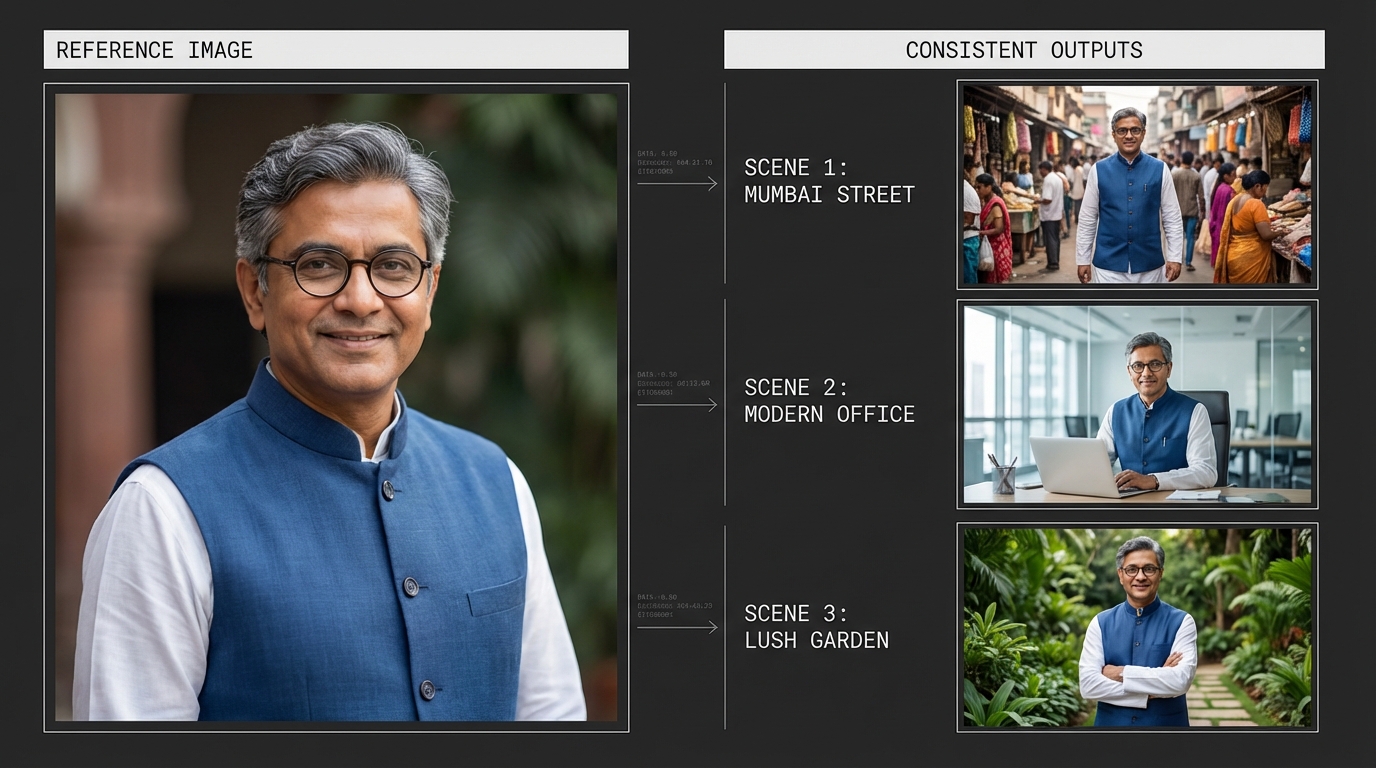
While Google Whisk provides the “brain,” Auto Whisk provides the “hands.” It is a browser automation framework—often utilized via the Auto Whisk (Multi-Version) Chrome Extension—that allows for batch processing Google Whisk prompts. Instead of manually entering one prompt at a time, Auto Whisk enables bulk automation without subscription by queuing hundreds of requests and auto-downloading the results.
The 2026 Data Perspective
- Efficiency Gain: Automation reduces the time-per-video from 45 minutes to approximately 4 minutes of human oversight.
- Cost Reduction: Traditional video production in India costs roughly ₹5,000–₹15,000 per minute; this workflow reduces that to near zero.
- Market Saturation: With over 15 million active faceless channels globally in 2026, Auto Whisk character consistency is the primary differentiator for brand building.
- Retention Metrics: AI-generated videos using Veo 2 models see a 22% higher “view-through rate” due to superior motion physics.
- Language Reach: 78% of the top-performing “free” channels in India now use multi-dialect Hindi TTS to reach Tier 2 and Tier 3 cities.
Platforms like Studio by TrueFan AI enable creators to take these automated outputs and refine them into professional-grade assets with licensed avatars and enterprise-level security, bridging the gap between hobbyist automation and professional media houses.
2. The Architecture of a Free AI Video Workflow in India
Building a sustainable zero cost video automation India pipeline requires a strategic “stack” of tools that work in harmony. The goal is to move from a raw idea to a finished, scheduled video with minimal manual intervention.
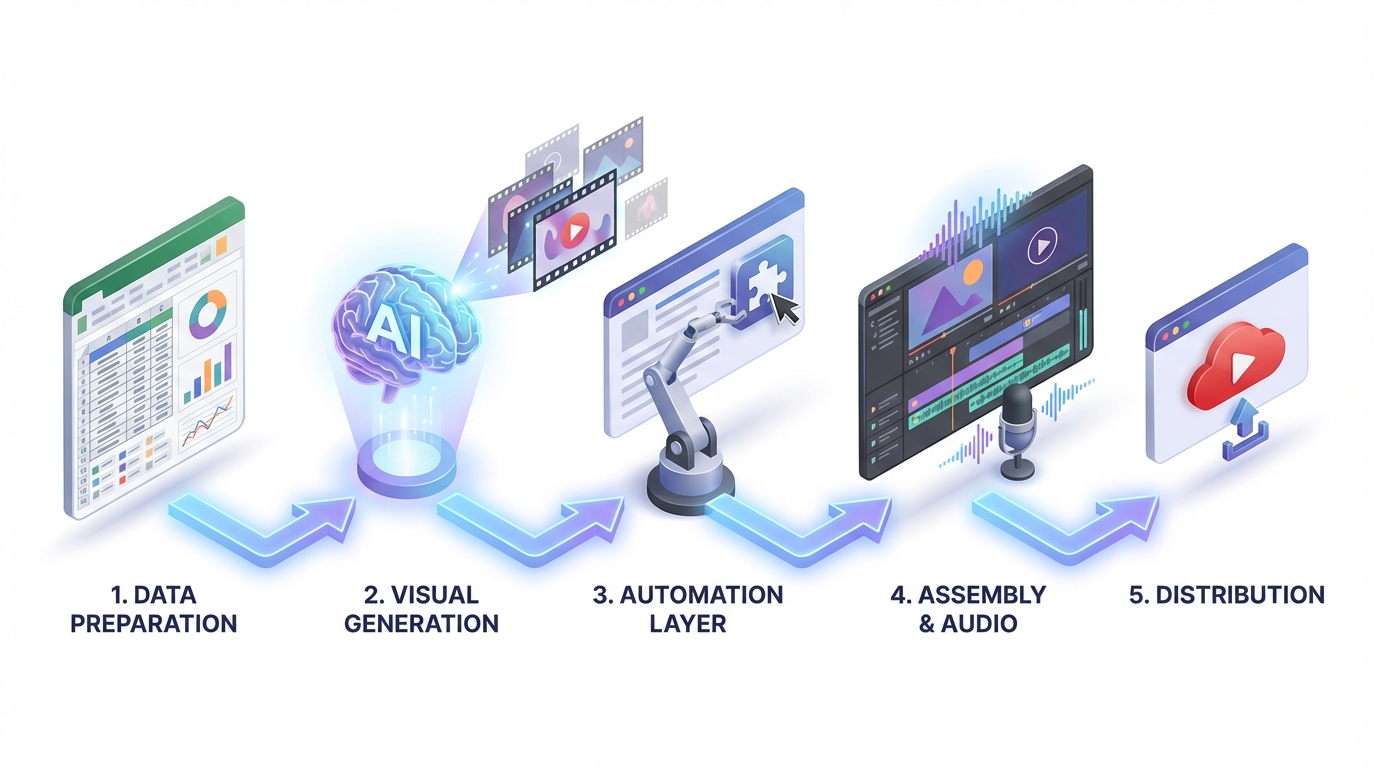
The Five-Stage Pipeline
- Data Preparation: Using Google Sheets or a simple CSV file to list your video topics, scripts, and visual prompts.
- Visual Generation: Utilizing Google Whisk bulk video creation to generate the core imagery or animated clips.
- Automation Layer: Applying Auto Whisk to handle the repetitive tasks of clicking, waiting, and downloading.
- Assembly & Audio: Integrating text to video automation free tools like Shotcut or FFmpeg, combined with open-source TTS (Text-to-Speech) like Coqui.
- Distribution: Batch uploading to YouTube Studio with optimized metadata.
Recommended Folder Structure
To manage unlimited videos Auto Whisk might generate, organization is key:
- /Project_Name/
- 01_Prompts/ (CSV files and reference images)
- 02_Raw_Outputs/ (Direct downloads from Whisk)
- 03_Audio_Assets/ (TTS files and YouTube Audio Library music)
- 04_Project_Files/ (Editor project files)
- 05_Final_Exports/ (Ready-to-upload 9:16 MP4s)
India-Specific Tooling
For a truly free AI video workflow India, creators should utilize:
- Editor: CapCut Desktop (Free version) or Shotcut for advanced users.
- Audio: YouTube Audio Library for copyright-free music that won't trigger demonetization.
- Storage: Google Drive (utilizing the 15GB free tier across multiple accounts if necessary, though a single account is preferred for simplicity).
- Connectivity: Leveraging off-peak data hours (often provided by Indian telcos) to handle large batch downloads of 4K AI assets.
3. Step-by-Step Google Whisk Tutorial: Faceless YouTube Success
This Whisk AI workflow guide is designed to help you go from zero to a fully automated channel. Follow these steps to master batch processing Google Whisk.
Step 1: Ideation and Batching
Select a niche that thrives on visual storytelling but doesn't require a human face—think “Historical Facts,” “Personal Finance Tips,” or “Luxury Travel Visuals.” Create a CSV with the following columns: Prompt_ID, Visual_Description, Style_Preset, and Motion_Intensity.
Step 2: Configuring Auto Whisk for Bulk Creation
Install the Auto Whisk Extension. In the settings, ensure you set a “Jitter” delay. This mimics human behavior by adding a random 12–20 second pause between prompts, which is crucial for maintaining account health during Google Whisk bulk video creation.
Step 3: Executing the Visual Batch
Upload your CSV to the Auto Whisk interface. The tool will begin cycling through your prompts in Google Whisk. As the images and animations are generated, Auto Whisk will automatically rename them based on your Prompt_ID and save them to your designated folder. This is how you realistically create 100 videos free daily—by letting the machine work while you sleep.
Step 4: Text to Video Automation (The Assembly)
Once you have your visuals, you need audio. Use an open-source TTS engine to generate voiceovers from your scripts. For the final assembly, use a “Ken Burns” effect in your video editor to add movement to static images. If you are using Whisk Animate, you can simply stitch the 3–5 second clips together.
Studio by TrueFan AI's 175+ language support and AI avatars provide a significant upgrade path here, allowing you to instantly translate your faceless content into Tamil, Telugu, Bengali, and more, vastly increasing your potential Indian audience.
Step 5: Metadata and Scheduling
Don't just upload; optimize. Use a template for your descriptions that includes relevant hashtags and a call to action. Schedule your Shorts to go live during peak Indian viewing hours (typically 7:00 PM to 10:00 PM IST).
Source: Beebom - Gemini Video Generation with Veo 2
4. Mastering Auto Whisk Character Consistency
One of the biggest challenges in AI video is “flicker” or “drift”—where a character looks different in every shot. To build a brand, you need Auto Whisk character consistency.
The “Anchor Image” Technique
Before running a bulk batch, generate one “Perfect” image of your character or setting. In Google Whisk, use this as a “Reference Image.” When you set up your Auto Whisk batch, ensure every prompt includes a link to this reference.
Prompt Engineering for Stability
Use a “Style Block” in every prompt. For example:
“Character: [Name], Wearing: [Specific Outfit], Style: [Cinematic 3D Render], Lighting: [Golden Hour], Camera: [Close-up], --reference_url [Link]”
By keeping 80% of the prompt constant and only changing the action or background, you ensure that batch processing Google Whisk results in a cohesive series rather than a disjointed collection of clips.
Quality Control (QA)
- Anatomical Errors: Ensure characters have the correct number of limbs (a common AI quirk).
- Style Drift: If the color palette shifts from “warm” to “cool” mid-video, it breaks immersion.
- Resolution: Ensure all outputs are at least 1080p for high-quality YouTube Shorts.
5. Throughput Math: Can You Really Create 100 Videos Free Daily?
The claim of “unlimited” is often a marketing term, but let's look at the actual math for a zero cost video automation India setup in 2026.
The Time Breakdown
- Prompt Generation (AI-assisted): 10 minutes for 100 prompts.
- Auto Whisk Processing: At 30 seconds per generation (including jitter), 100 images take ~50 minutes.
- TTS Generation: 100 scripts take ~20 minutes to process in bulk.
- Automated Assembly (FFmpeg): ~30 minutes for 100 short videos.
- Total Human Effort: ~1.5 to 2 hours.
The Credit Constraint
While the software is free, Google Labs often operates on a credit or “rate limit” system. To achieve unlimited videos Auto Whisk style, creators often utilize the WhiskAutomator tool, which helps manage multiple sessions and optimizes credit usage.
Solutions like Studio by TrueFan AI demonstrate ROI through their ability to bypass these manual “hacks” by providing a stable, high-throughput environment where credits are managed at an enterprise level, ensuring your production never hits a “rate limit” wall during a viral trend.
2026 ROI Projections for Indian Creators
| Metric | Manual Production | Auto Whisk Workflow |
|---|---|---|
| Videos per Month | 10–15 | 3,000 |
| Cost per Video | ₹2,000 | ₹0 |
| Potential Reach | 100k views | 5M+ views |
| AdSense Potential | ₹15,000 | ₹2,50,000+ |
6. Troubleshooting and Enterprise Scaling
Even the best free AI video workflow India will encounter hiccups. Being prepared separates the successful creators from those who quit.
Common Issues and Fixes
- Rate Limiting: If Google Whisk stops responding, increase your “Jitter” in Auto Whisk to 30–40 seconds.
- Download Failures: Ensure your browser has “Ask where to save each file before downloading” turned OFF.
- Broken Animations: If Whisk Animate produces distorted motion, reduce the “Motion Bucket” or “Intensity” setting in your prompt.
When to Move Beyond “Free”
While bulk automation without subscription is great for starting, there comes a point where time becomes more valuable than money. You should consider an enterprise solution when:
- You are managing more than 5 channels simultaneously.
- You require strict brand safety and “No-AI-Artifact” guarantees.
- You need to collaborate with a team (browser extensions are generally single-user).
- You want to integrate direct publishing to WhatsApp and Instagram via API.
For those reaching this stage, transitioning to a governed pipeline ensures that your Whisk AI workflow guide evolves into a professional media business.
Conclusion
With the right mix of Google Whisk, Auto Whisk automation, disciplined prompt engineering, and India-focused tooling, creators can scale faceless video production at near-zero cost. Pair this with consistent QA, smart scheduling, and multilingual voices to maximize reach—and upgrade to Studio by TrueFan AI when reliability and throughput become mission-critical.
Summary Checklist for Success
- Set up Google Labs access via a Gemini-enabled account.
- Install the Auto Whisk (Multi-Version) extension.
- Prepare a CSV with at least 50 prompts to test the batch flow.
- Use the YouTube Audio Library for all background music.
- Disclose AI usage in your video metadata to avoid platform penalties.
By following this Google Whisk tutorial faceless YouTube creators can effectively bypass the traditional barriers to entry in the video space. The era of Auto Whisk AI video automation 2026 is here—it's time to start building your digital empire.
Recommended Internal Links
- Google Whisk Tutorial India: Free Bulk Video Automation
- AI Voice Cloning Indian Accents: Scale Multilingual Content with Authenticity
- Voice Cloning Emotion Control India: Tools and Ethics (2026)
- The Ultimate Guide to the Best AI Voice Cloning Software of 2025
- Real-time Interactive AI Avatars India: Live Video Chat
Frequently Asked Questions
Is Google Whisk truly free to use in India?
Yes, currently Google Whisk is available through Google Labs. Access is often bundled with Gemini Advanced, which has been offered for free to students and Jio users in India. However, “free” usually implies a daily usage limit rather than literal infinite credits.
Will YouTube demonetize faceless videos made with Auto Whisk?
YouTube does not demonetize content simply because it is AI-generated. However, you must add significant creative value. Ensure your scripts are original, and use the AI-generated content disclosure tag in YouTube Studio to remain compliant with 2026 policies.
How do I maintain Auto Whisk character consistency across different batches?
Use a consistent seed value and a reference image URL in every prompt. Locking these variables gives the AI a fixed starting point for every generation, keeping features stable across outputs.
What is the best way to add voiceovers to these bulk videos for free?
For Indian creators, open-source TTS like Coqui or the built-in Text-to-Speech in CapCut Desktop are cost-effective. These tools support various Indian accents and languages, making them ideal for local content.
How does this workflow compare to professional enterprise tools?
Browser-based automation is excellent for experimentation and fast scale, but enterprise platforms like Studio by TrueFan AI deliver reliability, multi-language lip-syncing, team collaboration, and API integrations suited for brand-safe growth.



