Pika Labs vs Haiper free AI video comparison India 2026: best no-subscription text-to-video picks for students
Estimated reading time: ~8 minutes
Key Takeaways
- Pika Labs delivers the most cinematic free-tier results for high-impact hooks.
- Haiper is the fastest and most mobile-friendly choice for quick B-roll.
- Expect watermarks, 5–10s clips, and 720p caps on free tiers across tools.
- Use Genmo for seamless loops and Leonardo Motion for consistent image-to-video characters.
- For scale and multi-language output, consider Studio by TrueFan AI over consumer free tiers.
If you’re a student creator hunting for a Pika Labs vs Haiper free AI video comparison India 2026, this guide is your ultimate roadmap to navigating the rapidly evolving landscape of generative media without breaking your budget. In 2026, the Indian creator economy has reached a staggering $1.2 billion valuation, with short-form video content driving over 80% of engagement for Gen-Z influencers. As platforms like YouTube and Instagram integrate advanced AI labels, the demand for high-quality, free text-to-video AI tools has skyrocketed among college students in Mumbai, Delhi, and Bangalore who are looking to build faceless channels or campus-focused content.
1. Quick Verdict: The Zero-Budget Reality Check for 2026
Before we dive into the technical nuances, let’s address the "free" elephant in the room. In 2026, the "completely free and watermark-free" dream is largely a myth. Following the widespread adoption of Google’s SynthID and industry-standard watermarking norms, almost every reputable AI video generator now includes a visible or metadata-based watermark on their free tiers.
According to recent 2026 marketing data, short-form video delivers the highest ROI for creators, but only when the quality meets the rising expectations of an AI-savvy audience. If you are operating with zero budget and no credit card, here is the current state of play:
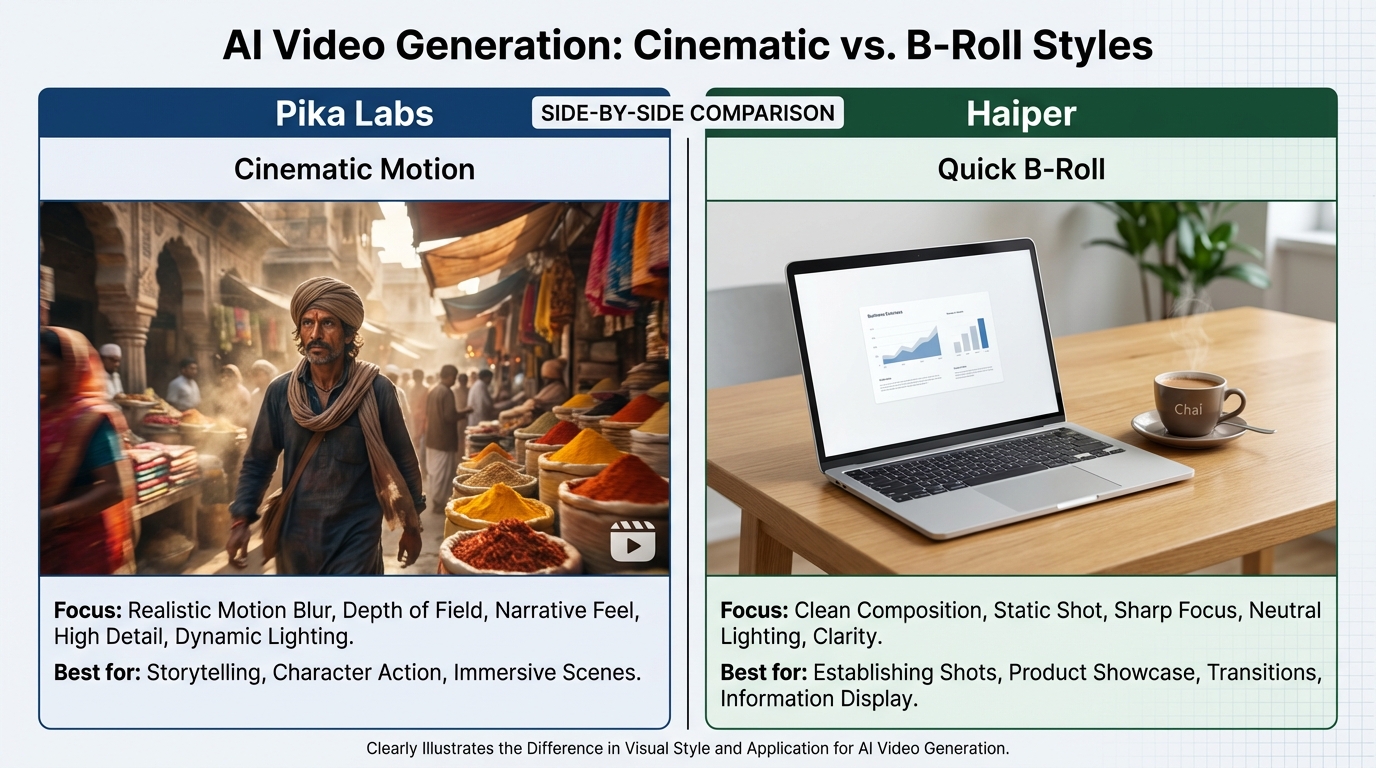
- Pika Labs: Best for cinematic, stylized hooks. If you want your video to look like a high-end movie trailer, Pika is your winner.
- Haiper: Best for speed and simplicity. It is the "quick-win" tool for beginners who need B-roll in under 60 seconds.
- Genmo: The king of abstract loops and background textures.
- Leonardo Motion: The go-to choice if you are already using Leonardo for image generation and want consistent motion.
The 2026 Reality: Expect clips to be capped at 5–10 seconds, resolutions to hover around 720p, and daily credit limits to be strictly enforced. However, for a student creator, these are perfect "Lego blocks" for building a 60-second YouTube Short.
Source: HubSpot State of Marketing Report 2026
2. Pika Labs vs Haiper comparison India 2026 (Free Tiers)
When comparing Pika Labs and Haiper in the 2026 Indian context, we have to look at how these tools handle the specific needs of mobile-first creators. With 82% of Indian student creators now producing content exclusively on smartphones, UI responsiveness and generation speed are critical. See the Fastest AI video generator benchmark.
Pika Labs (The Cinematic Powerhouse)
Pika has maintained its edge in 2026 by focusing on "expressive motion." While other tools often produce "sliding" images, Pika understands physics.
- Prompting Control: Pika offers advanced negative prompts and camera controls (pan, tilt, zoom) that are remarkably intuitive.
- Motion Quality: It excels at complex actions—like a person walking through a crowded Mumbai market—with fewer "morphing" artifacts than its competitors.
- Free Tier Limits: You get a daily allowance of credits that refresh every 24 hours. The watermark is present in the bottom corner, but the 16:9 and 9:16 aspect ratios are both supported.
- Student Fit: Ideal for "hook" shots—the first 3 seconds of your video that stop the scroll.
Haiper (The Speed King)
Haiper has carved out a niche in the Indian market by being incredibly lightweight. It doesn't require a high-end PC; it runs flawlessly on a basic Android browser.
- Ease of Use: The UI is cleaner than Pika’s Discord-heavy roots. It’s a simple "type and generate" flow.
- Throughput: During peak Indian Standard Time (IST) hours, Haiper often generates clips 30% faster than Pika’s free tier.
- Free Tier Limits: Similar to Pika, it uses a credit system. The motion is slightly more "floaty" and less "cinematic," making it better for background B-roll than for primary subject action.
- Student Fit: Best for "I need a 5-second clip of a generic laptop setup for my study-vlog" scenarios.
Source: Pika Pricing & Policy; Haiper FAQ
3. The "B-Roll" Alternatives: Genmo AI & Leonardo Motion
While the Pika vs Haiper debate dominates Reddit threads, two other players are essential for a complete free text to video AI tools comparison.
Genmo AI Review India Free
Genmo is the "artist" of the group. In 2026, it has become the favorite for creators making "Lo-Fi" study beats or abstract background videos.
- The Genmo Advantage: It excels at "loops." If you need a background that moves subtly without a jarring jump-cut at the end, Genmo’s "v4" engine (released in late 2025) is superior.
- Quality Comparison: In a Genmo vs Pika quality comparison, Pika wins on realism, but Genmo wins on "vibe." For a student making a faceless finance channel, Genmo’s abstract data visualizations are a goldmine.
- Source: Genmo Pricing
Leonardo Motion vs Pika Labs
Leonardo.ai has evolved from a simple image generator into a full creative suite. Its "Motion" feature is a game-changer for students who already have a library of AI-generated images.
- Consistency: By using an image-to-video workflow, Leonardo ensures your character looks the same in every clip—a major pain point in pure text-to-video.
- Free B-Roll Generator AI India: It is arguably the best tool for creating consistent "talking head" style B-roll where the background remains stable while the subject moves.
Source: Beebom - Best AI Video Generators 2026
4. Practical Student Workflows & Hindi Tutorials
To truly master text to video AI free 2026, you need more than just a tool; you need a workflow. Here is how Indian students are turning 5-second free clips into viral 60-second Shorts.
The "Shorts Loop" Strategy
- Generate 4 Clips: Use Pika for the "Hook," Haiper for the "Middle B-roll," and Genmo for the "Background."
- Aspect Ratio: Always select 9:16.
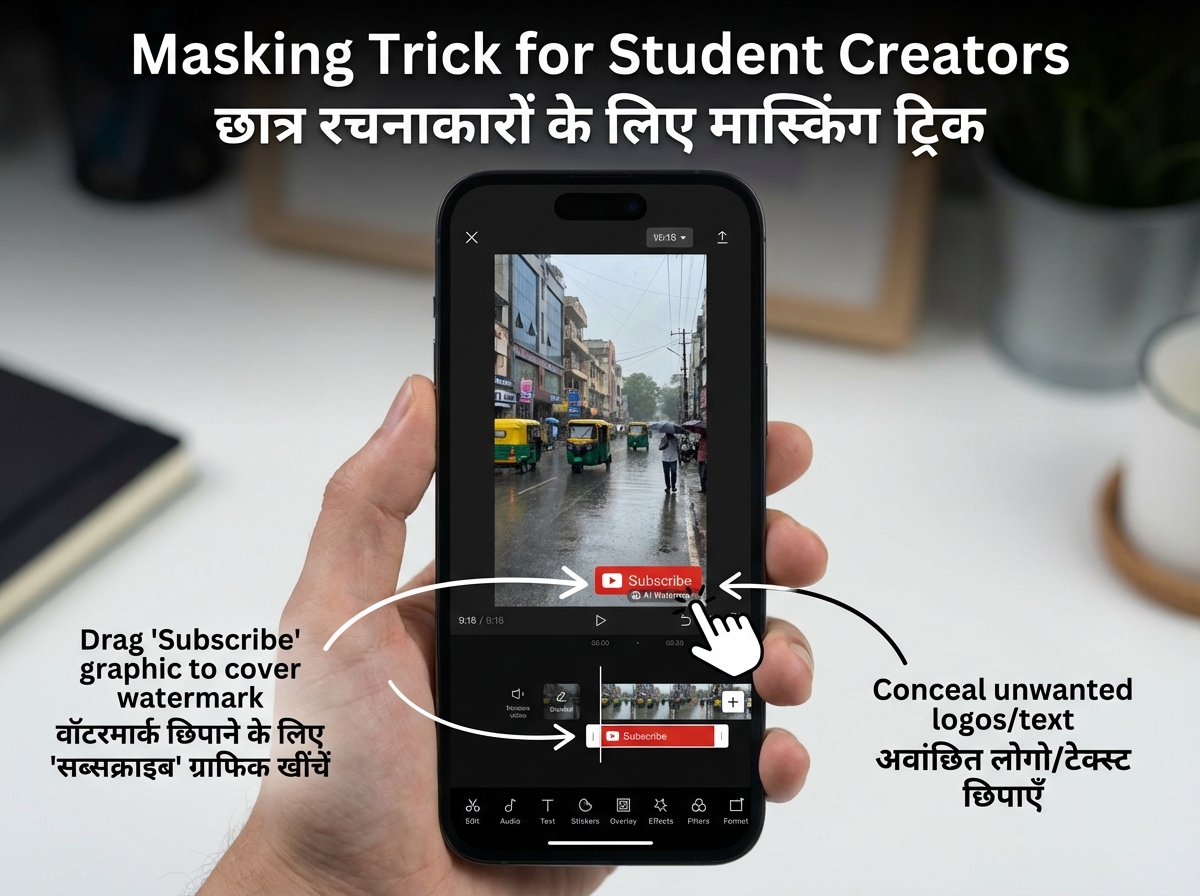
- The Masking Trick: Since all these tools have watermarks, use a free editor like CapCut or VN Editor. Place your "Subscribe" button or "Captions" directly over the watermark area.
Pika Labs Tutorial Hindi (Transliterated)
- Step 1: Pika.art par login karein.
- Step 2: "Text-to-Video" select karein.
- Step 3: Prompt likhein: "Cinematic Indian street food stall, steam rising, evening light, 9:16, high detail."
- Step 4: Negative prompt mein daalein: "—no blur, —no jitter, —no distorted faces."
- Step 5: Generate button dabayein aur 1 minute wait karein.
Haiper Quickstart in Hindi
- Step 1: Haiper.ai open karein (No Discord needed).
- Step 2: Prompt box mein likhein: "Rainy day in Bangalore, window view, coffee mug, 9:16, cozy aesthetic."
- Step 3: Motion slider ko 50% par rakhein (zyada motion se artifacts badh jaate hain).
- Step 4: Download karein aur apne video mein B-roll ki tarah use karein.
5. No-Watermark Realities & Ethical Workarounds in 2026
In 2026, the Indian government and platforms like YouTube have implemented strict guidelines regarding AI-generated content. According to reports from Analytics India Mag, YouTube now requires creators to label "altered or synthetic" content that looks realistic.
The Watermark Dilemma
If you are looking for the best free AI video generator no watermark India, you will likely find that "no watermark" usually means "low quality" or "limited time trial." However, the industry is moving toward "invisible watermarking" like Google’s SynthID.
- SynthID Integration: By mid-2026, most AI videos contain a digital fingerprint that doesn't ruin the visual but tells platforms it’s AI-made.
- Ethical Workaround: Instead of trying to "hack" the watermark off (which can lead to copyright strikes), incorporate it. Many creators use a "Made with AI" badge as a sign of transparency, which actually builds trust with a 2026 audience.
6. Scaling Up: From Student Creator to Enterprise Powerhouse
While Pika and Haiper are fantastic for individual students, they often fail when a creator scales into a professional agency or when an Indian university wants to empower 10,000 students to create content. This is where the "Buyer's Ladder" comes in.
Once you outgrow the 5-second clip limit and the daily credit "hunger," you need a platform that offers governance, scale, and professional-grade output. Studio by TrueFan AI enable creators and institutions to bypass the limitations of consumer-grade free tiers.
For instance, if you are running a campus-wide awareness campaign in 10 different Indian regional languages, manual prompting in Pika is impossible. Studio by TrueFan AI's 175+ language support and AI avatars real-time interactive AI avatars in India allow for the instant generation of localized content that feels personal and professional.
Furthermore, for brands and educational institutions, solutions like Studio by TrueFan AI demonstrate ROI through automated video pipelines that reduce production costs by up to 70% compared to traditional filming. While Pika and Haiper are great for "creative sparks," a dedicated enterprise tool is necessary for "creative scale."
Source: Analytics India Mag - YouTube AI Video Trends
7. FAQs & Final Verdict
Q1: Is there a completely free text-to-video AI with no watermark in India?
Practically, no. In 2026, high-quality tools like Pika and Haiper require a subscription to remove watermarks. However, you can ethically hide watermarks using 9:16 overlays in mobile editing apps.
Q2: Which free AI video maker is best for students in India?
For cinematic quality, use Pika Labs. For speed and ease of use on mobile, Haiper is the winner. For abstract backgrounds, go with Genmo.
Q3: Pika Labs vs Haiper—who has better free-tier quality in 2026?
Pika Labs generally has better "temporal stability" (less flickering), but Haiper is more accessible for beginners who don't want to learn complex prompting.
Q4: How can I use these tools for my college project without it looking "fake"?
Use the "Image-to-Video" feature in Leonardo Motion or Pika. Start with a real photo of your campus and add subtle motion (like wind in trees or moving clouds). This keeps the "grounding" of reality while adding AI magic.
Q5: Can I use Studio by TrueFan AI for my student projects?
Studio by TrueFan AI is primarily an enterprise-grade tool designed for creators and brands who need to scale. While students can explore its features, it is most powerful for those looking to create high-volume, multi-language content with professional avatars.
Final Verdict
For the Indian student creator in 2026, the Pika Labs vs Haiper free AI video comparison boils down to your specific goal.
- Choose Pika if you are making a high-effort "Short Film" or a cinematic YouTube intro.
- Choose Haiper if you are a "Daily Vlogger" who needs quick B-roll to fill gaps in your storytelling.
- Choose Genmo if you are a musician or a "Lo-Fi" creator needing long, atmospheric loops.
The era of budget-free AI video tools has democratized storytelling. Whether you are in a dorm room in IIT or a creative studio in Mumbai, the power to create world-class video is now just a prompt away. Download your Hindi prompt pack today and start creating!
Recommended Internal Links
- Genmo AI Review India Free
- Leonardo Motion vs Pika Labs
- Genmo vs Pika quality comparison (deep-dive)
- Fastest AI video generator benchmark (India 2026)
- Free AI video generator unlimited (rotation strategy)
- YouTube Shorts editor Android India (best free editors)
- YouTube Shorts Automation AI (workflows)
- Real-time Interactive AI Avatars India (enterprise avatars)
- YouTube Shorts Product Tagging India (shoppable strategy)
Frequently Asked Questions
Which tool is fastest on mobile in India (2026)?
Haiper typically generates clips up to 30% faster than Pika’s free tier during peak IST hours and runs smoothly in basic Android browsers, making it ideal for quick B-roll.
How do I handle watermarks ethically?
Do not remove or obscure watermarks deceptively. Use overlays (captions, subscribe buttons) to cover visible marks, disclose AI usage, and note that many tools embed invisible marks like SynthID.
Can I monetize AI-generated clips on YouTube?
Yes, provided you follow YouTube’s disclosure rules for synthetic media, avoid deceptive edits, and ensure your content adds original value beyond raw model output.
When should I upgrade to enterprise tools?
If you need consistent characters, governance, team workflows, or multilingual scale, move beyond free tiers. Consider Studio by TrueFan AI for automated pipelines and 175+ language support.



